MSP 3000 Printer
5
5-1
5 MSP 3000 Printer
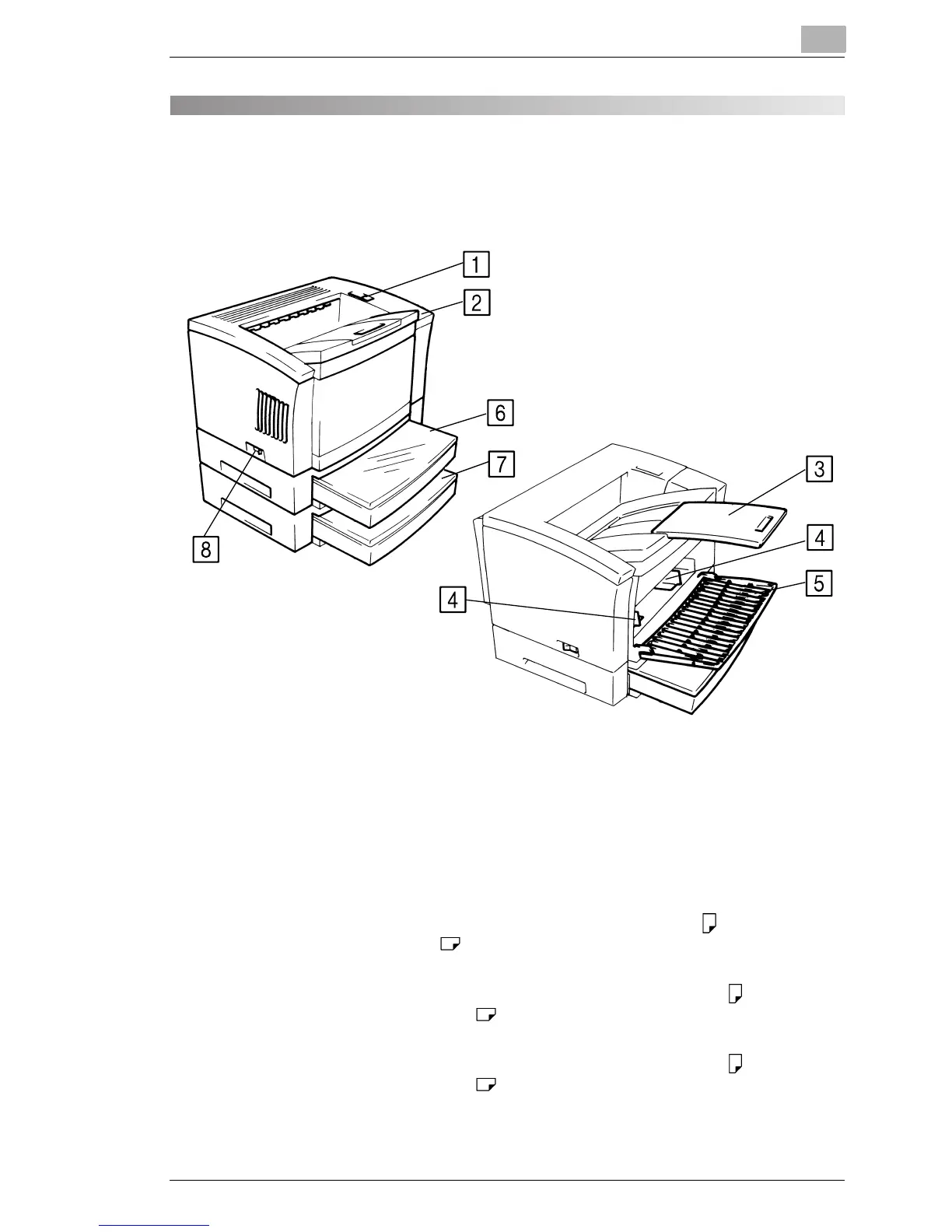
5.1 Parts of the Printer
1 Upper Unit Lock Release Lever: Use to open the Upper Unit.
2 Power Indicator: Light indicates when the Printer is turned ON.
3 Print Tray: Prints are output from the Printer, face down onto this
tray which can hold up to 500 sheets of standard paper.
4 Paper Guides: Slide the guides to secure the paper stack.
5 Paper Feeding Tray: Capable of holding up to 150 sheets of standard-size
paper ranging from 8-1/2"
× 11" (A4) to 11" × 17" (A3)
paper.
6 Cassette 1: Capable of holding up to 250 sheets of standard-size
paper ranging from 5-1/2"
× 8-1/2" (B5) to 11" × 17"
(A3) paper.
7 Cassette 2:
(Option)
Capable of holding up to 250 sheets of standard-size
paper ranging from 5-1/2"
× 8-1/2" (B5) to 11" × 17"
(A3) paper.
8 Power Switch: Use to turn the Printer ON and OFF.



 To Next Page
 Loading...







