Getting Started
10
1
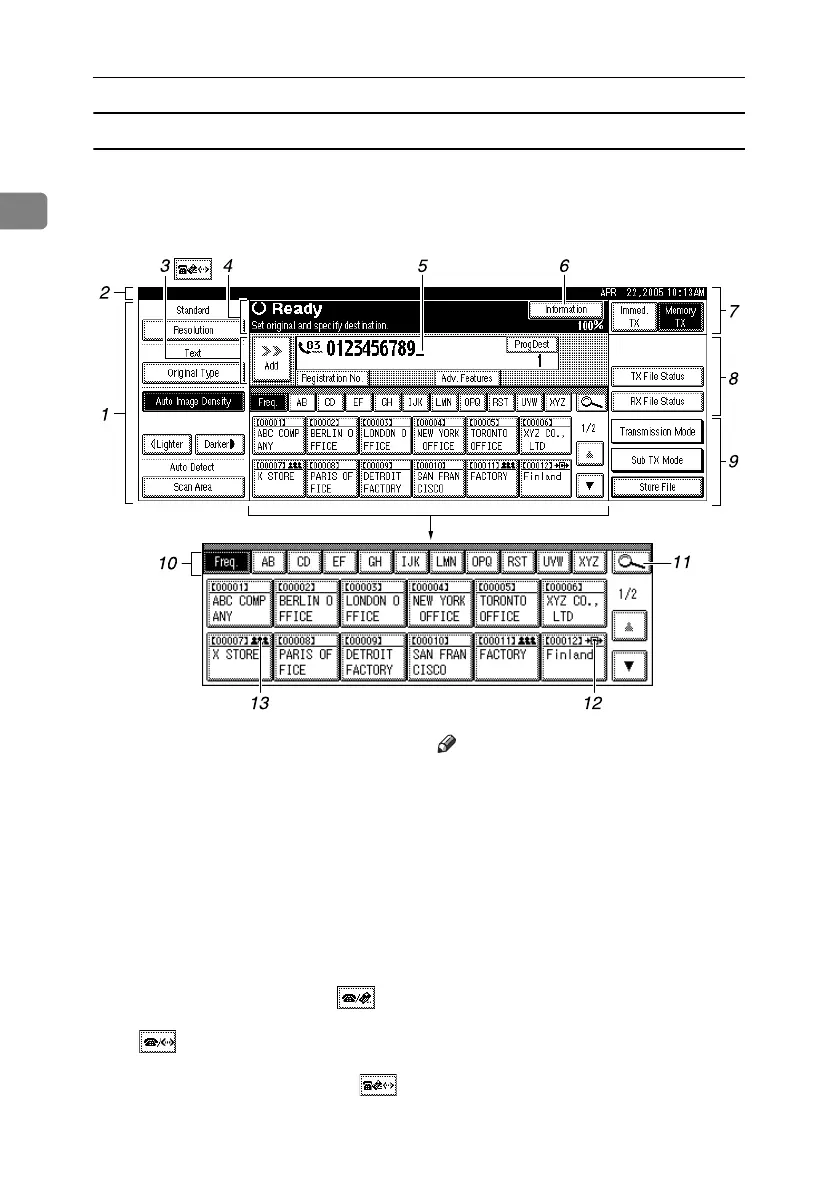
Reading the display panel and using keys
Display contents will differ depending on installed optional units.
❖ Initial Display
1. Allows you to select scanning
conditions and sizes.
2. Displays the date and time, the
name and facsimile number of a des-
tination when transmitting, and the
size of the original.
When user authentication is set, a log-
in user name appears.
3. Press this button to enter or add fax
numbers, e-mail address, or IP-Fax
number.
• Internet Fax setting “On”:
• IP-Fax, H.323, SIP setting “On”:
• Internet Fax setting “On” and IP-
Fax, H.323, SIP setting “On”:
Note
❒ To use the Internet Fax or IP-Fax
function, the optional HDD and
printer/scanner unit are required.
❒ You can change Internet Fax set-
ting under E-mail Settings in the
Facsimile Features menu. See p.148
“E-mail Settings”, Facsimile Refer-
ence <Advanced Features> .
❒ You can change IP-Fax settings un-
der IP-Fax Settings in the Facsimile
Features menu. See p.150 “IP-Fax
Settings”, Facsimile Reference <Ad-
vanced Features> .
AJC102S
RussianC4-EN_Combine-F_FM.book Page 10 Wednesday, April 27, 2005 2:01 PM



 To Next Page