Using Internet Fax Functions
76
3
Received Images
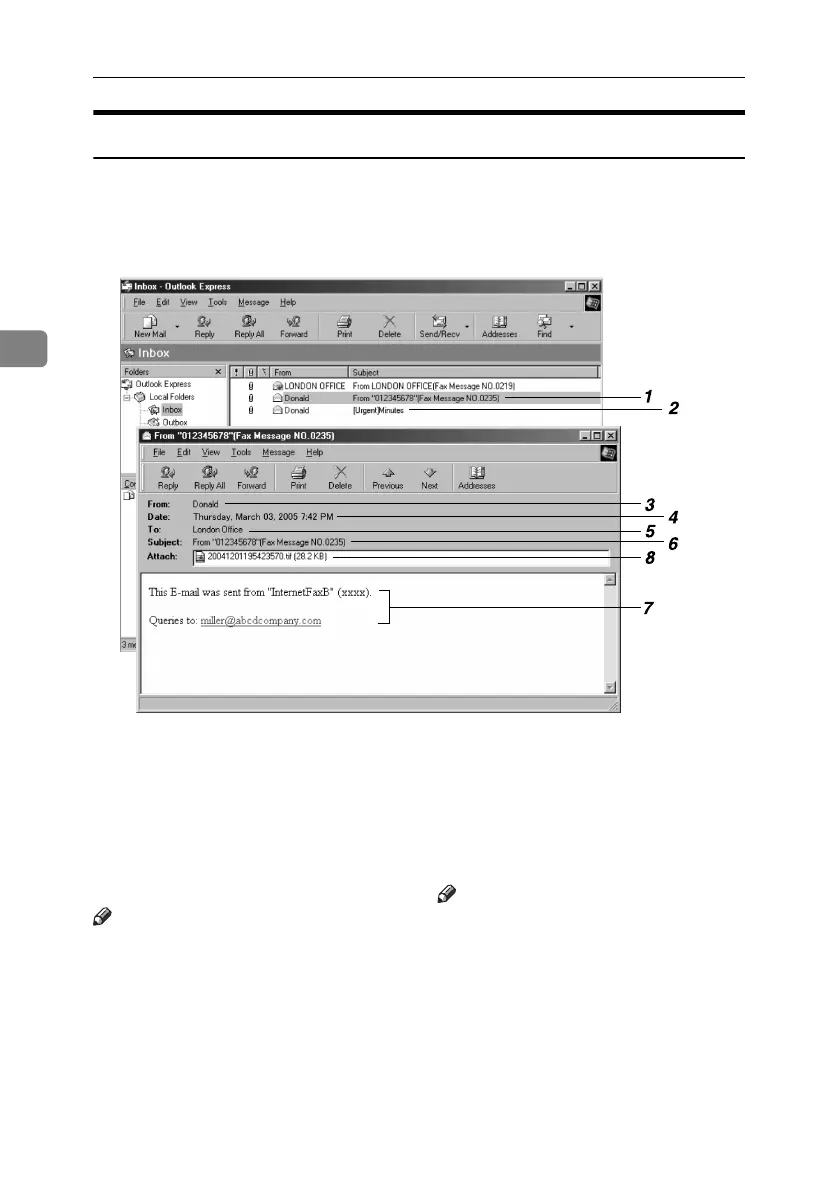
Here is an example of an Internet Fax document sent from this machine and re-
ceived on a computer using an Outlook Express e-mail application.
The received image varies according to the e-mail application.
1. E-mail transmitted without speci-
fying a subject in “E-mail Options”.
2. E-mail transmitted with a subject
specified in “E-mail Options”.
3. From
The name (e-mail address) of the sender
Note
❒ The display format of the sender name
differs according to that of the Stamp
Sender Name setting and other func-
tions.
4. Date
The date and time of e-mail transmission
5. To
The e-mail address of the recipient
6. Subject
Shows the subject specified in “E-mail
Options” at the time of transmission. If
no subject is specified, one is automati-
cally assigned in the format shown in 1
above.
Note
❒ The format varies according to Stamp
Sender Name and other settings. See
p.69 “About the E-mail Subject”.
7. The message is inserted in all e-
mails. “xxxx” is the machine name.
8. Attachment File
Any document included by the sender is
displayed as an attached document.
AJC004S
RussianC4-EN_Combine-F_FM.book Page 76 Wednesday, April 27, 2005 2:01 PM



 To Next Page