Faxing
48
2
Searching for a Destination
Use this procedure to search through
the destination lists for a particular
destination.
❖ Search by Destination Name
p.48 “Search by Destination
Name”
❖ Search by Fax Number
p.49 “Search by Fax Number”
❖ Search by E-mail Address
p.50 “Search by E-mail Address”
❖ Search by IP-Fax Destination
p.51 “Search by IP-Fax Destina-
tion”
❖ Search by LDAP Server
p.52 “Search by LDAP Server”
❖ Specifying a Registration Number
p.54 “Specifying a Registration
Number”
Note
❒ If you press [Fax], [E-mail] or [IP-
Fax] on the search result display,
you can switch between fax desti-
nation, e-mail destination and IP-
Fax destination.
❒ The search returns only destina-
tions whose beginnings match the
entered name.
❒ A warning appears if the search re-
turns more than 100 items. Press
[OK] and change the destination
name to view fewer destinations.
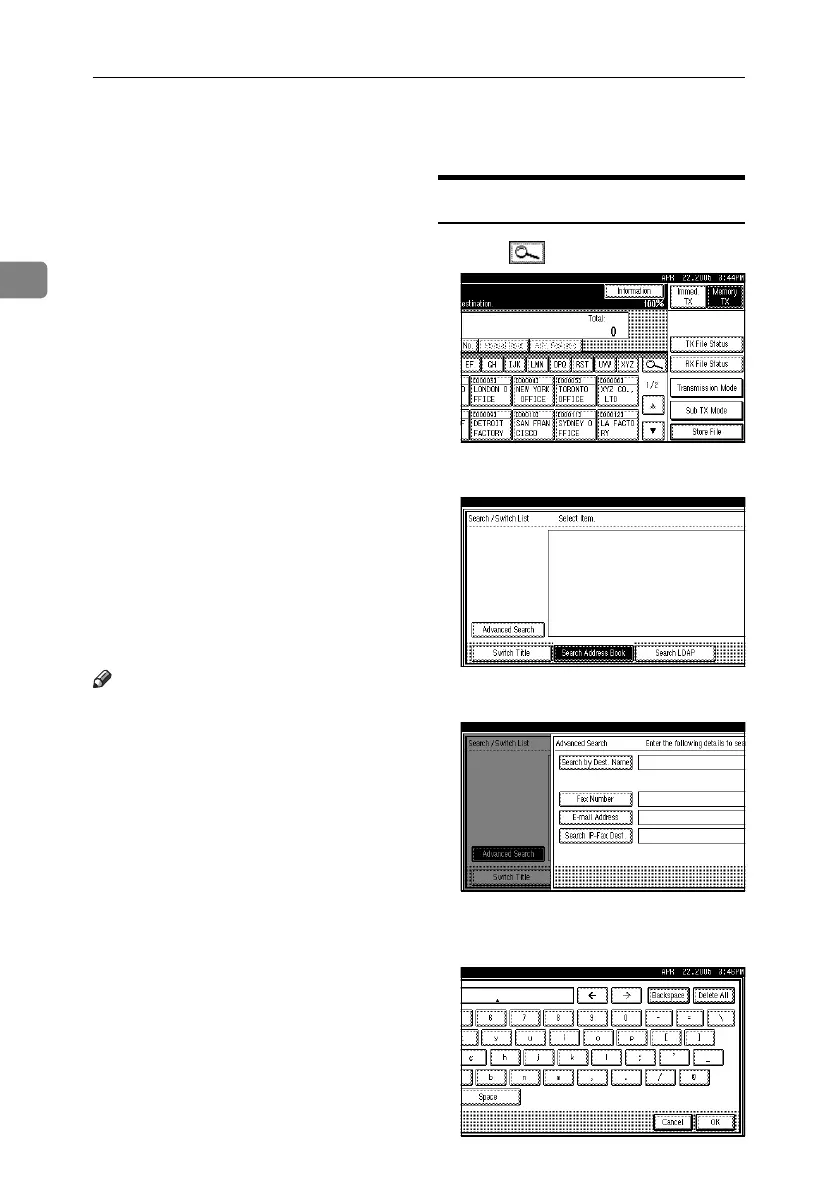
Search by Destination Name
A Press , the magnifier icon.
B Press [Advanced Search].
C Press [Search by Dest. Name].
D Enter a destination name to search
for, and then press [OK].
RussianC4-EN_Combine-F_FM.book Page 48 Wednesday, April 27, 2005 2:01 PM



 To Next Page