Operating Control Console
1
2
Main
Conveyor
Lift
Deector
Small Conveyor
Lift (Option)
Small Conveyor
Deector
Small Conveyor
Small Conveyor
Swivel (Option)
3
4
5
6
7
8
9
10
11
12
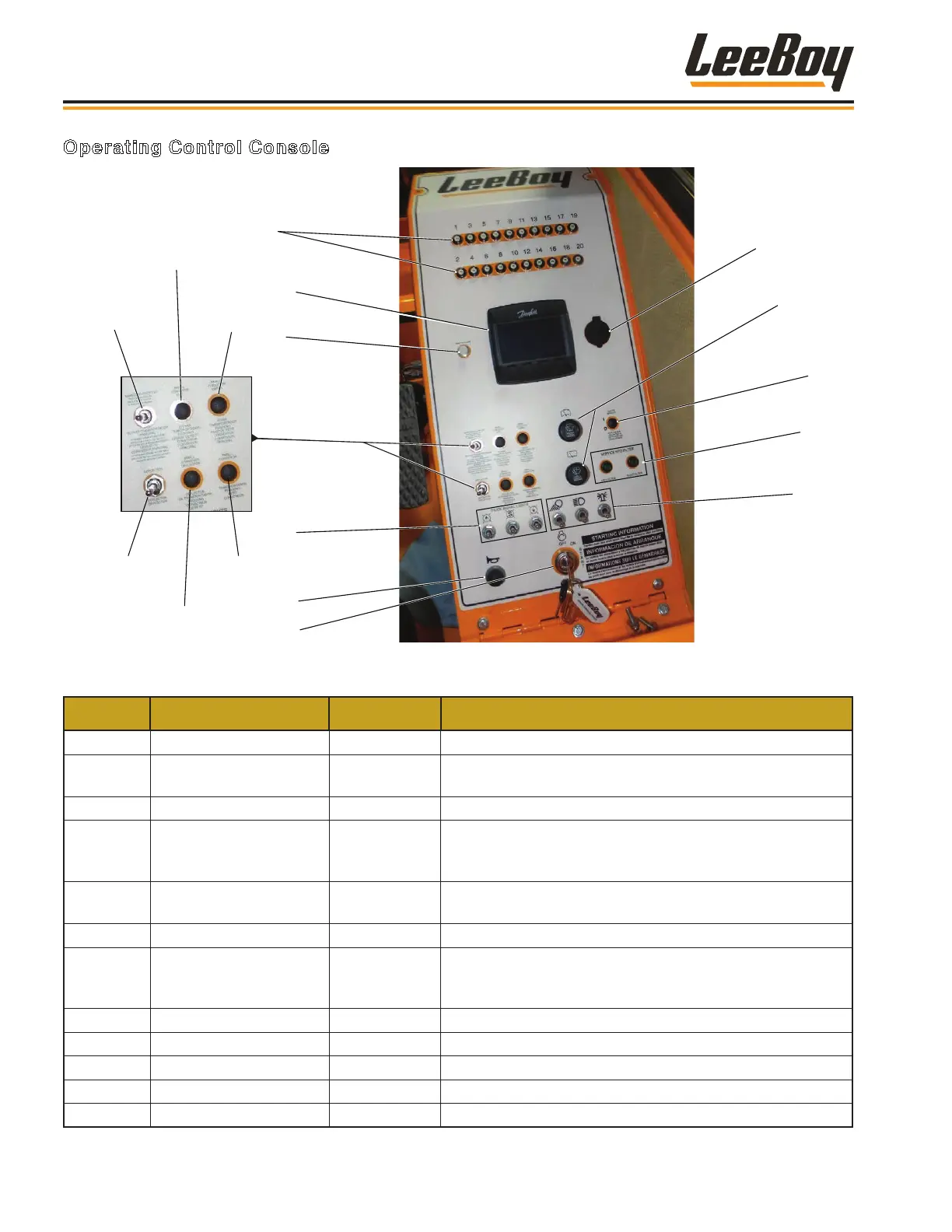
Figure 4-8. Operating Control Console
ITEM NO. CONTROL NAME TYPE FUNCTION
1 Reset Buttons Push Buttons Resets for dashboard.
2 DP250 Digital Display Digital Display
Indicators include: tachometer, fuel level gauge,
temperature gauge, pressure gauge, voltmeter.
3 Wait to Start Indicator Light Indicates engine pre-heat and screen booting.
4 Additional Switches
Switches and
Push Buttons
Switches/buttons used for operation of the main and small
conveyor lifts; small conveyor, conveyor swivel (Optional),
conveyor lift (Optional), and conveyor deector.
5 Optional Work Lights Switches
Signal lights used to communicat with the material truck
operator.
6 Horn Push Button Sounds horn.
7 Ignition Key Switch
Key-Operated
Rotary Switch
Starts and stops engine. Full clockwise is START.
Automatic return to center position when key is released.
Full counterclockwise position is OFF.
8 12-Volt DC Outlet Outlet Standard 12VDC automotive-style power receptacle.
9 Windshield Wipers Rotary Switch Operates front and rear windshield wipers.
10 Heated Mirror Push Button Turns heat for mirrors on and off.
11 Service Hydraulic Filters Indicator Light Illuminates when lter(s) need service.
12 Lights Switches Turns lights on and off.
Component Location
3000C Force Feeder Loader3-4


 To Next Page