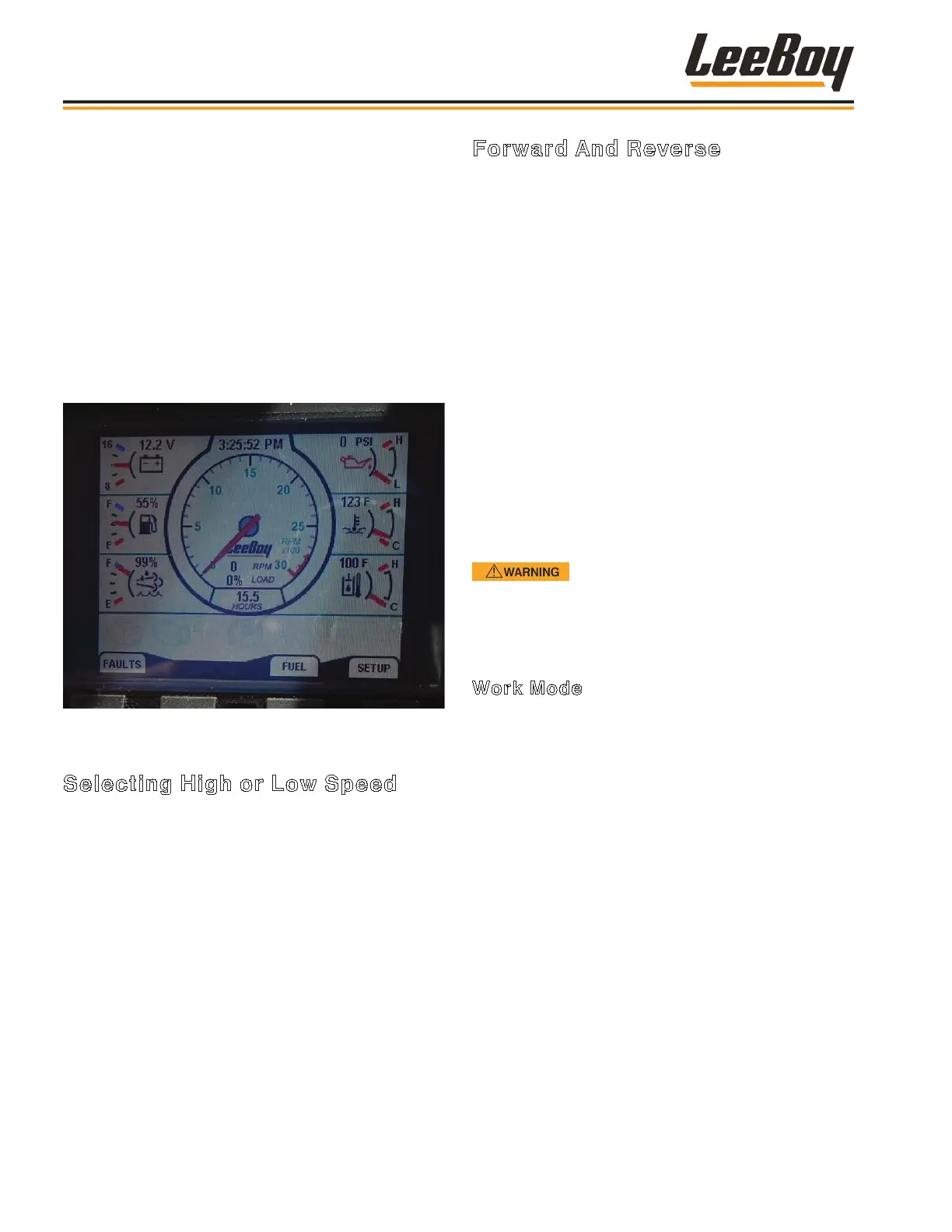
5. The DP250 Digital Display on the Operating
Control Console will illuminate, rst displaying
the LeeBoy logo as the system “boots,” followed
by the indicators. These indicators include the
tachometer, fuel level, temperature gauge, pressure
gauge and voltmeter. (Figure 4-11)
• The SETUP softkey function allows you to set
the screen contrast, clock and other convenient
functions.
• Touch the FAULTS softkey if it or the WARN
light illuminates to see what component needs
attention (i.e., coolant level low, engine oil
pressure low, and any other system fault).
Figure 4-11. DP250 Digital Display Screen
Selecting High or Low Speed
The 2-Speed gear switch selects high or low speed.
It is located below the throttle on the right side of the
operator control console. (Figure 4-8)
After starting engine (using the previous procedures)
• On the travel control panel, turn the parking brake
switch to the ON position.
• Shift the High/Low toggle to the gear desired. Hold for
two seconds, then return to center.
• Turn the parking brake switch to OFF and ensure the
gear changed by slowly moving forward and backward
to ensure engagement.
Forward And Reverse
Before driving on public roads, check state and local
laws that may apply to tractors, self-propelled machines,
and towed equipment. Additional lights, mirrors, slow-
moving vehicle emblems, or reectors may be required.
The LeeBoy 3000C Force Feed Conveyor Loader
is equipped with a Forward/Reverse variable speed
hydraulic motor that has a two-speed rear-end. The
directional control lever controls the speed and
direction of the hydraulic pump. (Figure 4-8)
Travel Mode
• Travel speed is determined by setting the drive motor
switch to AUTO; set engine RPMs to the desired
speed; and the 2-Speed gear shift switch to the HIGH
speed position .
• The farther you move the directional lever either
forward or backward, the faster the machine will travel
in that direction.
When using the 2-Speed gear switch
to change speed, the vehicle must be stopped and
the direction control lever set to the NEUTRAL
position.
Work Mode
The Drive Motor switch on the travel control panel has
two settings: Work Low and Auto. (Page 3-6)
When working at the job site, follow these procedures
for moving forward and reverse:
• Shift the machine into low gear using the 2-Speed
gear shift switch.
NOTE: ALWAYS use the LOW speed position on the
2-Speed gear shift when working.
• Set desired engine RPM.
• Setting the drive motor switch to AUTO allows the
machine to grade at the fastest possible speed with
load.
• Setting the drive motor switch to Work Low allows the
machine to stay at a steady speed, varying only when
using the foot pedal.
Operation
3000C Force Feed Loader4-10


 To Next Page