112
L
N
8
7
6
5
_
+
_
+
_
+
_
+
4
3
2
1
_
+
_
+
_
+
_
+
OUTPUT
1
2
3
4
5
F429
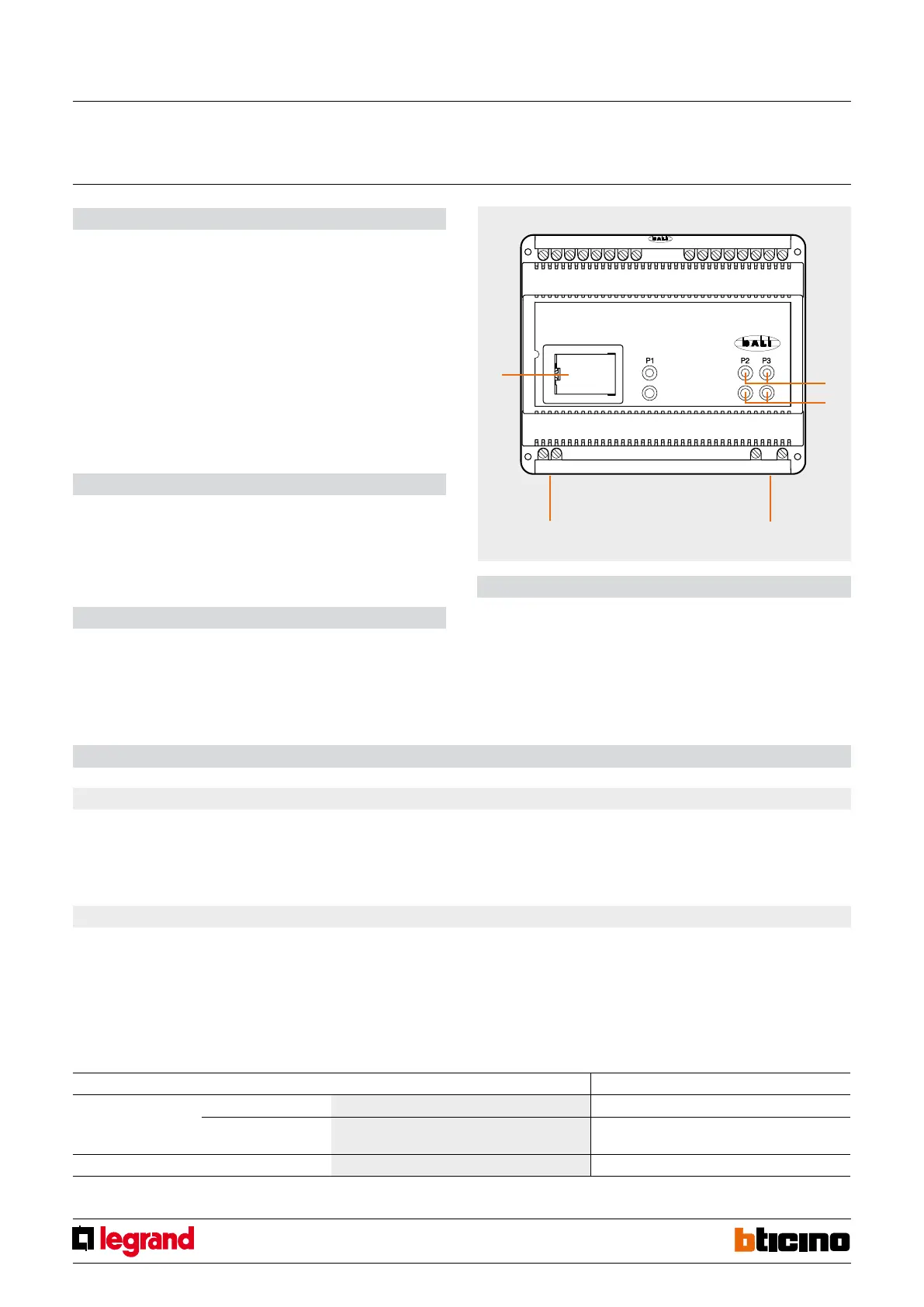
1. Push-buttons
2. LED
3. Power supply
4. BUS
5. Configurator socket
Legend
Description
The device is an interface between My Home/Lighting Management systems and devices
driven using the DALI (Digital Addressable Lighting Interface) protocol. It has 8 indepen-
dent outputs to which up to 16 DALI devices can be connected for each output. Three
pushbuttons with notification LEDs set the operating mode. Key P1 sets up the device
for the virtual configuration, key P2 is used to select one of the 8 outputs which connect
with the DALI devices and key P3 is used to switch the output which has been selected
with key P2 ON, OFF and to dim it. On pressing key P3 quickly one can switch the load ON
or switch it OFF cyclically,
while pressing it for a long time adjusts the brightness.
The device can be installed in a My Home system and use the physical or virtual con-
figuration, or as a component of the Lighting Management system and use the specific
configuration types (Plug&go, Project&Download).
Technical data
Power supply: 110 – 240 Vac @ 50/60 Hz; 110 – 240 Vdc
Current draw: 5 mA
Operating temperature: (-5) – (+45) °C
Dissipated power: 4 W
No. of DALI outputs: 8 x 16 ballast
Dimensions
Size: 6 DIN modules
Configuration
SCS/DALI
gateway
MQ00284-c-EN 07/06/2014
2.1 Addressing
Address type Virtual configuration (MYHOME_Suite) Physical configuration
Point-to-point Room 0-10 A=1-9
Lighting point 0-15 takes the PL number from the output number to which the load
is connected
Group Group 1 - Group 10 = 0-255 G1, G2, G3 = 0-9
If the device is installed in a My Home system it can be configured in two ways:
- PHYSICAL CONFIGURATION, inserting the configurators in position.
- Configuration via MYHOME_Suite software package, downloadable from
www.homesystems-legrandgroup.com; this mode has the advantage of offering many
more options than the physical configuration.
For a list of the procedures and their meanings, please refer to the instructions in
this sheet and to the "Function Descriptions" help section in the
MYHOME_Suite software package.
When installed in a Lighting Management system, the actuator can be configured in the
following ways:
- PLUG&GO
- PROJECT&DOWNLOAD
1. Lighting Management System
2. MyHome System



 To Next Page