266
N°
MOD
Z
AUX
N°
MOD
Z
AUX
N°
MOD
Z
AUX
N°
MOD
Z
AUX
N°
MOD
Z
AUX
4
1
N°
MOD
Z
AUX
N°
MOD
Z
AUX
N°
MOD
Z
AUX
N°
MOD
Z
AUX
N°
MOD
Z
AUX
4
1
N°
MOD
Z
AUX
N°
MOD
Z
AUX
N°
MOD
Z
AUX
N°
MOD
Z
AUX
N°
MOD
Z
AUX
2
3
2
N°
MOD
Z
AUX
N°
MOD
Z
AUX
N°
MOD
Z
AUX
N°
MOD
Z
AUX
N°
MOD
Z
AUX
4
1
AUX
Z
N°
MOD
HD4607
HS4607
L4607
N4607
NT4607
AM5787
HC4607
573949
067508
573948
AUX
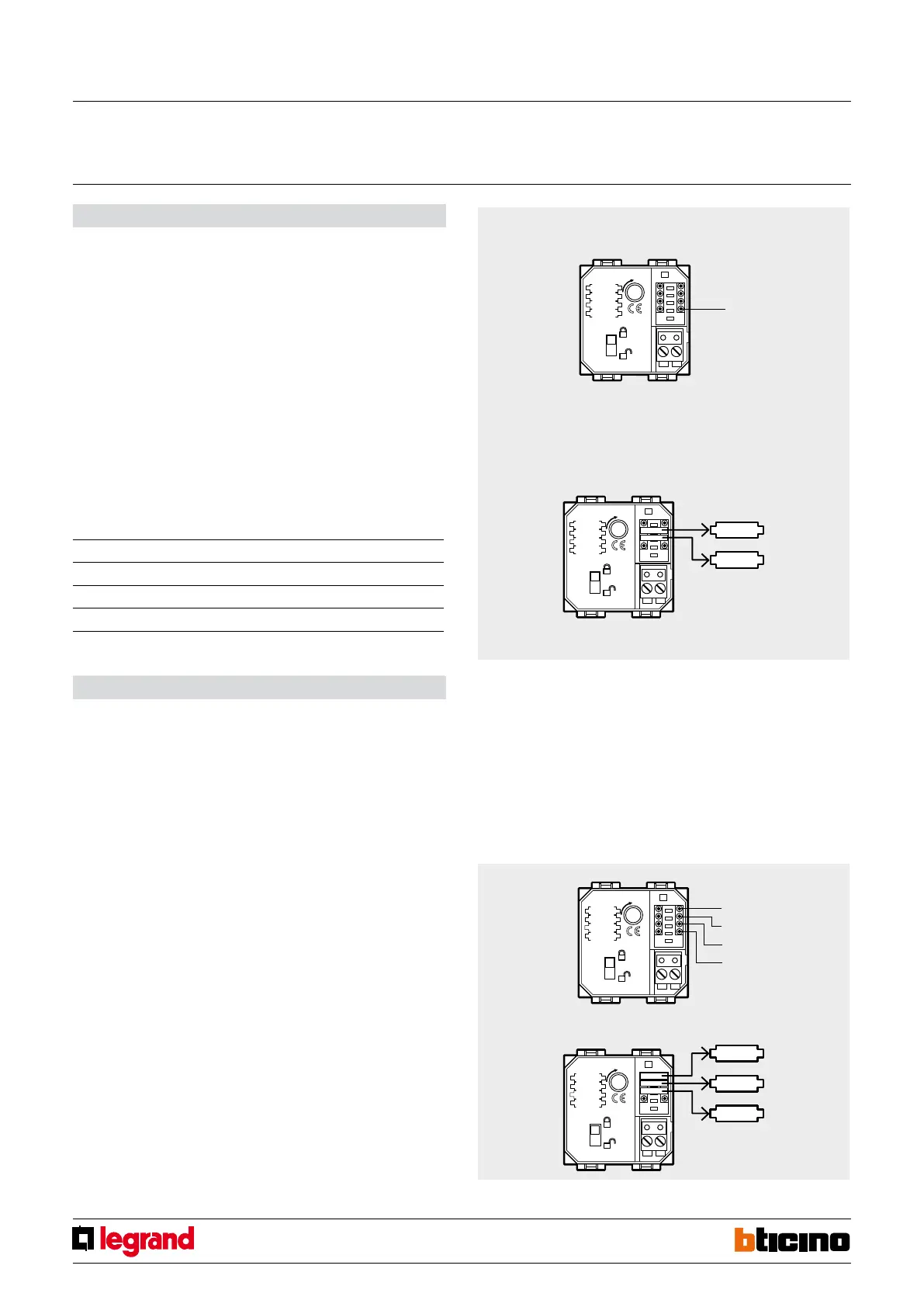
Conguration
Night function: when the system is disconnected, it is possible to activate the zones up
to the numeric value of the congurator in AUX position. This function can be enabled
with congurator 7 in MOD position if central units with a display are used or with
congurator 8 if ush mounted central units item L/N/NT4600/4 are used.
Example: MOD = 7, AUX = 3
In this case, when the burglar-alarm with the central unit and communicator are
activated, only the rst three zones will be enabled.
AUX
This congurator activates the activator auxiliary modes of operation, assigning an
auxiliary channel.
To use the activator as auxiliary device, refer to the My Home application guide.
Example
congured in this way the transponder reader works as 4th device of the activator group.
Use with central unit item L/N/NT4600/4
The transponder (badge) programming operation is necessary in order for it to work as a
normal infrared remote control, item 4050.
The initial programming - which is carried out when installing the Transponder reader –
shall be carried out with the central unit in MAINTENANCE mode (selector switch located
on the back in OFF position).
Proceed as indicated below:
1) With central unit in maintenance mode, press the P key and check if the yellow LED
PROG lights up.;
Congurator position Value
Z none
N 4
MOD 1
AUX none
2) Program the IR remote controls rst;
3) Now, move the badges towards the transponder reader;
4) Make sure that two short tones are emitted: the rst is emitted from the transponder
reader, the second is emitted from the central unit.;
5) Repeat points 3 and 4 for all available badges;
6) When you have nished programming the last badge, press the S pushbutton on the
central unit (the yellow PROG LED turns o) and ip the back selector switch to ON.
AUTOMATION mode – ON/OFF TIMED:
It can be used for the actuation of an ON/OFF control lasting 1 second.
Z
This congurator coincides with A (room) of the automation system; (it assigns the
homogeneous room where the actuation is performed – from 1 to 9 -).
N°
It coincides with the PL of the automation system (it assigns the point where the
actuation must be performed – from 1 to 9 -).
MOD
Assigns the operating mode. For the automation functions connect congurator 2.
AUX
No congurator.
Example: If Z=3, N=2 and MOD=2 the device sends an ON/OFF control lasting 1 second
(e.g. electrical door lock release) to an actuator with address A=3 and PL=2.
Example
Example
Transponder reader
MQ00033-c-EN 24/04/2014


 To Next Page