Group 7 Data Entry Page 102
Release 3.00 Leibinger-Jet 2 se
Manner of proceeding:
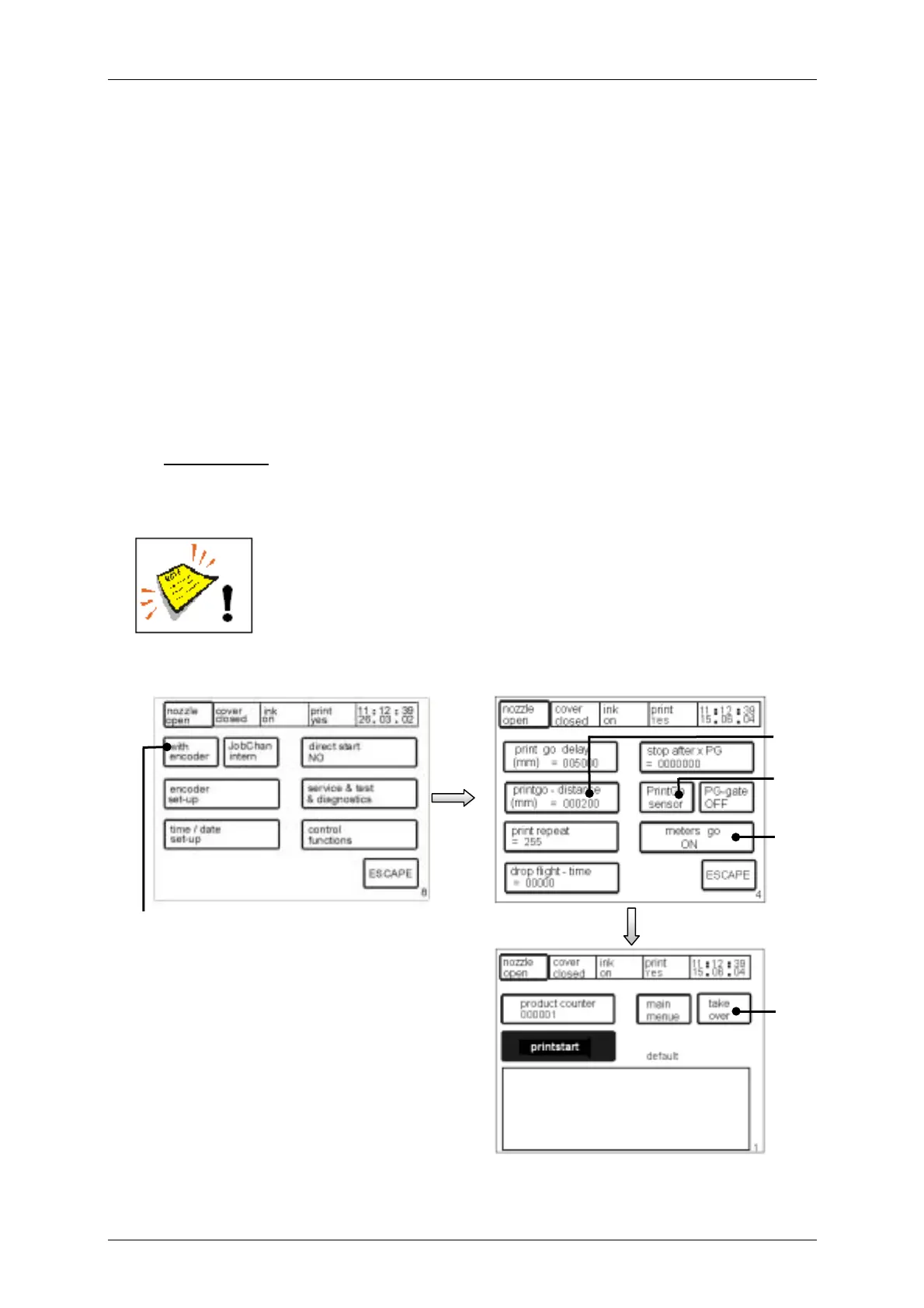
! Choose the function <With Encoder> (110) in the menu level <E8>.
! Activate the function <meters go ON> (111) in the menu level <E4>. The set up
<PrintGo> (102) changes automatically to the set up „sensor“ and should be not
changed anymore!
! Press the touch field <printgo-distance> (113) to enter the certain value (distance
from printing start to printing start) in mm.
! With the <ESCAPE>-button you can leave the menu and you can go back to the
menu level <E1>.
! With the touch field <take over > (114) in the menu level <E1> the set up will be
taken over to the production.
Observation:
The touch field <take over > (114) will be only displayed during open nozzle!
Note! To guarantee the correct start value for the first „printing start“
with the function it is absolutely necessary that all counters are reset
accordingly.
Figure 77
[E4]
111
[E8]
110
[E1]
114
112
113



 To Next Page