Group 7 Data Entry Page 88
Release 3.00 Leibinger-Jet 2 se
7.3.3 Deleting jobs
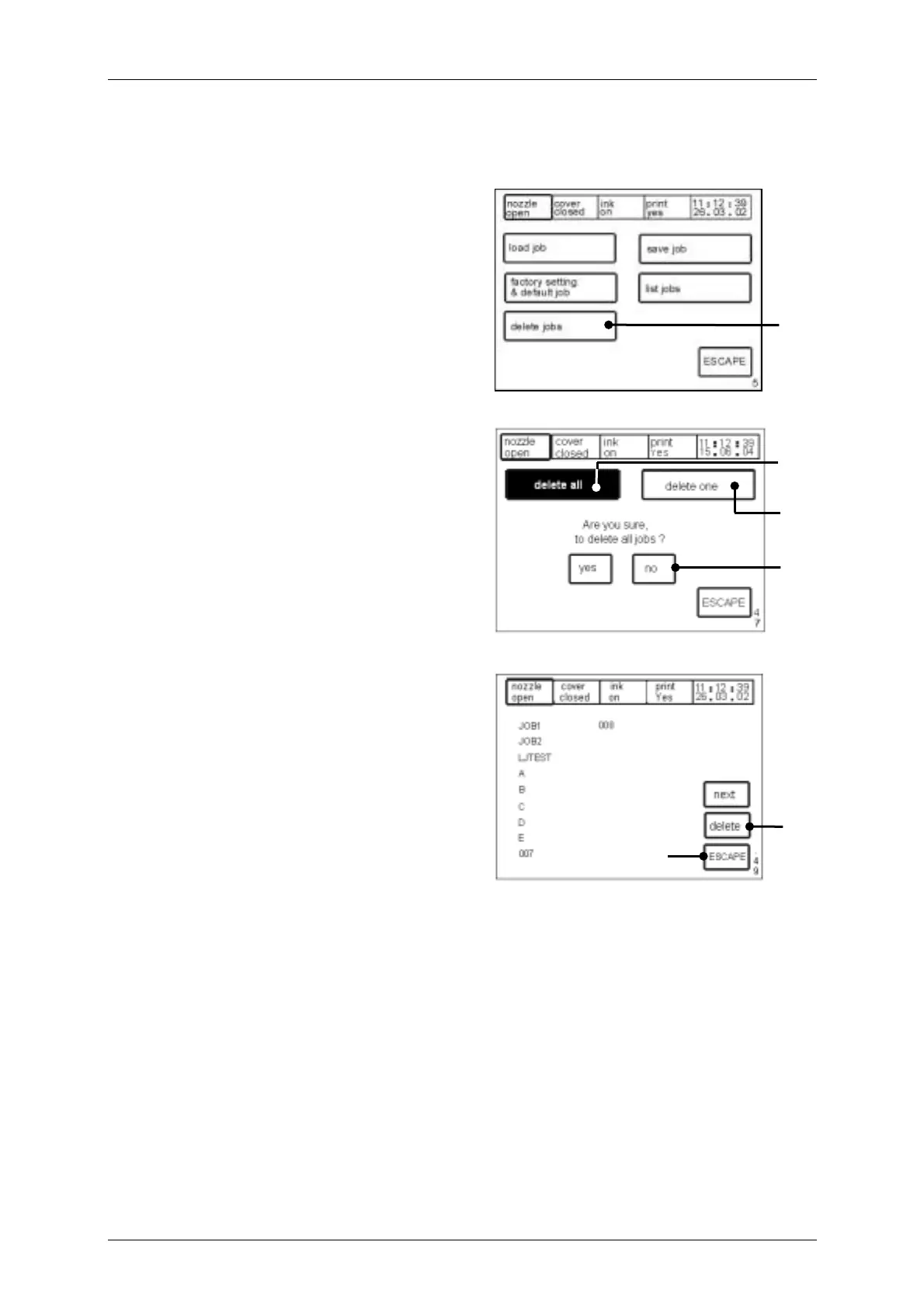
Figure 61
The touch field <delete jobs> (66) enables
the deletion of existing jobs. The “deletion
menu” <E47> is called up.
Figure 62
The touch field <delete all> (67) causes
the deletion of all jobs created. The safety
inquiry with the two touch fields <No> and
<Yes> (69) is displayed.
The touch field <delete one> (68) enables
the selection of one job for deletion. The
menu level <E49> is displayed. A job
selected for deletion is shown with a black
colored background.
The following options can be carried out:
! A different job can be selected.
! By means of touching the touch field
<Delete> (70) the job is effectively
deleted and the display is updated.
! Further jobs can be selected for
deletion.
! By means of touching the touch field
<ESCAPE> (71) the menu can be
ended without making alterations.
[E5]
66
[E49]
71
70
67
[E47]
68
69



 To Next Page