Group 7 Data Entry Page 72
Release 3.00 Leibinger-Jet 2 se
7.2.1 Text entry
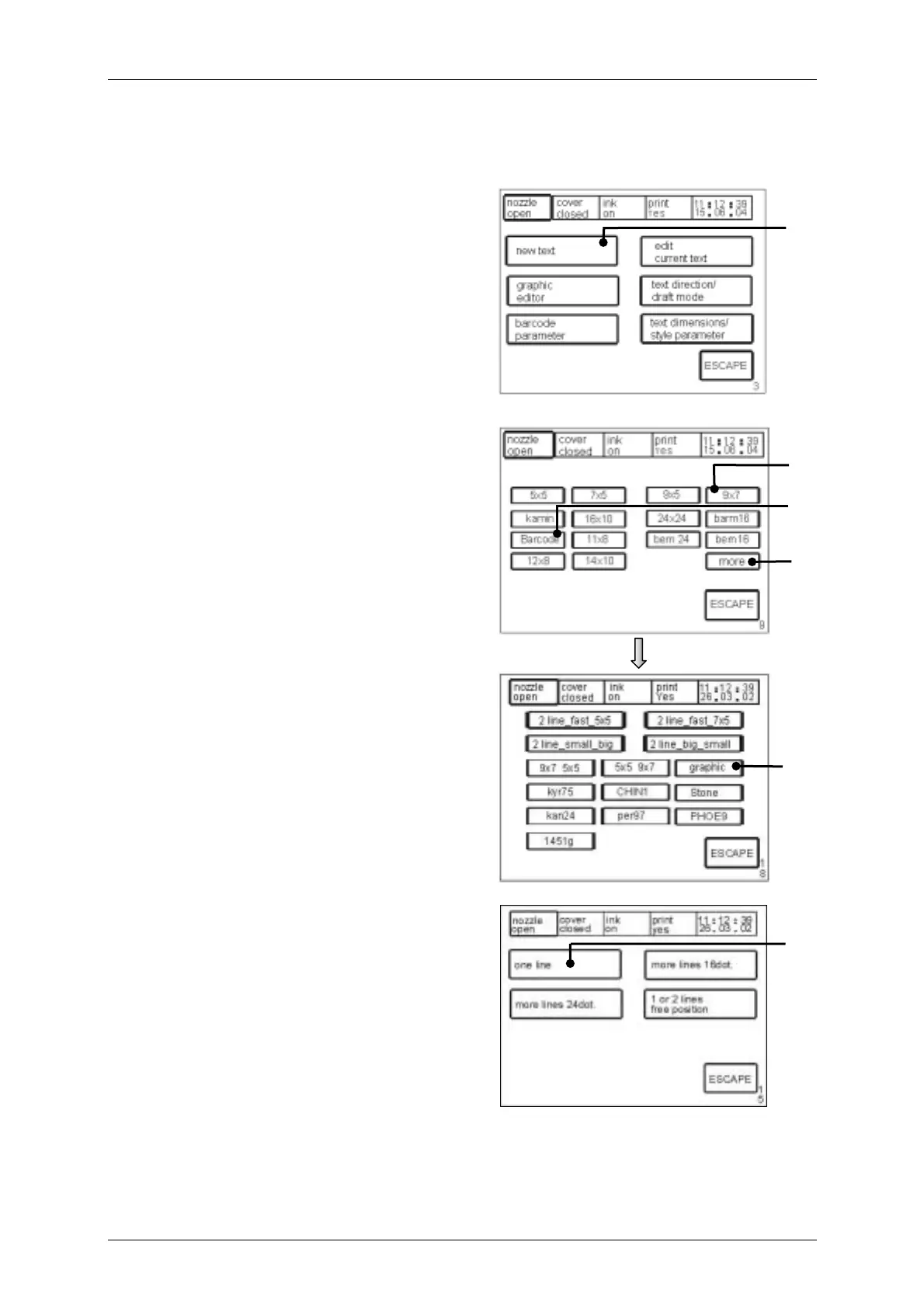
Figure 42
The touch field <new text> (5) enables the
entry of new texts. The “font menu“ <E9> is
now called up.
Figure 43
The desired font can be selected.
Entry; e.g.: 9 x 7 = <9 x 7> (6)
The touch field <more > (7) opens the
menu level <E18> in which you can choose
further fonts and via the touch field
<graphic > (8) you can choose given
graphic symbols. You will find further
information regarding graphics in the
chapter Graphic input/graphic selection.
The touch field <Barcode> (9) enables the
input of various bar codes. You will find
further information regarding barcodes in
the chapter Barcode entry.
Figure 44
Following the selection of the font, the line
menu <E15> is opened. By means of
pressing the corresponding touch field the
number of lines or the desired line position
can be selected.
entry e.g. single line = <one line> (10)
5
[E3]
10
[E15]
6
[E9]
9
7
8
[E18]



 To Next Page