Group 7 Data Entry Page 85
Release 3.00 Leibinger-Jet 2 se
7.2.7.3 Barcode parameter
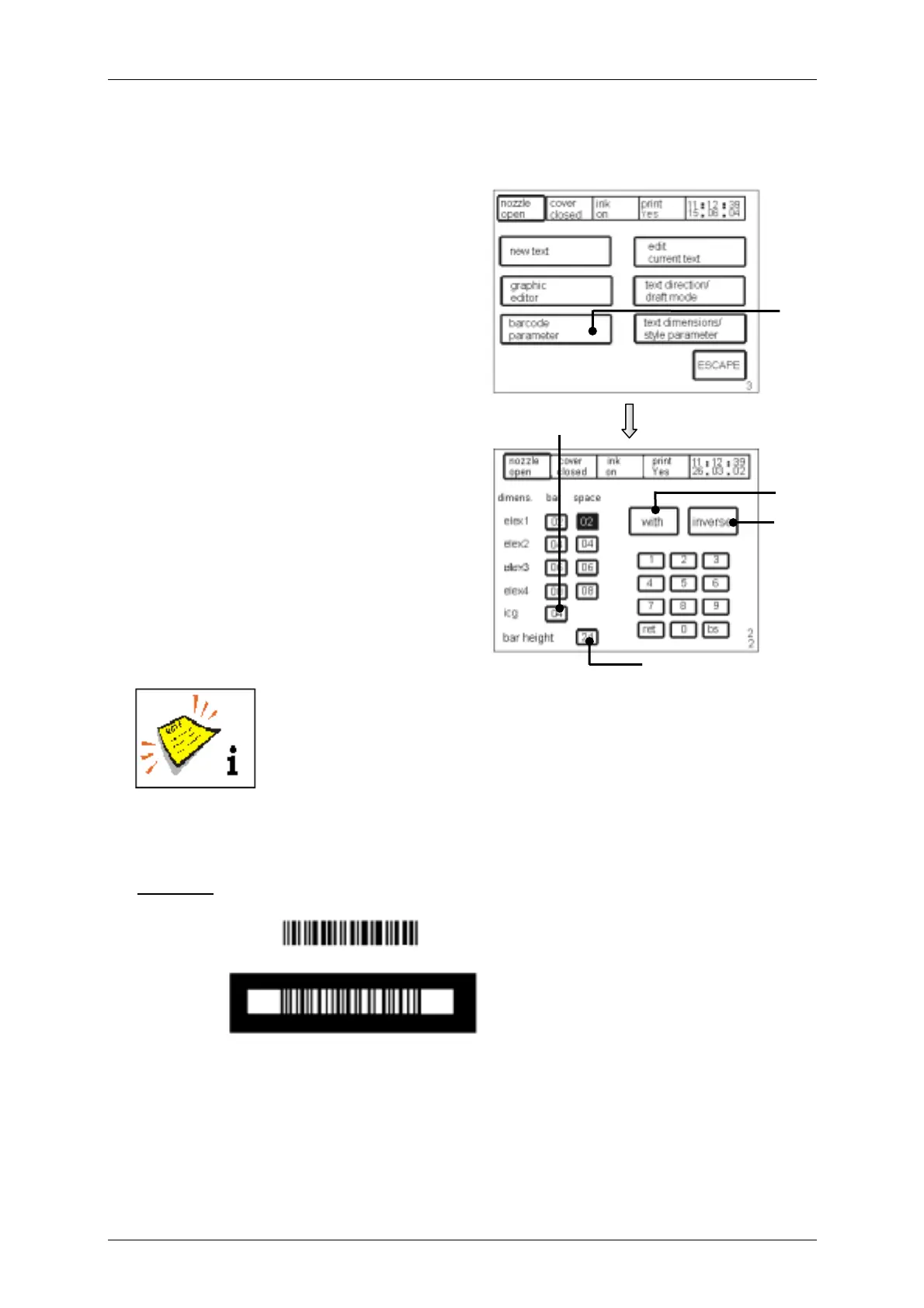
Figure 56
The touch field <barcode parameter> (46)
opens the menu for defining the bars and
gaps (between 01-12) with barcodes. EAN
has 4 bar widths.
In the field <icg> (47) the desired gap
between the elements is set and in the field
<bar hight> (48) the desired height
entered. The bar height can be selected as
desired between 1 and 24.
The touch field <with/without> (49)
activates the barcode display with or
without clear figure under the Barcode.
Clear figure is only available for the following Barcodes:
EAN 13, EAN 8, UPC A, UPC E, C128 b, C128 c, C39 and 2 of 5
interleaved
The touch field <normal/inverse> (50) acivates the normal or the inverse print-out of the
Barcode. This enables e.g. the print-out of a Barcode with white ink on dark background.
Example:
2 of 5 interleaved
}
Calm area
Calm area
inverse
normal
(print-out with light ink on
dark background)
(print-out with dark ink on
light background)
}
[E3]
[E22]
46
47
48
50
49



 To Next Page