Group 7 Data Entry Page 74
Release 3.00 Leibinger-Jet 2 se
Manner of proceeding:
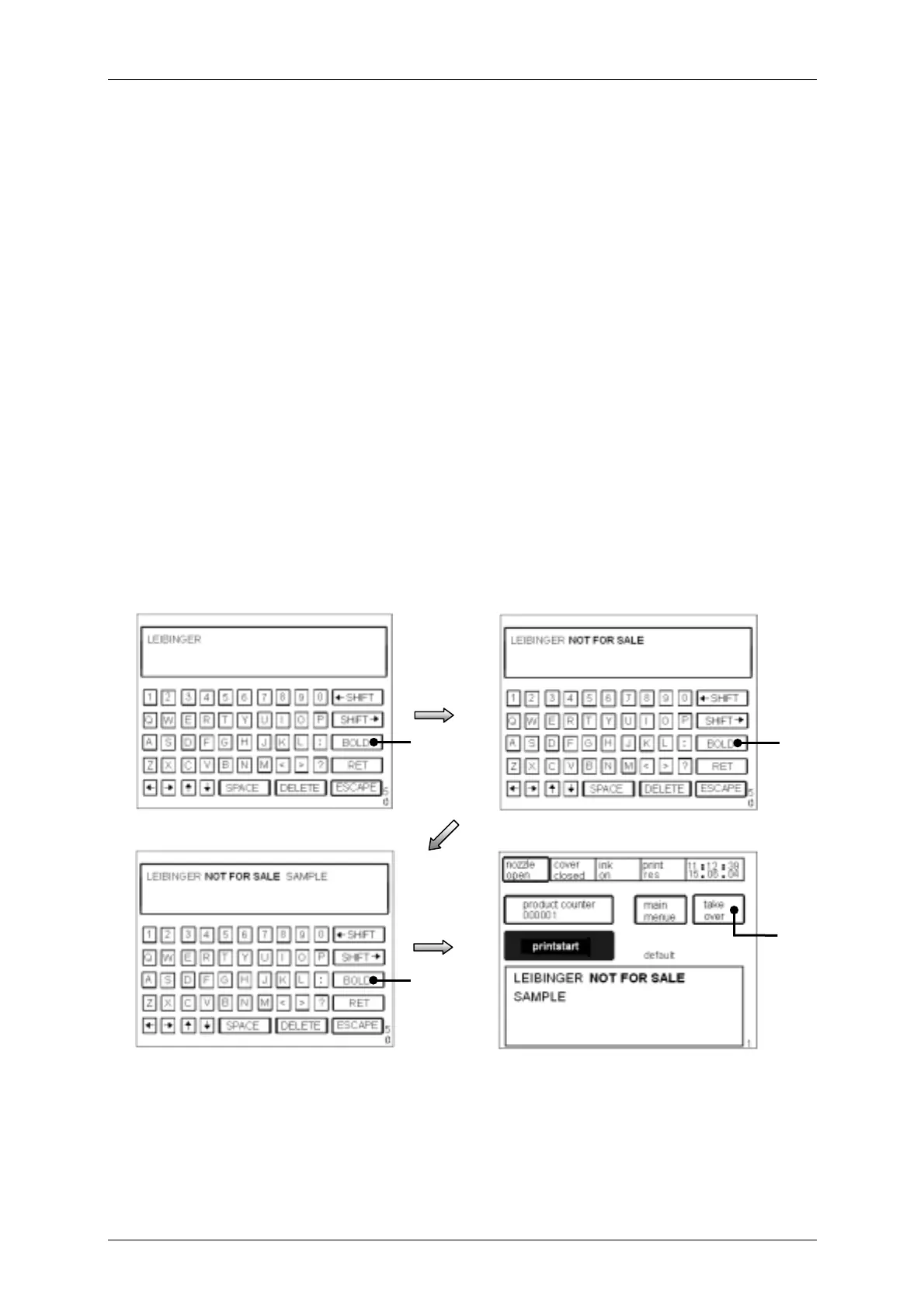
Example: It should be written „LEIBINGER SAMPLE NOT FOR SALE.
! Press the touch field <Text new> in the menu level <E3>.
! The „font menu“ <E9> will be called up.
! After choosing the font the line menu <E15> either the keyboard field <E50> will be
displayed if necessary.
! Enter the text „LEIBINGER“ and one blank.
! Press the touch field <BOLD> (17). The bold print is activated for the further input.
! Enter the text „ NOT FOR SALE“.
! Press the touch field <BOLD> (17) again. The bold print is now deactivated.
! Enter one blank and the text „SAMPLE“.
! By the <ESCAPE> -button you can leave the menu and you can change to the
menu level <E1>.
! With the touch field <take over > (18) in the menu level <E1> the data are taken
over to the production.
Figure 46
You will find further information regarding set up of the bold value in the chapter Font
parameter.
17
[E50]
17
[E50]
Taking over to the production
18
[E50]
Activating the bold print
[E1]
17



 To Next Page