LS SERIES SERVICE MANUAL
ISSUE 4.0 MECHANICAL ASSEMBLIES 2
8 Press the SLOW DOWN key and check that the machine runs at a slow speed. If the
machine continues to run at full speed, check the motor encoder.
9 Position the upper limit switch just above the crosshead then press and hold the FAST UP
key. Check that the machine stops with an error message on the console.
10 Position the lower limit switch just below the crosshead then press and hold the FAST
DOWN key. Check that the machine stops with an error message on the console.
8.3 Cleaning
If the machine is located in a dusty environment, it may require frequent cleaning to keep the
mechanics in good order.
BEFORE USING ANY KIND OF CLEANING FLUID, DISCONNECT THE MAINS LEAD FROM
THE MACHINE.
The exterior casework of the unit can be cleaned using a damp cloth and mild detergent but care
must be taken to avoid splashing water inside the frame. Remove the lower cover then clean the
inside of the machine using suction or a soft brush. Also remove any broken pieces of test
samples that may have entered the machine.
8.4 Removing the Lower Cover
Removing the lower cover will give access to the Main PCB, Motor Drive PCB, switch mode
power supply, drive motor and belt, limit switches, safe-line switch and lamp, emergency stop
switch and mains input module.
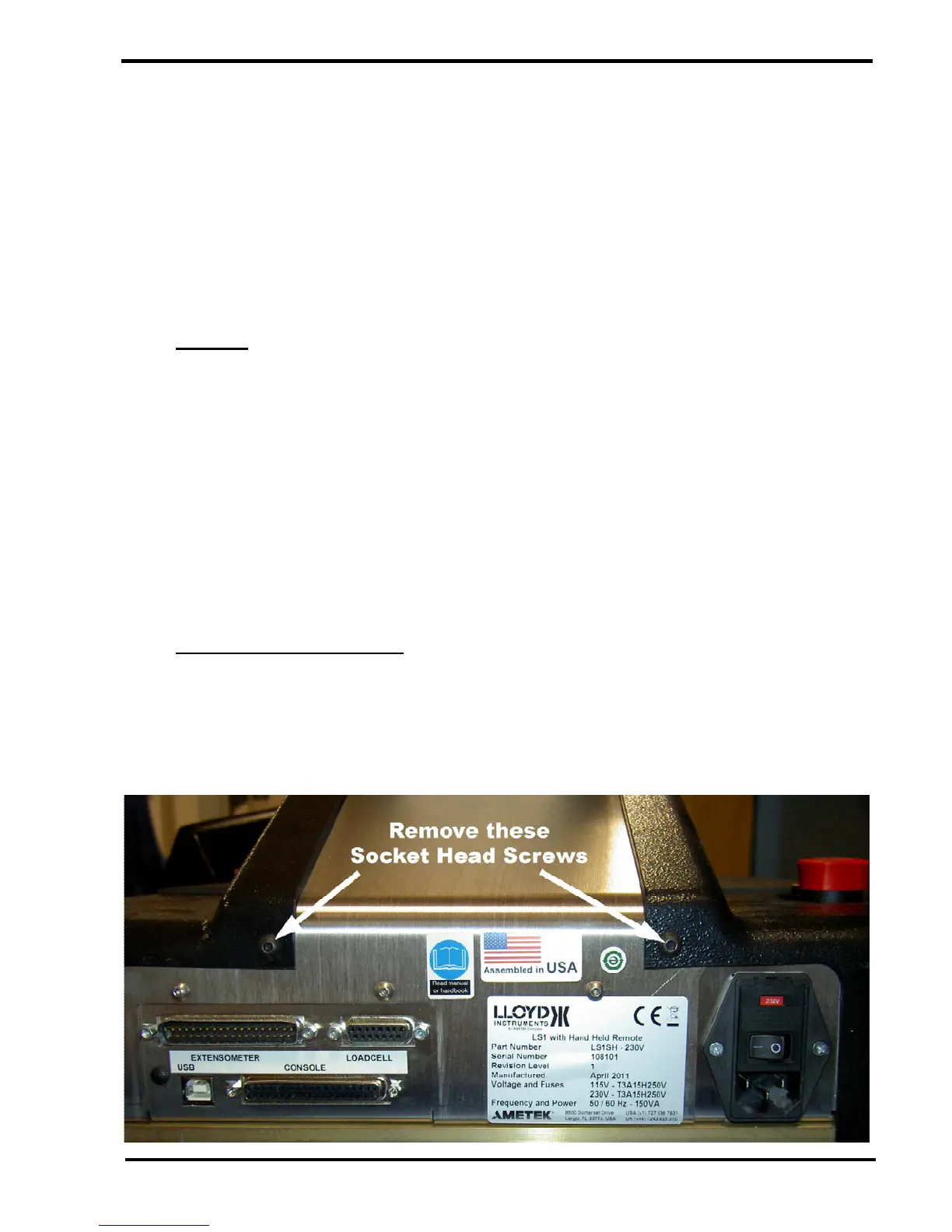
Remove the 2 socket head screws that secure the cover to the machine.



 To Next Page