
 Need help?
Do you have a question about the LNC Robot Series and is the answer not in the manual?
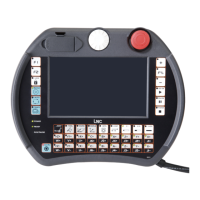
Details the physical layout and components of the robot's handheld controller, including interfaces and buttons.
Explains the layout and functionality of the robot's screen interface, including title bar and areas.
Details the information displayed in the title bar and its interactive elements, such as version and login.
Describes the function of buttons in the right quick-operating area for mode switching and speed control.
Explains the purpose and function of the left-side menu buttons for system mode selection and navigation.
Describes the initial screen displayed upon system startup and the status of coordinate setting.
Details the five types of system permissions and their associated user roles and access levels.
Explains how to display and set coordinate systems, including preset bars and current values.
Details how to display current world, work, and tool coordinates, including span and path rollback.
Explains coordinate selection and input methods for controlling robot motion.
Describes the system's built-in and user-defined resources, including digital and analog signals.
Shows current and historical alarms and warnings, including user-defined alarm configurations.
Explains Pbase, Ptool, Pwork, world, and work coordinates, defining position and attitude.
Explains motor, joint, world, work, and tool coordinates, and the role of forward/inverse kinematics.
Details the two types of quick instruction applications for moving the robot quickly to a target position.
Explains guidelines for processing path motions, including linear and arc transitions.
Identifies and explains the purpose of various buttons for mode selection, speed control, and motion.
Details the operation characteristics of Maintenance mode and Teaching mode.
Compares handwheel and non-handwheel modes regarding motion, direction, speed, and position control.
Explains how selected coordinate systems (Joint, Tool, Work, World) determine motion directions.
Describes three ways to rotate direction in teaching mode: Teach Rotate Mode, Change ABC Value, Tilt By Selected Coor.
Step-by-step guide for calibrating robot tool parameters, including setting offsets and angles.
How to view the current coordinate system records stored in the system.
Method to calculate positional offset, direction rotation, and tilt using three calibration points.
Explains the teaching mode interface, including program editing, block operations, and command types.
Details functions like Cut, Copy, Paste, Mirror, and Offset for manipulating program blocks.
Explains how to record motion paths for quick teaching, using coordinate systems for recording.
Covers basic instructions like flow control, waiting, state setting, and motion commands.
Explains extended instructions for program readability and composite motion flows.
Details how to switch program display modes (detailed, simple, G code) and edit columns.
Explains how to create, save, and open program files via the file operation page.
Details the process of recording continuous robot tracks and IO motions in teaching mode.
Explains using Step, Forward, and Back functions for confirming and correcting robot trajectories.
Guides on testing robot operation using the handwheel in automatic mode.
Explains how to observe and optimize repeated program execution, including handwheel usage.
Explains Mark (labeling lines) and Jump (skipping to lines) instructions for program flow control.
Covers Wait I, Wait R, and Delay instructions for controlling program flow based on conditions or time.
Explains how to set program status using Set O (output point status) and Set R (R value).
Details World Record (WorldRec) and Joint Record (JointRec) commands for robot motion.
Explains how to call G code modules and pass parameters for greater flexibility.
How to directly input coordinate system values for fixed or arbitrary settings.
Setting XYZ in world record for XYZ type bases without tilt or rotation.
Setting XYZABC in world record for bases, suitable for loading/unloading tasks.
Setting coordinate system records for applications with fixed tabletops like adhesive or cutting.
Using current position/attitude as work coordinate system, useful for packaging into G code.
Reading R value for work coordinate system, suitable for visual system matching.
Using joint record to set work coordinate system, useful for dynamic tool parameter switching.
Directly inputting joint coordinate values, typically used for development environment testing.
Using current work coordinate system to replace original, simplifying repetitive work.
Resetting coordinate system with offset obtained after recognition, suitable for vision systems.
Procedure for selecting and adding program files to the robot's execution list.
How to select and execute programs from the list, including using binary values for selection.
Procedure for appointing programs in order, managing execution counts, and pausing/resuming.
How to call program files that have been previously placed in the list page.
Explains how to call O files exported from other programs.
Demonstrates calling G code files and passing parameters using a maker_macro_g example.
Describes file types (ncfiles, G Macro, Ins Macro), save locations, rules, and execution modes.
Explains full-screen viewing and embedded editing methods for NC code, including soft keyboard use.
Details file folders, formats, and selection methods for runnable files.
Explains program code and drawing viewing modes, including options for changing displayed lines.
Details G codes for fast and direct movements, explaining parameters like L, M, X, Y, Z, A, B, C, F, K.
Explains G codes for path movements, including linear, arc transitions, and attitude change modes.
Details setting arc midpoint using S2 and end point using S4.
Details setting arc center using S3 and end point using S4, specifying clockwise/counterclockwise arcs.
Details setting arc point using S2 and end point using S4.
Explains G codes G2 and G3 for drawing clockwise and counterclockwise arcs.
Details the G4 code for waiting in seconds (X) or milliseconds (P).
Explains the G5 code for switching tool parameter groups (0-3).
Details the G6 code for enabling or disabling work coordinate inversion mode.
Explains G7 code for setting path process styles, coordinate systems, and movement parameters.
Details the G8 code for waiting until an interrupt counting value is reached.
Details the G9 code for continuing operation when servo values are within a range.
Explains G10 code for moving to joint record positions, specifying record number, speed, and action mode.
Explains G11 code for moving to world record positions, specifying record number, speed, and action mode.
Details G13 code for setting whether axis output commands are active or stopped.
Explains G17/G1T17 codes for retrieving final world coordinates.
Explains G18/G1T18 codes for retrieving final work coordinates.
Explains G19/G1T19 codes for retrieving final joint coordinates.
Details G20 code for waiting for Point I conditions, specifying number, value, time, and failure processing.
Details G21 code for waiting for R value conditions, specifying number, comparison, and mode.
Explains G22 code for setting output point status (On/Off) and waiting time.
Details G23 code for setting R values, specifying number, type, status, and waiting time.
Details G31 code for stopping actions based on R value comparison and sensing point I.
Details G32 code for stopping actions based on R value comparison and sensing torque.
Explains G52 code for re-offsetting coordinate systems, especially with visual system feedback.
Covers various G54 methods for setting work coordinate systems, including direct offset and record use.
Details G90 code for setting synthetic linear and bell acceleration/deceleration times.
Details G91 code for setting shaft speed smoothing linear and bell times.
Details G92 code for setting allowable differences for axis speed.
Explains G95 code for eliminating servo lag and updating coordinates.
Explains G96 code for updating coordinates.
Explains regional and global variables used in macro programming.
Details regional variables (#0~#199) and their correspondence to letters A-Z.
Details global variables (@0~@999) available for interworking between files.
Lists system resources and access functions for interpretation, execution, and handed over operations.
Lists supported mathematical functions like SIN, COS, TAN, ABS, ROUND, etc.
Details program flow control syntax, including IF, SELECT, FOR, DO UNTIL, and CALL SUB.
 General
| Brand | LNC |
|---|---|
| Model | Robot Series |
| Category | Controller |
| Language | English |

 To Next Page
