Joint Robot Manipulator - Software Operation Manual
Advantech LNC Technology Co., Ltd.
8
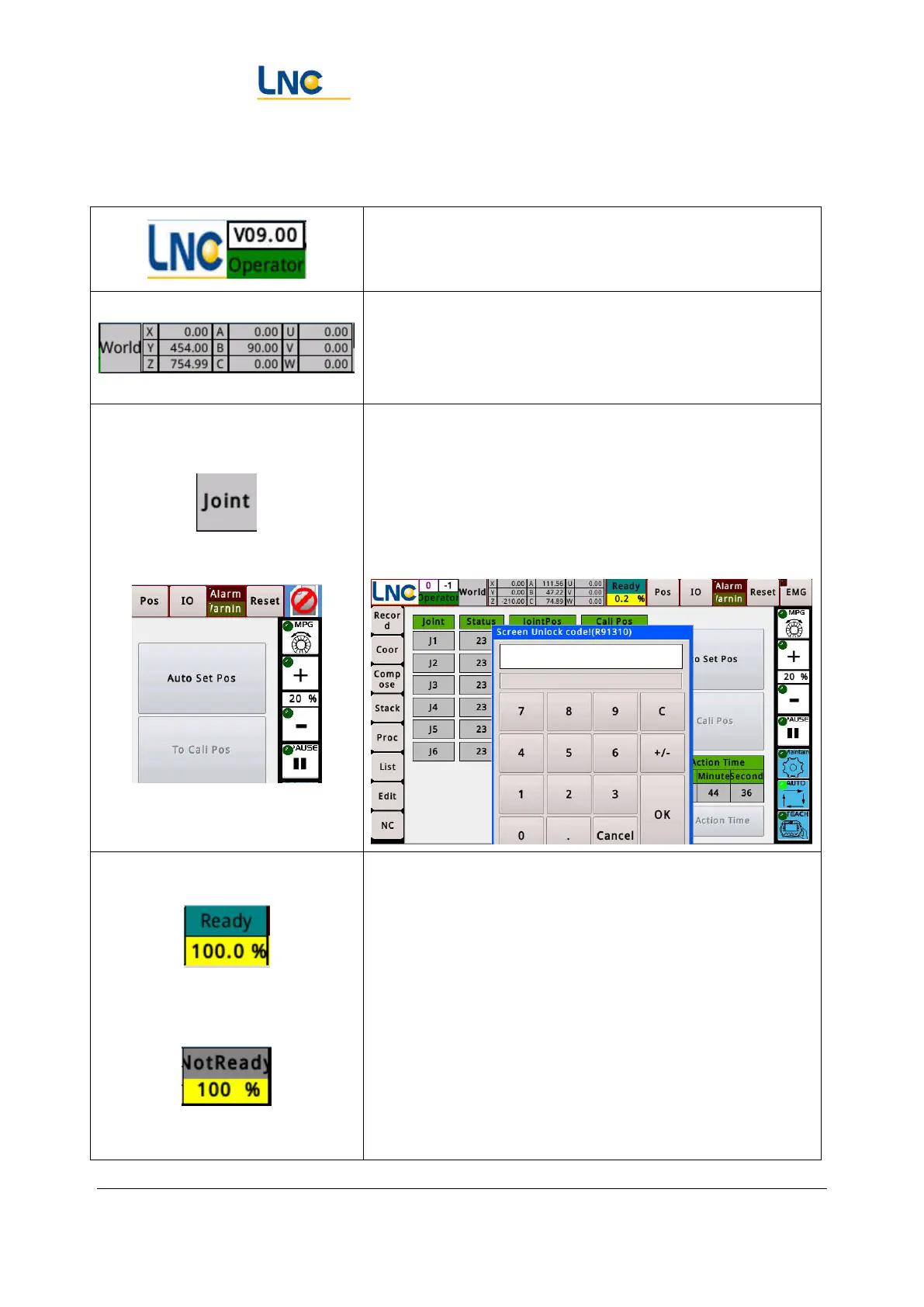
2.3. Title Bar
Display the system version number, the current login level,
click on this area to enter the permissions page.
This area will display the coordinate values in this
coordinate system according to the system mode
(maintenance, automatic, teaching), and the selected
coordinate system (world, work, tools, joints).
Screen lock function: Clicking three times in this area
continuously allows the system to enter the screen lock
state. It needs to enter the correct password to operate. If
you click Cancel, it will display a small square of "Forbid"
in the upper right corner. Click it and the password
window will pop up again.
Click on the upper half to switch
the start status of servo.
Displays the rate percentage of the system operating speed
in the current system state and automatic mode.
Not ready:It will stay in this state until the coordinates of
any of the motors are not confirmed. In this state, the
automatic mode cannot be used, and the teaching mode
operation can only be the joint coordinates.
Ready:When the coordinates of each motor have been
confirmed, it will become ready to complete. After the
being ready, there is a way to enter the "automatic mode",
because the kinematics calculation path of the robot is
meaningful after the coordinates of the axes of the system


 To Next Page