ASSEMBLY/SETUP IN STRUC TIONS
2.3.2 Install
ing the Platform Rail: M150/M200
To install the
platform rail to the right-hand platform of an
M150 or M200,
follow these steps:
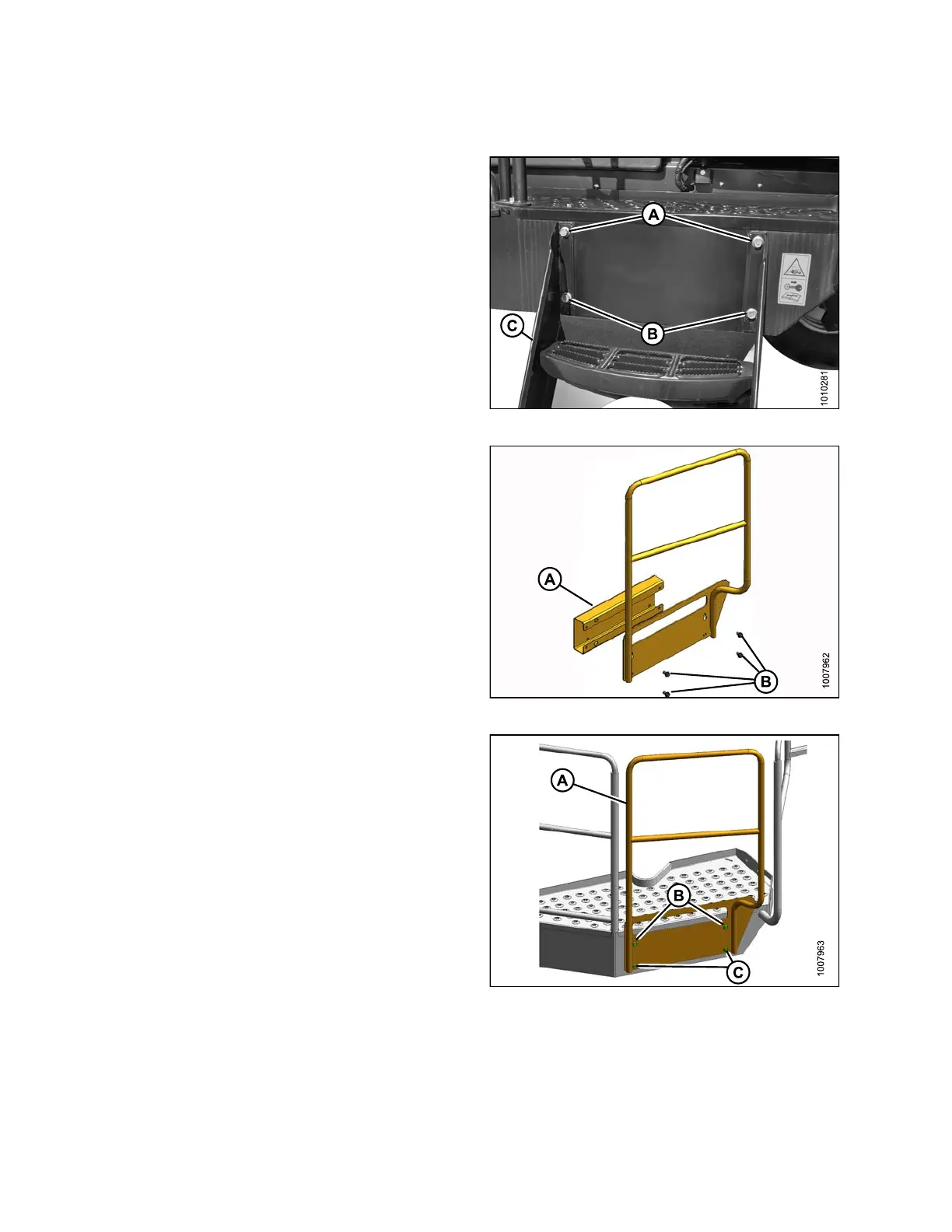
1. Remove th e ri
ght-hand stairs (C) from the platform
by loosening
the two top bolts (A) and removing tw o
bottom bolt
s(B).
2. Lift the s te
ps to detach the top keyhole slots from
bolts (A). R
etain bolts for the next step.
Figure 2.13: Right-Hand Stairs
3. Remove ad
apter plate (A) by removing four 1/2 NC x
1in. flang
e bolts (B) and nuts .
Figure 2.14: Platform Rail
4. Hang r
ail (A) without spacer plate by engaging keyhole
slots
on top bolts (B).
5. Insta
ll two bottom bolts (C) and tighten all four bolts.
Figure 2.15: Platform Rail
214049 18 Revision A



 To Next Page