MAINTENANCE AND SERVICING
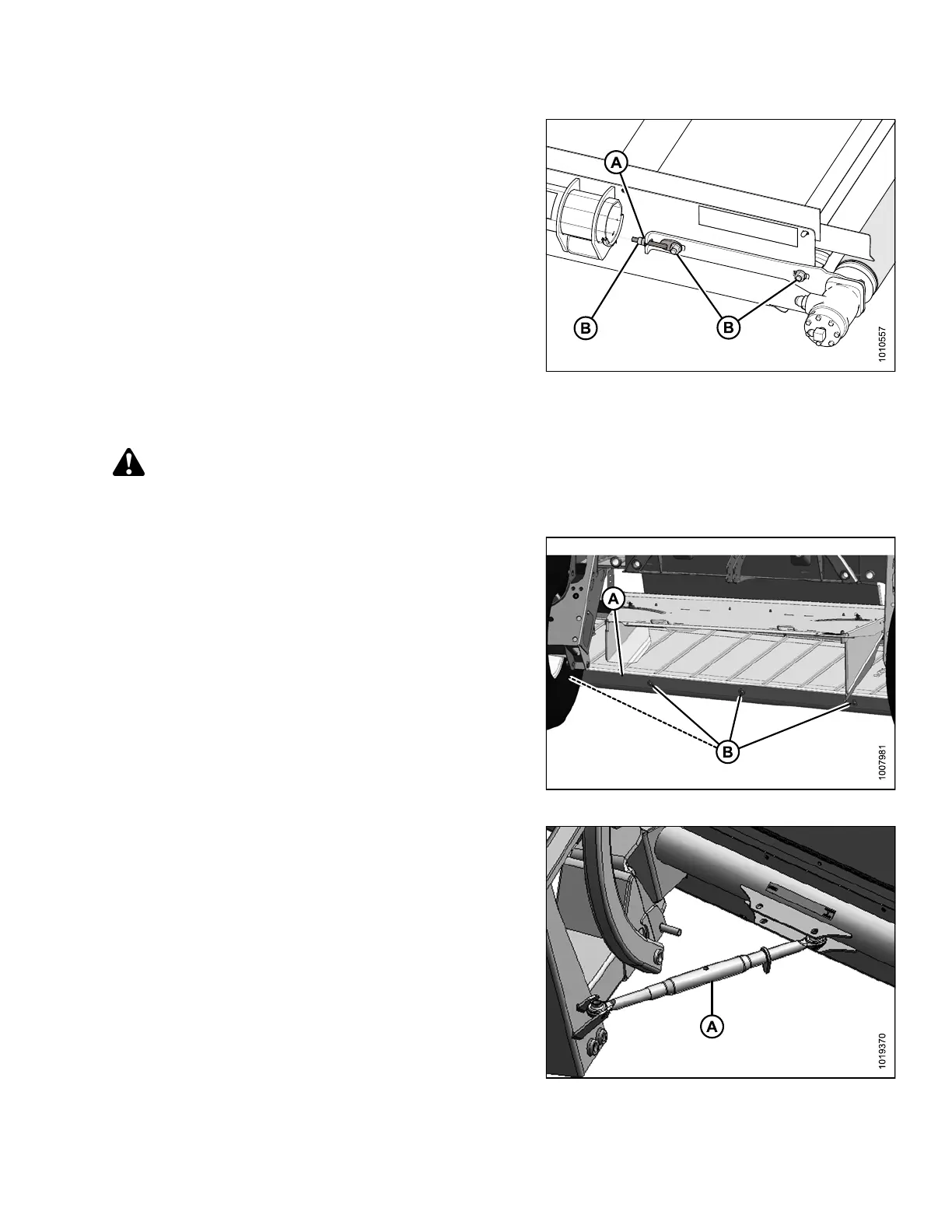
To adjust tracking on the drive roller side:
1. Loosen the three locking nuts (B).
2. Adjust nut (A) according to Table 4.1 Draper Tracking
Adjustments, page 68 above.
3. Tighten the three nuts (B) to secure the drive roller.
4. After adjusting draper tracking, adjust the draper
tension. Refer to 4.1.1 Adjusting Draper Tension, page
67.
Figure 4.4: Drive Roller
4.1.4 Replacing Draper
DANGER
To avoid bodily injury or death from unexpected start-up or fall of raised machine, stop engine, remove
key and engage safety pin before going under machine for any reason.
1. Raise the deck up enough to increase the space
between the deck and the right-hand drive tire.
2. Remove the front skid (A) by removing four nuts (B).
3. Loosen the draper tension, and push the idler roller
inward as far as possible.
Figure 4.5: Front Skid
4. Disconnect turnbuckle (A) and allow the deck to rotate
rearward to increase the space between the deck
and tire.
5. Pull off the old draper and slide on the new one. The
draper is bidirectional so orientation does not matter.
6. Tension the draper. Refer to 4.1.1 Adjusting Draper
Tension, page 67
7. Reinstall turnbuckle (A) and the front skid.
8. Adjustthefrontskidtoachievea1.5–3.0mm
(1/16–1/8 in.) gap to draper.
9. Run the new draper and check alignment. Adjust
alignment if necessary.
10. Recheck draper tension after it has run for a few hours.
Figure 4.6: Deck Angle Turnbuckle
214049 69 Revision A



 To Next Page