ASSEMBLY/SETUP INSTRUCTIONS
2.3 Installing the Platform Rail
To install the platform rail, proceed to the section that applies to y our windrower:
• 2.3.1 I nstalling th e Platform Rail: M15 5 /M 155 E 4 /M 20 5 , page 17
• 2.3.2 Installing th e Platform Rail: M150 /M200, page 18
2.3.1 Installing the Platform Rail: M155/M155E4/M205
To install the platform rail on the right-hand platform of an
M155, M155E4, or M205, follow these steps:
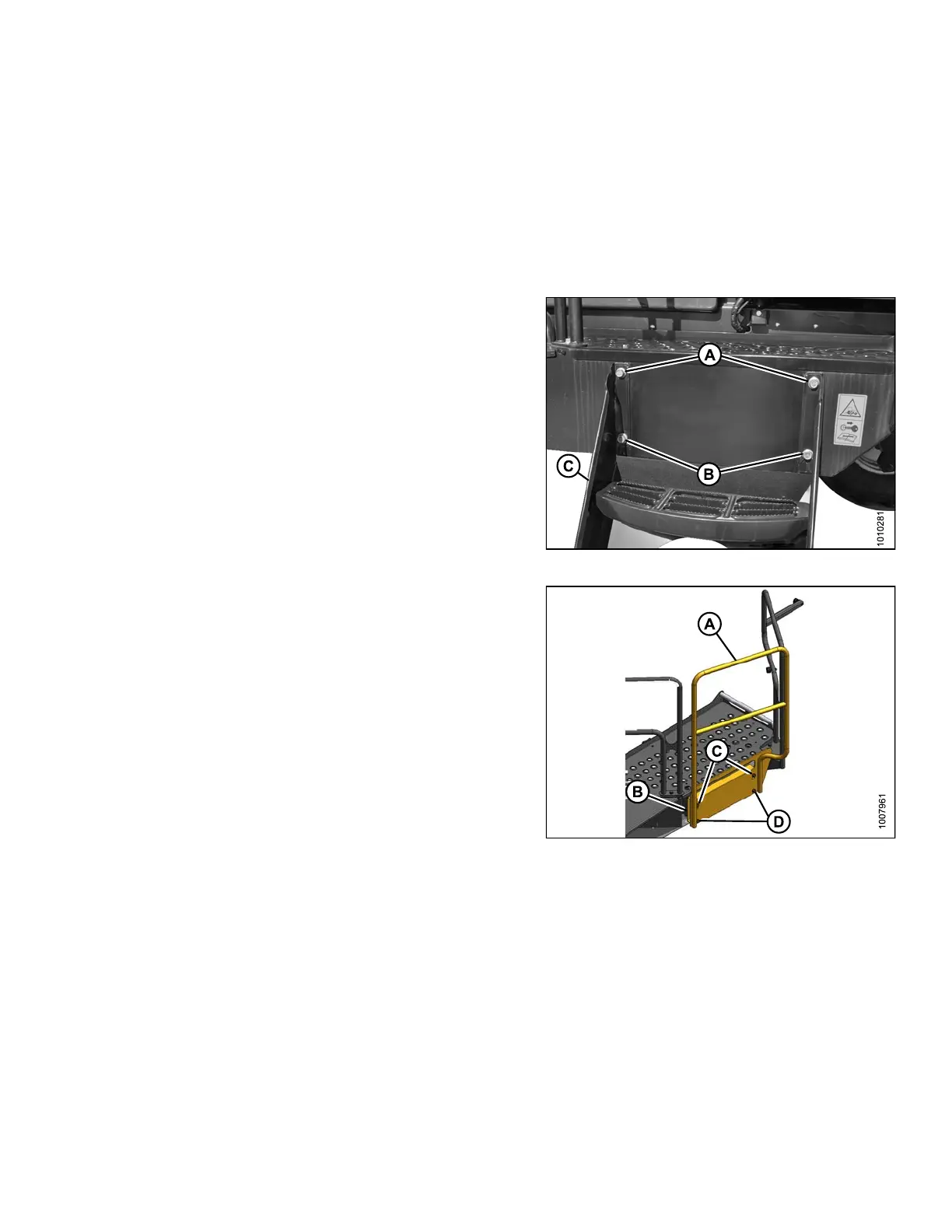
1. Remove the right-hand stairs (C) from the platform
by removing the two top bolts (A) and loosening two
bottom bolts (B). Retain bolts for reuse.
2. Lift the steps to detach the bottom keyhole slots from
bolts (B).
3. Remove bolts (B) from bottom location on frame and
loosely install bo lts in top location (A).
Figure 2.11: Right-Hand Stairs
4. Hang the platform rail (A) by fitting the keyhole slots in
the adapter plate (B) onto the top bolts (C).
5. Install the two bottom bolts (D) and tighten all four bolts.
Figure 2.12: Platform Rail
214049
17
Revision A


 To Next Page