215620 208 Revision A
5.5.4 Connecting R216 Rotary Disc Header Hydraulics and Electrical to Windrower –
M1240 Windrower
The procedure for connecting the R216’s hydraulic and electrical systems to the windrower differs depending on the
configuration of the windrower.
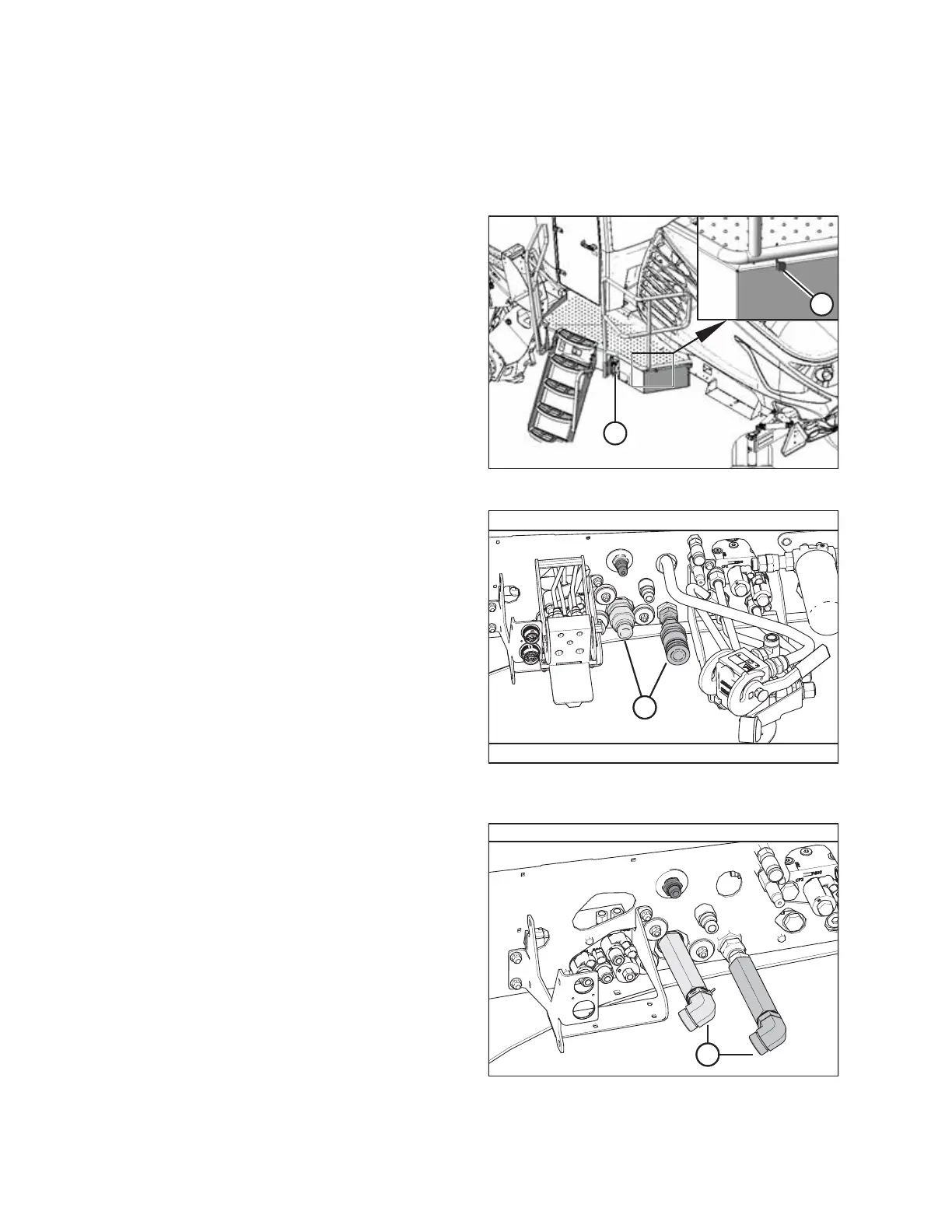
Figure 5.201: Left Cab-Forward Platform
1. Approach platform (A) on the left cab-forward side of the
windrower and ensure the cab door is closed.
2. Push latch (B), and pull platform (A) toward the walking
beam until it stops and the latch engages.
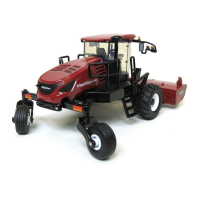
Figure 5.202: Header Hydraulics Configurations –
Auger/Rotary Disc/Draper-Ready
Proceed with the steps relevant to your windrower
configuration:
• Auger/rotary disc/draper-ready configuration (A): For
instructions, refer to Auger/Rotary Disc/Draper-Ready
Configuration – Quick Coupler Connections, page 209.
Figure 5.203: Header Hydraulics Configuration –
Rotary Disc-Ready with Hard-Plumbed Connections
• Rotary disc only hard plumbed configuration (A): For
instructions, refer to Rotary Disc Only Configuration – Hard-
Plumbed Connections, page 213.
ATTACHING A HEADER TO THE WINDROWER


 To Next Page