215620 63 Revision A
3.8 Installing Left Platform Assembly
Install the platform, railings, and steps on the left side of the windrower.
Installing left platform
1. To avoid accidental damage, raise the windrower hood.
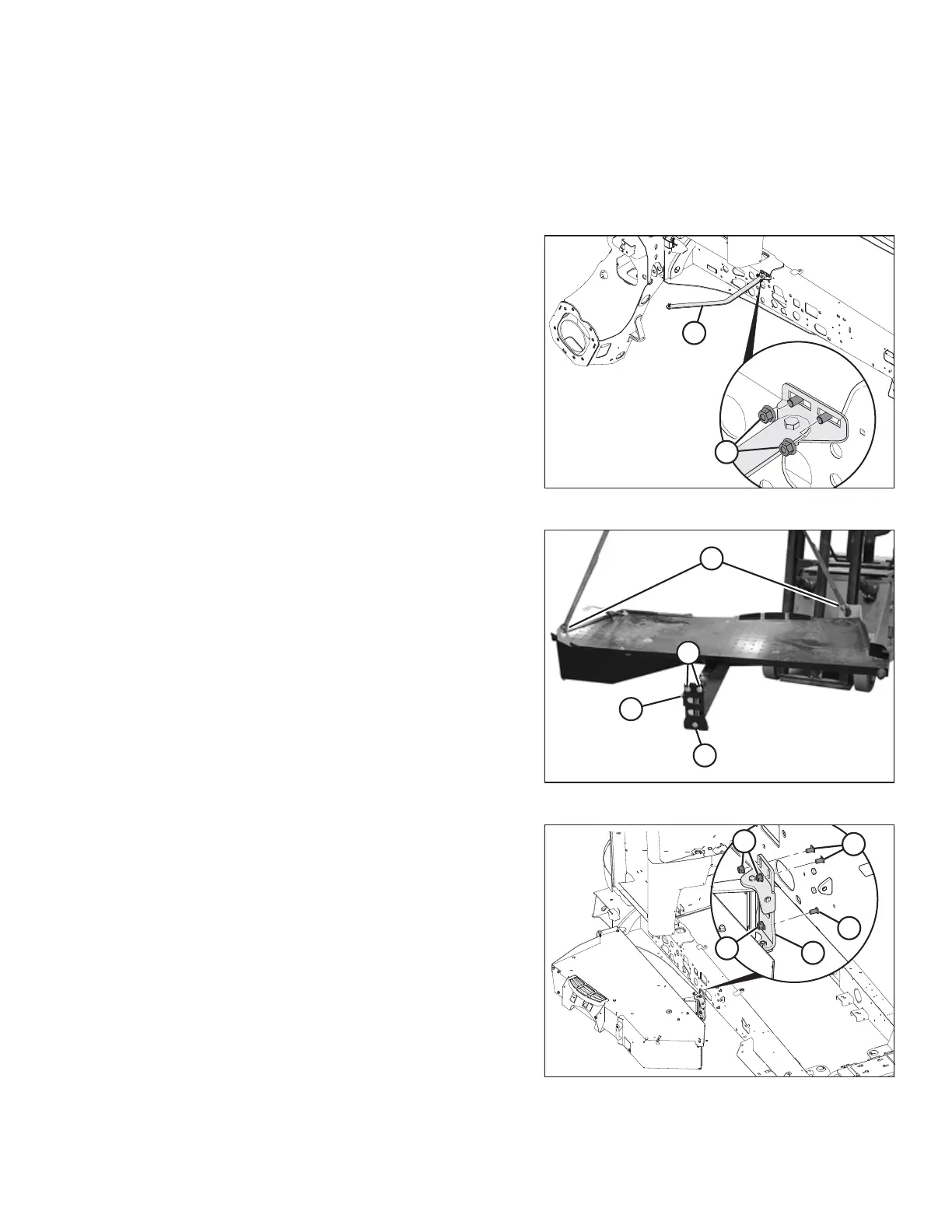
Figure 3.41: Platform Linkage
2. Install platform linkage (A) onto the frame with two existing
bolts and nuts. Nuts (B) should face outward.
Figure 3.42: Left Platform
3. Remove three existing nuts and bolts (A) and adjuster
bolt (B) from the left platform bracket. Retain hardware for
installation.
4. Attach a suitable lifting device to lift brackets (C) and move
the left platform next to the left side of windrower.
Figure 3.43: Left Platform Bracket
5. Align holes in platform bracket (A) with holes in the
windrower frame, and secure bracket with three existing
bolts (B) and nuts (C). Nuts should face outward.
ASSEMBLING WINDROWER



 To Next Page