215620 196 Revision A
5.5 R2 Series Rotary Disc Header
The rotary disc header, when attached to a windrower, is designed to cut, condition, and lay a wide variety of grasses and
hay crops in windrows.
5.5.1 Attaching Forming Shield
The forming shield controls the width and placement of the windrow.
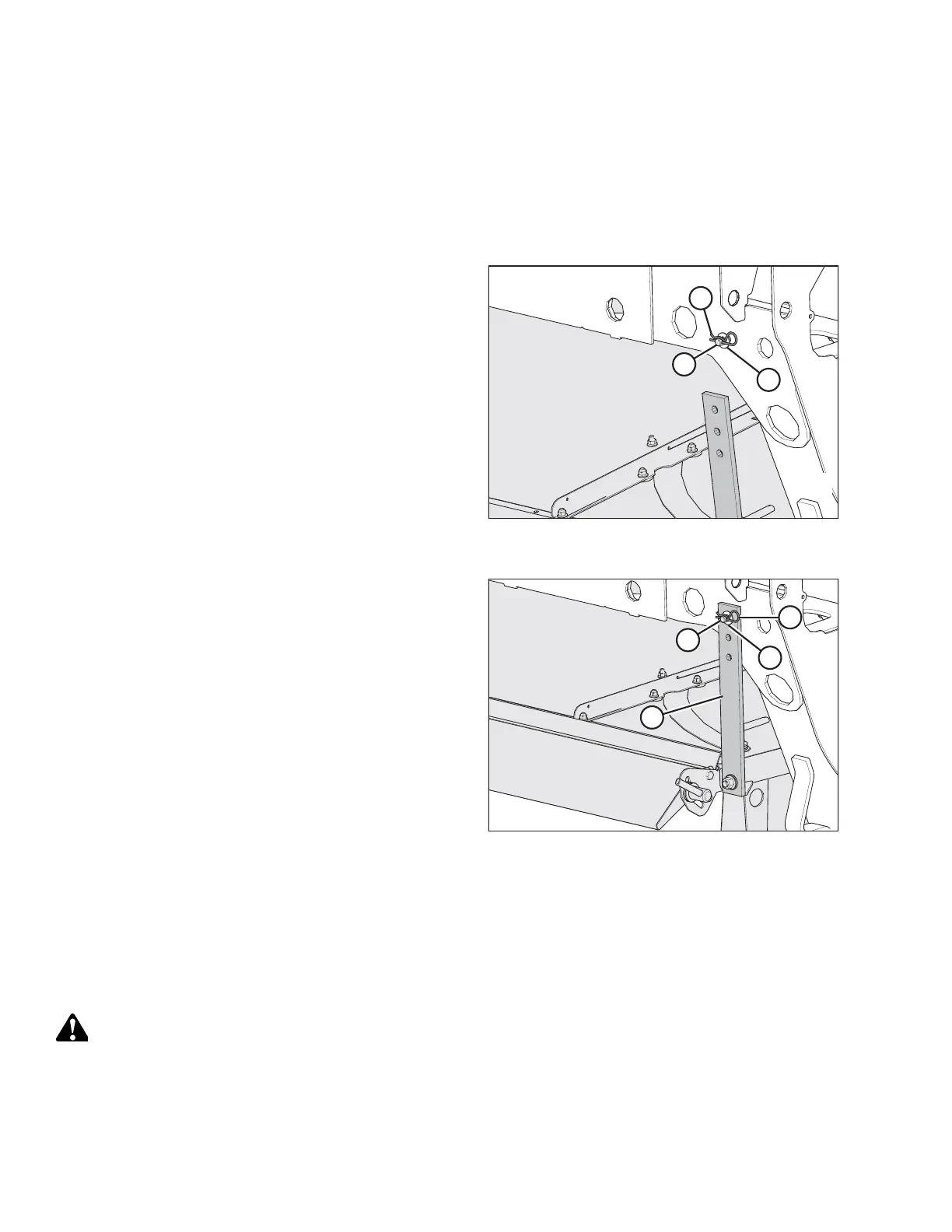
Figure 5.171: Lynch Pin and Washer at Rear of
Windrower Leg
1. Remove lynch pin (A) and washer (B) from straight pin (C).
Figure 5.172: Rubber Strap Securing Forming Shield
onto Windrower Leg
2. Attach rubber strap (D) to straight pin (C) at the rear of the
windrower leg. Secure it with washer (B) and lynch pin (A).
3. Repeat Step 1, page 196 to Step 2, page 196 at the
opposite side of the forming shield.
5.5.2 Attaching R2 Series Rotary Disc Header
The windrower may have an optional self-aligning hydraulic center-link, which allows control over the vertical position of
the center-link from the cab. If the windrower is so equipped, the procedure for attaching an R2 header will be slightly
different.
DANGER
To prevent bodily injury or death from the unexpected startup of the machine, always stop the engine and remove the
key from the ignition before leaving the operator’s seat for any reason.
ATTACHING A HEADER TO THE WINDROWER


 To Next Page