215620 227 Revision A
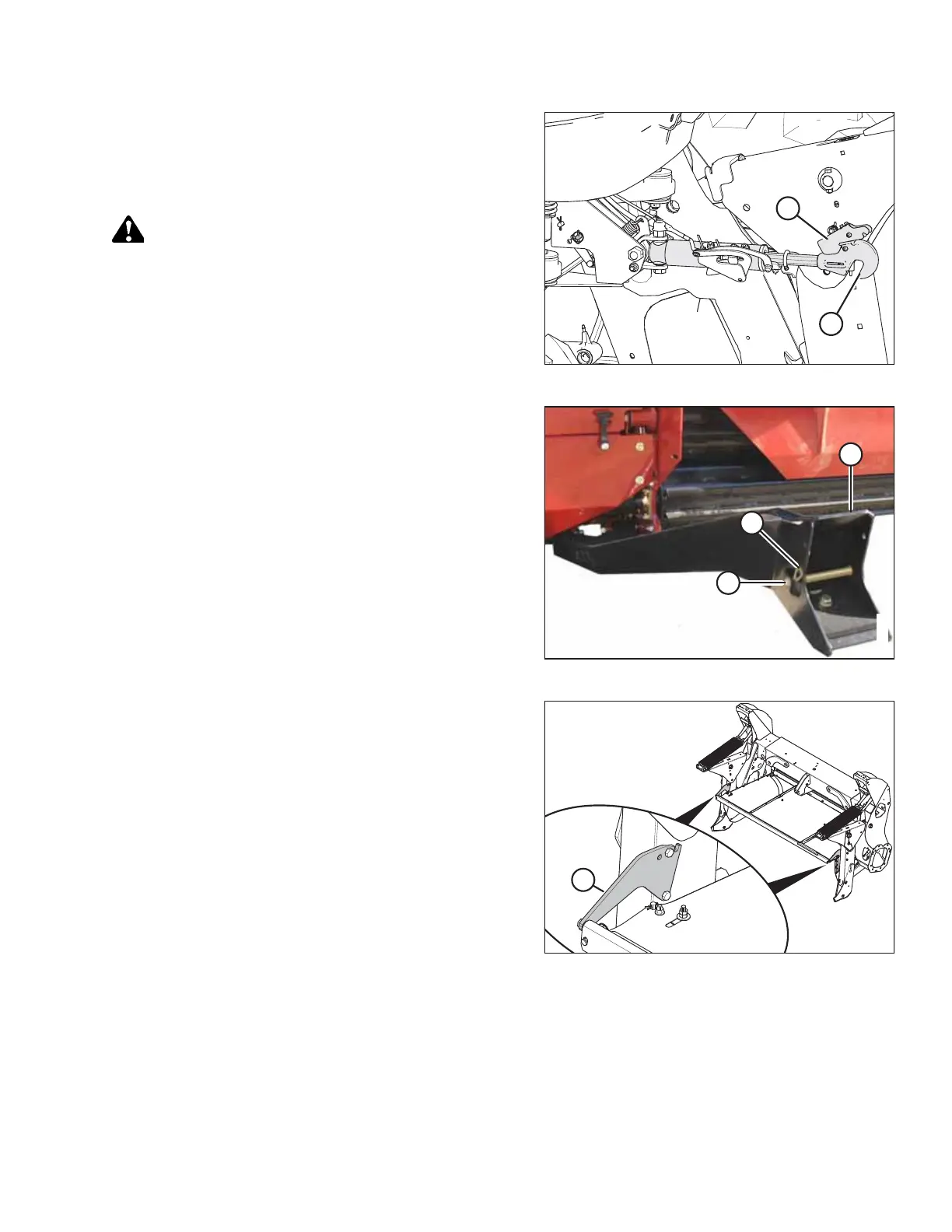
Figure 5.245: Hydraulic Center-Link
21. Windrowers WITHOUT center-link self-alignment kit: Shut
down the engine, and remove the key from the ignition.
22. Windrowers WITHOUT center-link self-alignment kit: Lift
hook release (A) and lift hook (B) off header pin.
DANGER
Ensure that all bystanders have cleared the area.
23. Windrowers WITHOUT center-link self-alignment kit: Start
the engine.
Figure 5.246: Header Support
24. Back the windrower slowly away from header.
25. Shut down the engine, and remove the key from
the ignition.
26. Reinstall clevis pin (A) through support (C) and secure with
hairpin (B). Repeat for the opposite side of the header.
Figure 5.247: Shield Mount Plates on Forming Shield
IMPORTANT:
When detaching an R216 SP Rotary Disc Header from an M1
Series Windrower that will be configured for a D1X Series Draper
Header, ensure the two shield mount plates (A) (MD #307045)
are removed from the windrower and forming shield.
5.5.6 Removing Forming Shield
The forming shield controls the width and placement of the windrow.
NOTE:
It is NOT always necessary to remove the forming shield after detaching the header from the windrower.
ATTACHING A HEADER TO THE WINDROWER



 To Next Page