215620 54 Revision A
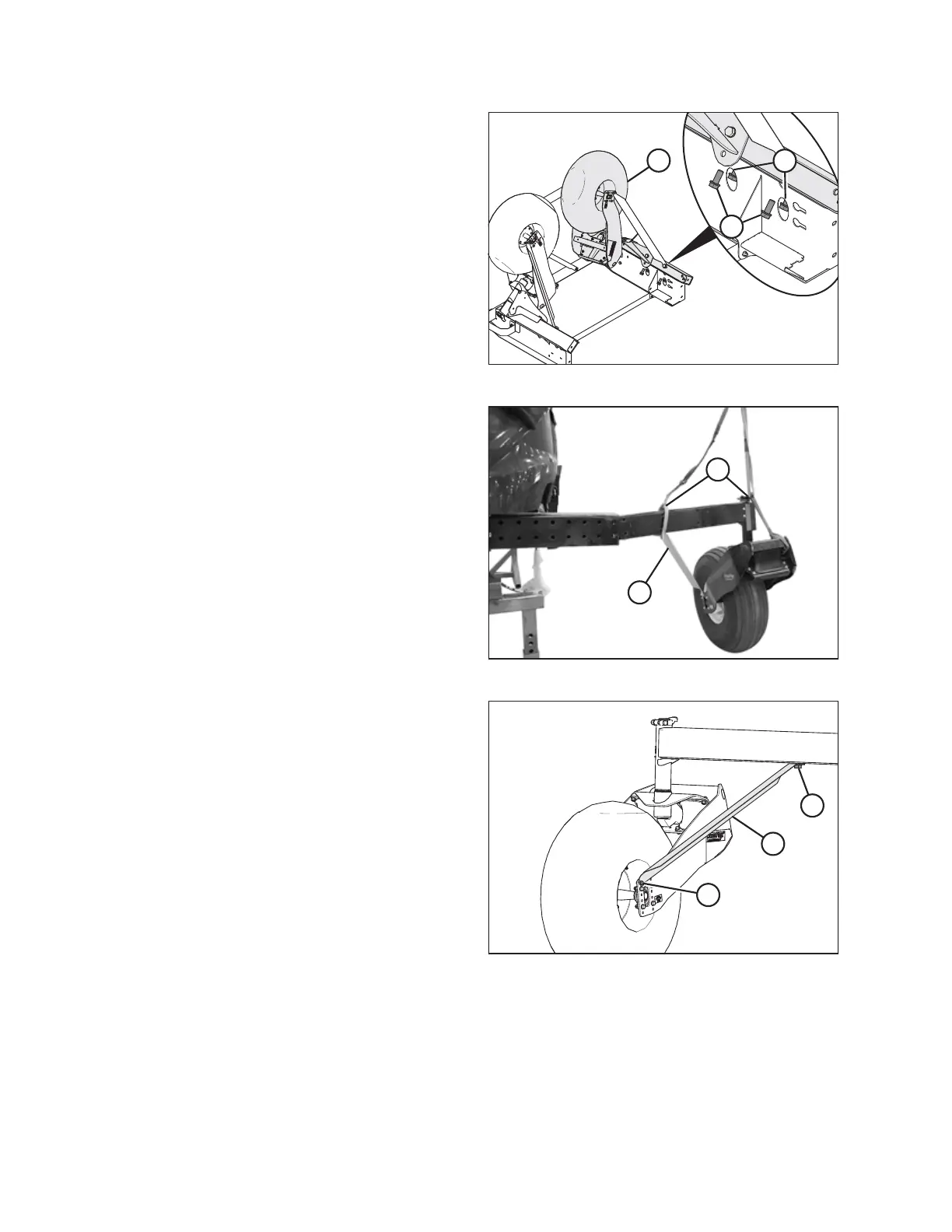
Figure 3.21: Caster Wheels Shipping Assembly
4. Remove four M24 bolts (A) securing right caster wheel (B)
to shipping stand. Retain bolts with washers for installation.
5. Lift right caster wheel away from shipping assembly and set
it down on a non-scratch surface.
Figure 3.22: Inserting Caster Wheel
6. Reposition lifting straps (A) around caster wheel beam and
shipping bracket (B), and lift wheel into position beside
walking beam.
7. Insert caster wheel approximately 305 mm (12 in.) into
walking beam up to shipping brace (B).
Figure 3.23: Caster Wheel Brace
8. Remove bolts (A) and (B) securing shipping brace (C) to
caster wheel. Discard bolt and nut from location (B).
9. Retain M24 bolt and washer from location (A). Discard
brace (C).
10. Rotate caster wheel and insert it into walking beam to the
desired caster width.
11. Apply anti-seize compound to the retained M24 bolts.
ASSEMBLING WINDROWER



 To Next Page