Matrox Display Wall – User Guide 19
Planning your display wall
This section describes the steps to consider if you’re setting up a Mura-based display wall for the first
time. We recommend you review these steps
before
setting up your display wall.
Planning the output layout of Mura MPX Series cards
Setting your card order
Mura MPX-4/4, MPX-4/2, MPX-4/0, and
MPX-SDI
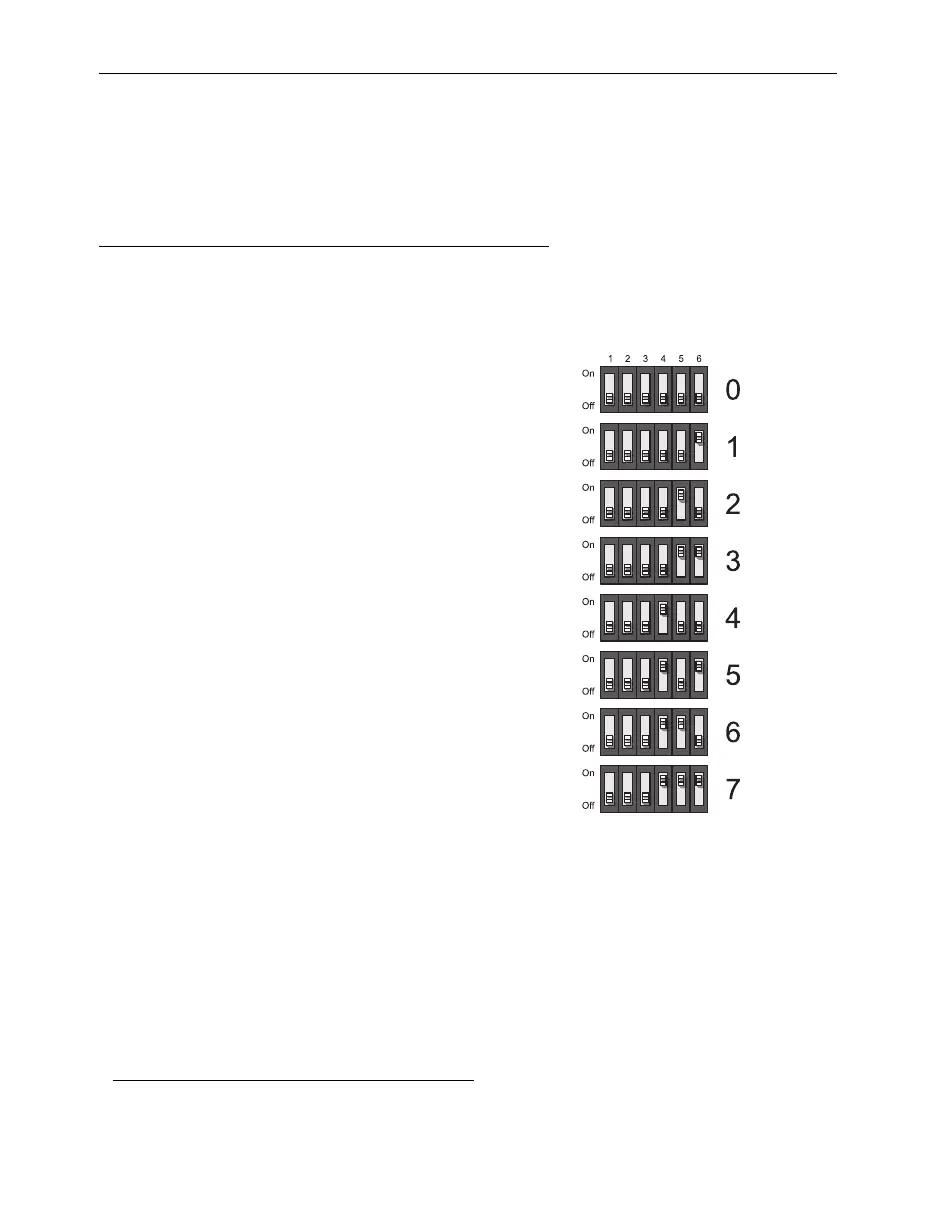
– The DIP switches on your
Mura MPX Series output cards are used to
control the order in which the GPUs of
your cards are used. Setting the DIP
switches is useful if you’re setting up a large
display wall layout that uses multiple cards.
Ordering the output connectors enables
PowerDesk software to properly lay out the
outputs of your display wall and avoids you
having to manually set up your multi-
display layout.
For example, setting the first card to
0
means that card will be the first one used,
and the first GPU of that card will be
identified by PowerDesk as
A
.
To set the DIP switches on your cards, use
the tip of a pen or pencil to flip the switch
on or off. We recommend setting your card
order as follows, starting with card
0
.
*
* The DIP switches use binary counting to set the card order.



 To Next Page