EasyManua.ls Logo

Matrox C Series - Mura MPX-SDI; Connection Overview; Description of Cables

Matrox C Series
104 pages
Print Icon
To Next Page IconTo Next Page
To Previous Page IconTo Previous Page
Loading...
Matrox Display Wall – User Guide 41
Mura MPX-SDI
This section describes how to connect your output devices (monitors) and input devices to your Mura
MPX-SDI card.
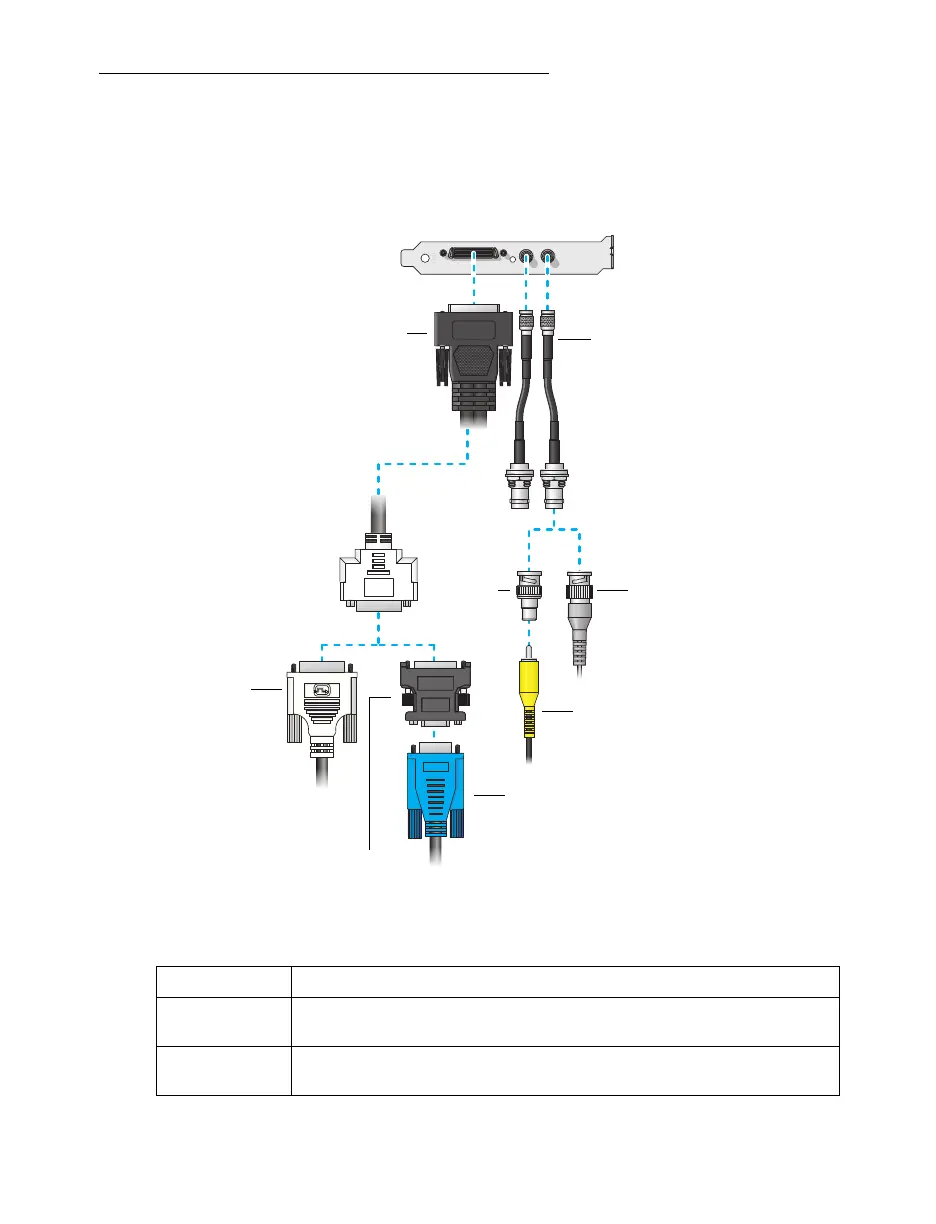
Connection overview
Description of cables
Cable Description
Output Mura MPX-SDI cards use a KX20 to dual-DVI cable to connect up to two (2)
monitors per card.
Input Mura MPX-SDI cards use a DIN to BNC cable to connect up to two (2) input
devices per card.
Output cable
(KX20 to dual-DVI)
Monitor connector
(HD-15)
Monitor
connector
(DVI)
DVI to HD-15
adapter
BNC to
Composite
adapter
Composite connector
Input cables
(DIN to BNC)
BNC connector

Table of Contents

Other manuals for Matrox C Series

Related product manuals