Open-wire connectors reference 123
When the Matrox Iris GTR breakout board supplies the power to the lighting
controller, verify that the total power required by the lighting controller and your
smart camera does not exceed the rating of your power supply. If the lighting
controller’s power requirements exceed the 1.5 A provided by your Matrox
Iris GTR breakout board, connect the lighting controller’s 24 VDC directly to
the power supply instead of using the +VDC wire-terminal (J7[+VDC]). For more
information on current consumption of your Matrox Iris GTR breakout board,
refer to Electrical specifications subsection in Appendix B: Technical reference. For
the current consumption of your lighting controller, refer to its associated
documentation.
Open-wire connectors reference
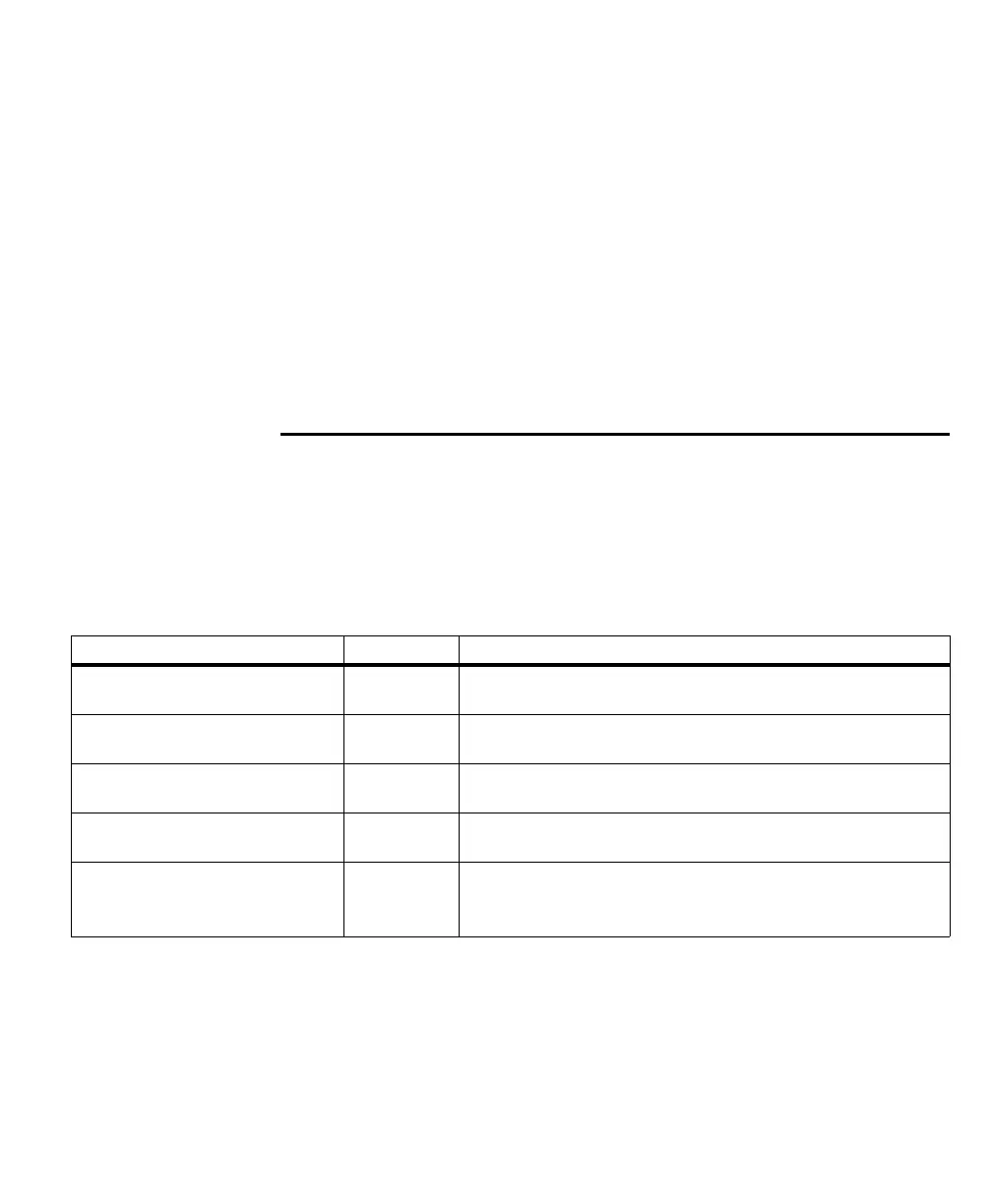
The Matrox Iris GTR breakout board has five separate terminal-block connectors
designed for open-wire connections. Each connector is composed of multiple
wire-terminals. Each of these wire-terminals requires a stripped cable with tinned
wires to be inserted, wire by wire, into the available wire-terminal. Each
wire-terminal is labeled (by color or signal name) on the board.
Matrox breakout board connector name Wire-terminal Connector type
Matrox camera connector J1 Connects your Matrox Iris GTR to the Matrox Iris GTR breakout board via the
digital I/O and power cable.
Power source connectors J2-J3 Provides power to the Matrox Iris GTR breakout board and your Matrox
Iris GTR.
Input connector J5 Connects to third-party devices so that they can send auxiliary input and trigger
signals to your Matrox Iris GTR.
Output connector J6 Connects to third-party devices so that they can receive auxiliary output signals
from your Matrox Iris GTR.
ICS3 connector J7 Connects to a lighting controller (such as, an Advanced Illumination inline
control system (ICS3),
a
Smart Vision Lights Brick light, or a similar device) so
that your Matrox Iris GTR can control a light source.



 To Next Page