Alterations reserved
Version 05/2008
Operating Manual B21-C - en
Page 69
3.3 Sheet infeed
Automatic calibration of sheet gap
and suction length
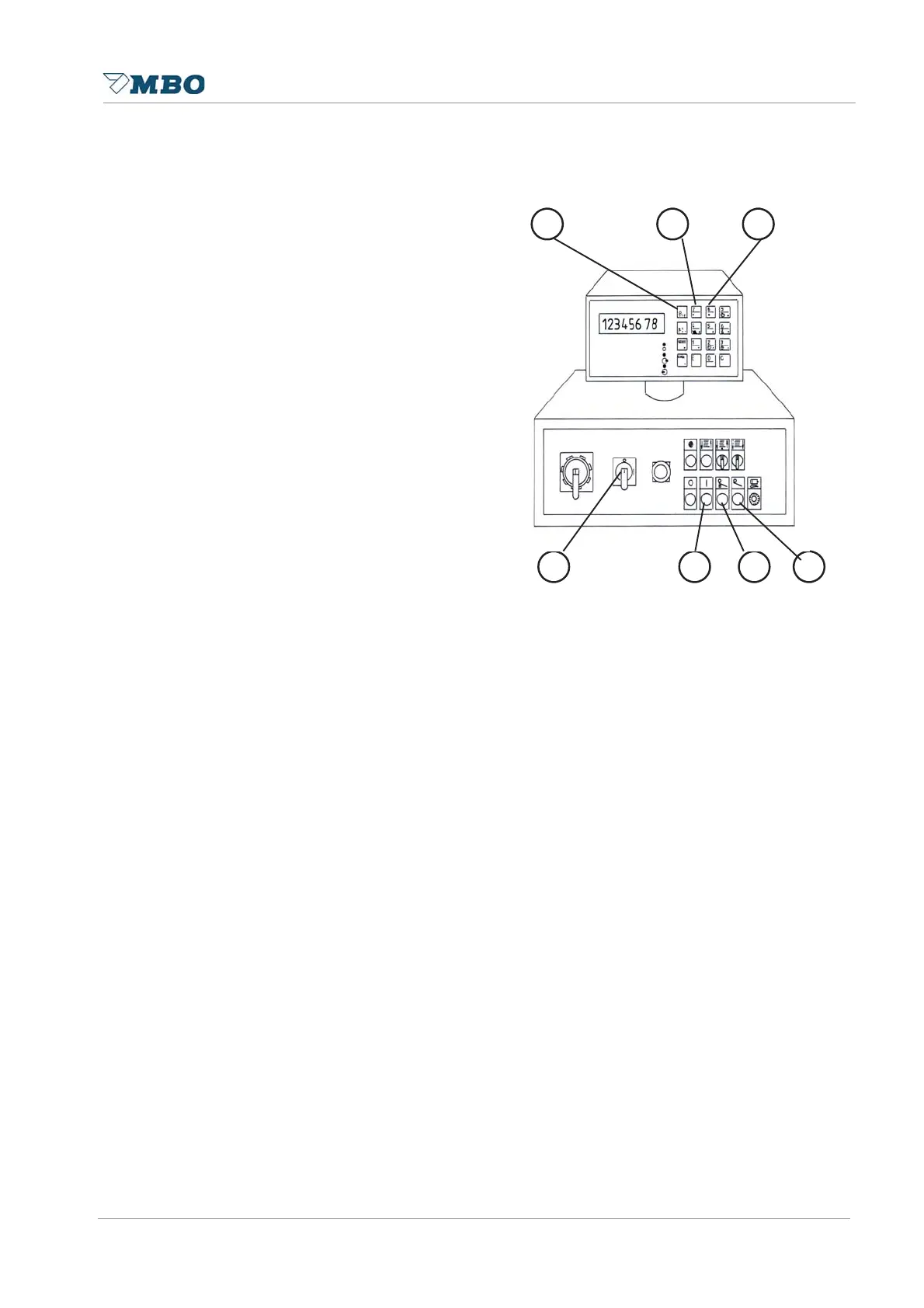
Start machine by pushing black button 5,
switch air pump 4 on.
Keep pressing soft touch button suction
length 1 and press single sheet button 7.
A single sheet will enter with a base
suction length (machine specific). The
suction length from the single sheet will
be measured by the reflection light
sensor B2 at the suction wheel.
To increase or decrease the suction
length for all following single sheets
press soft touch button 1 together
with + 2 or - 3.
All following single sheets are new
calibrated.
Touch white button sheet infeed 6 to
complete calibration, sheet gap will be
calculated based on the last sheet length
meusured.
Suction length = 1/3 of full sheet length.
Sheet gap basic setting code 24 = 1 =
sheet length + 1cm.
Sheet gap basic setting code 24 = 0 =
1cm.
Calibrated suction length and sheet gap
allows reconfiguration, see chapter 8.2
and 8.3 in operating manual “MS-
Steuerung”.
1
2 3
4 5 6 7


 To Next Page