Page82Alterations reserved Version 05/2008
Operating Manual B21-C - en
7.3 Setting and sheet transportation
7.3.1 Knife folding unit “X” as first crossfold
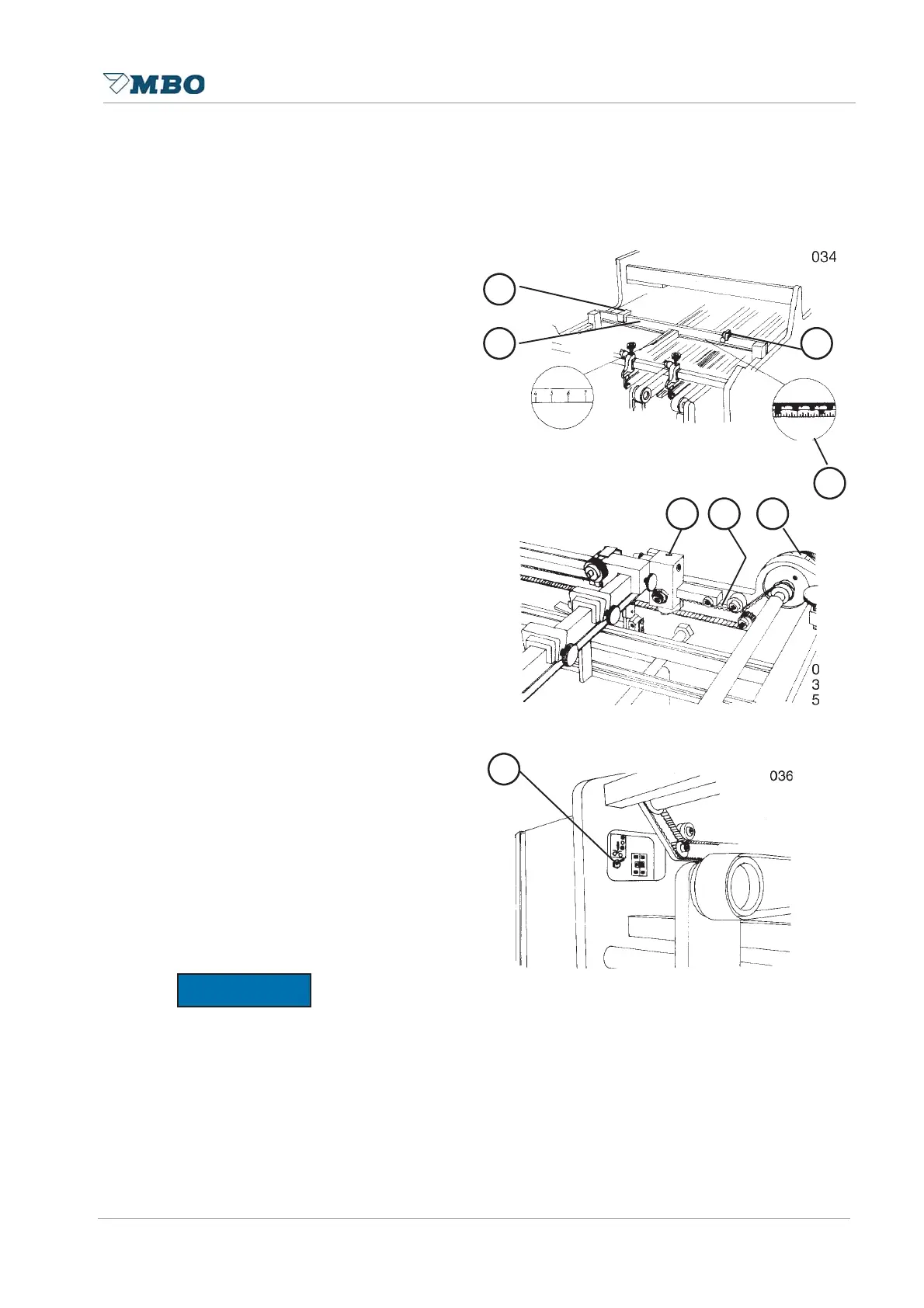
Set the sheet stop 2 through the central
adjustment 6 to the sheet size.
Measurements can be read-off at toothed
belt 5 or through the marked indication at
guide rail. Angular adjustments may be
obtained through the central adjustment,
as mentioned under item 4.2, page 52 for
buckle plates. In addition, the sheet stop
may also be fixed through the hexagon
screws 4 (if heavy sheets are
processed).
If the sheet stop is not used you may lift
it so that only parallel folded sheets will
pass underneath.
Turn OFF coupling of knife, i.e. activate
switch 7 to the middle position.
Move a sheet to the sheet stop and put
the adjustable sidelay 3 with fine
adjustment 1 to the sheet edge. Set the
spring sidelay 2 to the opposite sheet
edge. By means of a scale which is
situated at the sheet stop 8, you may
pre-set the sidelays to the corresponding
sheet size.
The sheet should run as close as possible to the sidelay. The spring sidelay should not guide the
sheet to the fixed sidelay but rather to slightly hold against it.
127,&(
12
3
4
5 6
7
8


 To Next Page