Page74Alterations reserved Version 05/2008
Operating Manual B21-C - en
B 5.0 Slitter shafts
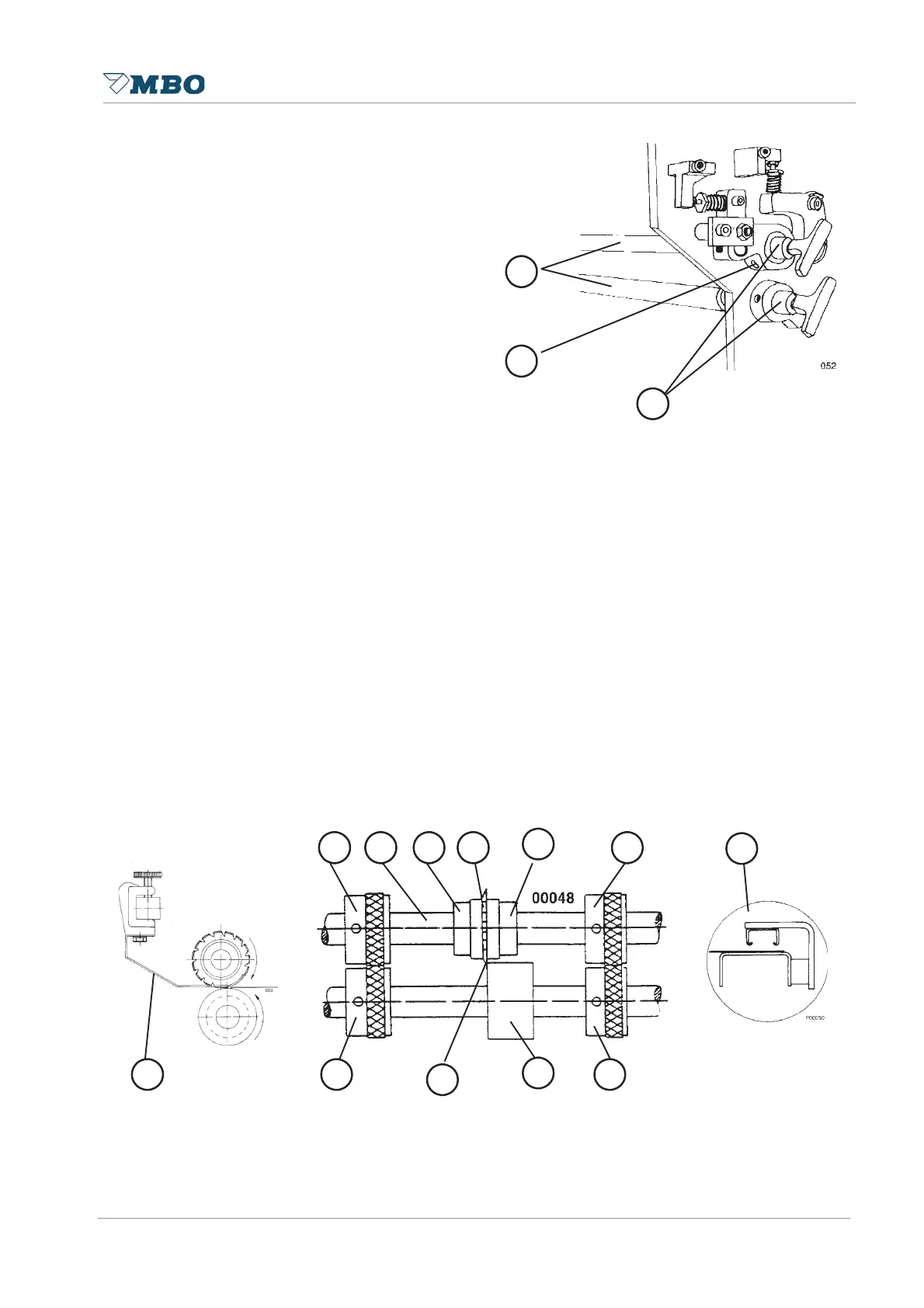
Both slitter shafts 1 which are fitted after
each folding unit may easily be mounted
and removed by plug bearings 3 enabling
insertion of tools for perforation, scoring
or cutting. For removal of the slitter
shafts loosen the internal hexagon screw
2 which locks the plug bearing. Pull the
plug bearing out of the slitter shaft while
holding the slitter shaft with your other
hand. Reinstallation occurs in the
opposite sequence. However, push the
plug bearing against the slitter shaft - to
equalize an axial play - while you are
locking the plug bearing with the internal
hexagon screw.
5.1 Perforating
To avoid creasing you perforate crossfold as well as for tear or punch perforation.
To use perforating or cutting knives, a knife shaft 9 as well as a counter knife (lower part) 11 is
required. When loosening the nut 7 you may fit a knife 8 into the holder.
Some knives are split 12, which enables you to install them without removing the shaft.
For proper installation the knife 8 should be adjacent to the ground side of counter knife 10
Make sure that during the installation of the shaft that the nut 7 is opposite to the direction of the
shafts rotation 8. This guarantees that the nut does not become loose during rotation. The lock
nut may also be retightened with a C-wrench.
Perforating knives with slanted teeth must be installed in such a manner that they enter with the
obtuse angle first into the sheet. In doing so you may avoid jam-up of sheets between perforating
knife and stripper 4.
Depending on the sheet size you may use additional transport rollers 5. Carefully read the
attached knife list TM 35/2 which indicates the knives you should use when processing different
kind of papers and/or making different types of folds.
1
2
3
5 6
7
9
8
4
5
5
1
1
1
5


 To Next Page