4 - COMMANDS AND INSTRUMENTS
4 - 8
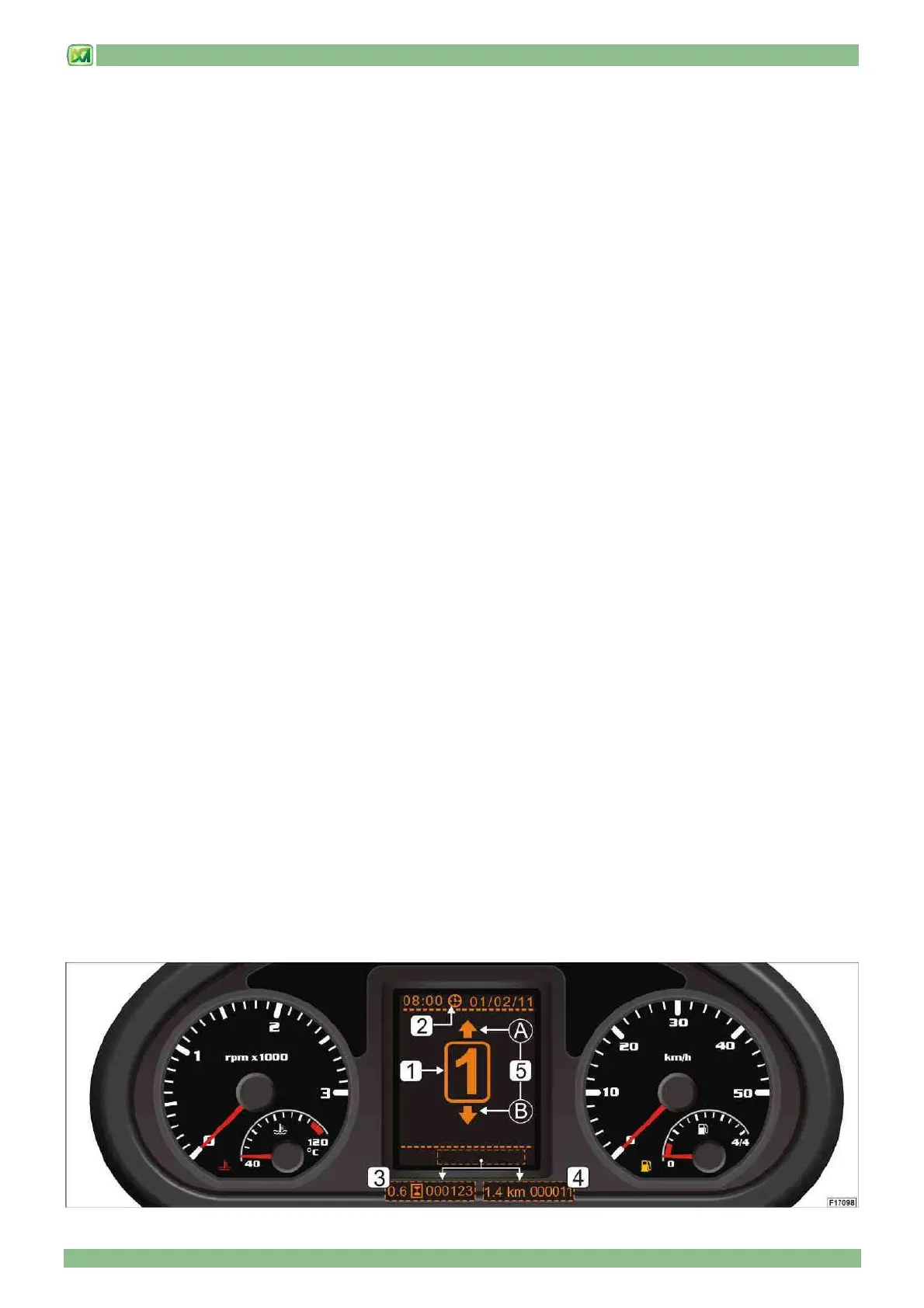
- LCD DISPLAY (62)
When the engine is off, the display (62) is disabled. To set some functions of the LCD display it is necessary to use the (OK)
and (C) keys on the control panel (P1). The LCD display provides the operator with the following information:
• gear selected (Ref.1)
The gear currently engaged is displayed in the middle of the LCD display (62). Gear selection is carried out using the gear
selector switch (19) beside the steering wheel. For further information see the section "GEAR SELECTOR" in this chapter.
• date and time (Ref.2)
The current time and date is displayed in the top part of the LCD display. To manually set this data, follow the instructions
below:
- press the button (C) for about 3 seconds; the time indicator will start to flash. Release the button (C) and then press the
button (OK) to adjust the time and date. By briefly pressing the button (OK) the data decreases, while keeping it pressed the
data quickly increases until the button is released. To switch to adjusting other information (minutes, day, month, year) press
the button (C) and carry out the same adjustment operations.
• partial and total hour counter (Ref.3)
The lower part of the LCD display (62) shows the information of the partial hour counter / total hour counter (separated by a
central indicator light in the shape of an hourglass) or the information of the trip odometer /total kilometres odometer (separated
by an indicator light showing the lettering "km"). To switch from one adjustment to another just press the button (C).
The partial hour counter shows the number of hours the machine has been used since the last reset. The maximum value that
can be displayed is 999.99 hours and then it starts again from 0.0. To reset the partial hour counter press the (OK) button for 3
seconds.
The total hour counter shows the total machine usage hours (the hour counter starts working when the engine is switched on).
The maximum value that can be displayed is 999999 hours, after which it will restart from 0.
• partial and total kilometre odometer (Ref.4)
The lower part of the LCD display (62) shows the information of the trip odometer / total kilometres odometer (separated by an
indicator light showing the lettering "km") or the information of the partial hour counter / total hour counter (separated by an
indicator light in the shape of an hourglass). To switch from one adjustment to another just press the button (C).
The trip odometer indicates the number of kilometres travelled with the machine since the last reset. The maximum value that
can be displayed is 999.99 hours and then it will restart from 0.0. To reset the trip odometer press the button (OK) for 3
seconds.
The total kilometres odometer indicates the total kilometres travelled with the machine (the odometer starts to operate after the
engine is started). The maximum value that can be displayed is 999999 hours, after which it will restart from 0.
• direction of the gear selected (Ref.5)
The system represents, in a graphic format, the direction of the gear selected (forwards or backwards) and displays it in the
display (62) in the following way:
A) forward gear selected
B) reverse gear selected
The selection of the gear direction takes place using the specific control lever (20). For further information see the section
DIRECTION SELECTOR in this chapter.


 To Next Page