4 - COMMANDS AND INSTRUMENTS
4 - 20
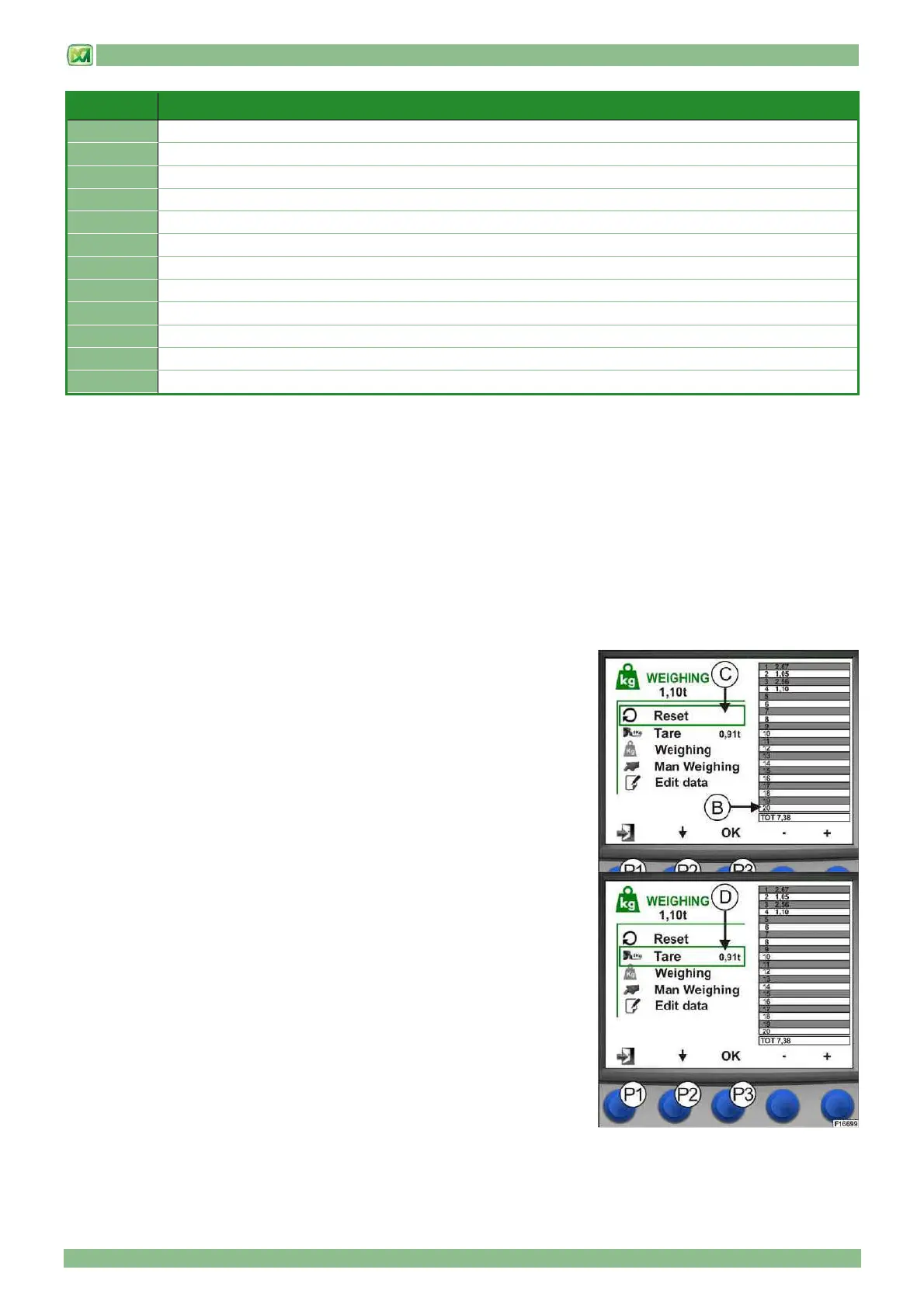
REF. DESCRIPTION
A
Net weight lifted by the attachment mounted on the carriage (in tonnes)
B
Table summarising the last 20 weighing operations stored indicating total lifted weight
C
Cancel all stored weighing operations. The total weight is reset.
D
Attachment tare
E
Manual weighing
F
Selecting the weighing mode: automatic or manual
G
Modifying the weights stored in table “B”
P1
Weighing screen exit button and return to main screen
P2
Weighing menu scroll button
P3
Confirm button for menu item selected
P4
Automatic weighing angle decrease button
P5
Automatic weighing angle increase button
1) INDICATIONS FOR WEIGHING A LOAD
To perform the most precise weighing operations possible, proceed as follows:
1) the machine must be placed on firm, level ground
2) the machine must be at a standstill with the wheels aligned with the chassis
3) the telescopic boom must be completely withdrawn and in a horizontal position
4) the carriage must be in a vertical position
5) the MANUAL WEIGHING mode is recommended
Under these conditions, the indicative load readout tolerance is about ±5% of maximum rated load.
The weight of the lifted load is merely indicative for the operator and has no fiscal and/or certified weighing value.
The various functions of the weighing system are described below in this paragraph.
2) RESET (C)
The reset command is used to cancel all weighing operations stored in table "B".
When all partial weights are cancelled, the total weight is also cancelled.
The reset command is performed from the weighing screen using the button
(P2), selecting "RESET" and then confirming by pressing the button (P3).
The total weighing value is also given in the main screen in field (224). The
RESET command also resets the value of field (224).
Press button (P1) to return to the main screen
3) TARE (D)
This command is used to calculate the tare of the weighing system. In this way, it
will then be possible to display in field (A) only the weight of the load lifted, net of
the weight of the attachment.
The tare command is performed from the weighing screen using the button (P2),
selecting "TARE" and then confirming by pressing the button (P3). At this stage,
the weight detected (in tonnes) is indicated next to the wording TARE.
Press button (P1) to return to the main screen


 To Next Page