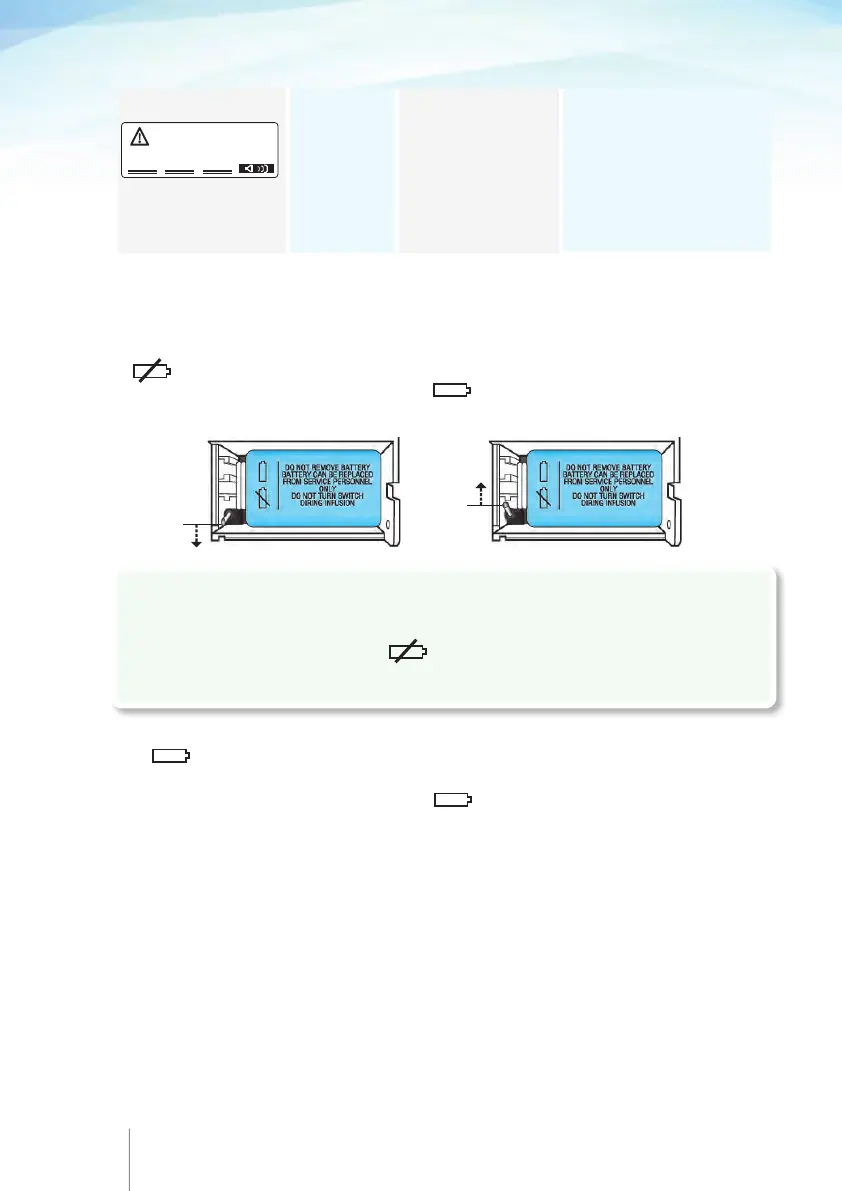
For pumps with rechargeable battery:
Ensure that the Micrel power adaptor is not connected to the Rythmic™ Evolution
pump. Open the transparent covers and take the battery cover off. Turn the switch to
, as shown in picture 1, the pump will turned OFF and the buzzer will stop. Wait
for 3 seconds and then turn the switch to as shown in picture 2 and replace the
battery cover. Turn the pump ON and continue.
70 71
Note: If pump cannot be turned on, check that the switch inside the battery compartment is
at position.
If "battery needed as backup for infusion" warning message is displayed, check that the
switch inside the battery compartment is at position.
For pumps with disposable 9V alkaline battery:
Ensure that the Micrel power adaptor is not connected to the Rythmic™ Evolution
pump. Open the transparent covers and take the battery cover off. Take the battery out
of the pump, wait for 3 seconds and then place the battery to the battery compartment.
Turn the pump ON and continue.
If the alarm persists, return the pump and its accessories to service, note the error
code and have the unit checked by a qualified engineer.
The next pages explain how to access the configuration. You may wish to remove the
pages to secure the access of this programming option.
May you need a copy, please contact your manager.
Audible YES
Visual YES
Acoustic tone:
Continuous
Cause
An internal error has
been detected. An
alarm may originate
from temporary Electro-
magnetic Interference
or extreme vibration.
Action
Note the error code. Turn
pump OFF then ON again.
If the alarm persists or the
pump cannot turned OFF see
below according to the pump
type of power supply.
Alarm message
ALARM
ERROR : XX XX
pic.2pic.1
!Caution
Do not turn the switch to position while the pump is switched ON, as this may
damage the pump.
Type of signal



 To Next Page