38 39
5.2.3 Select programming units
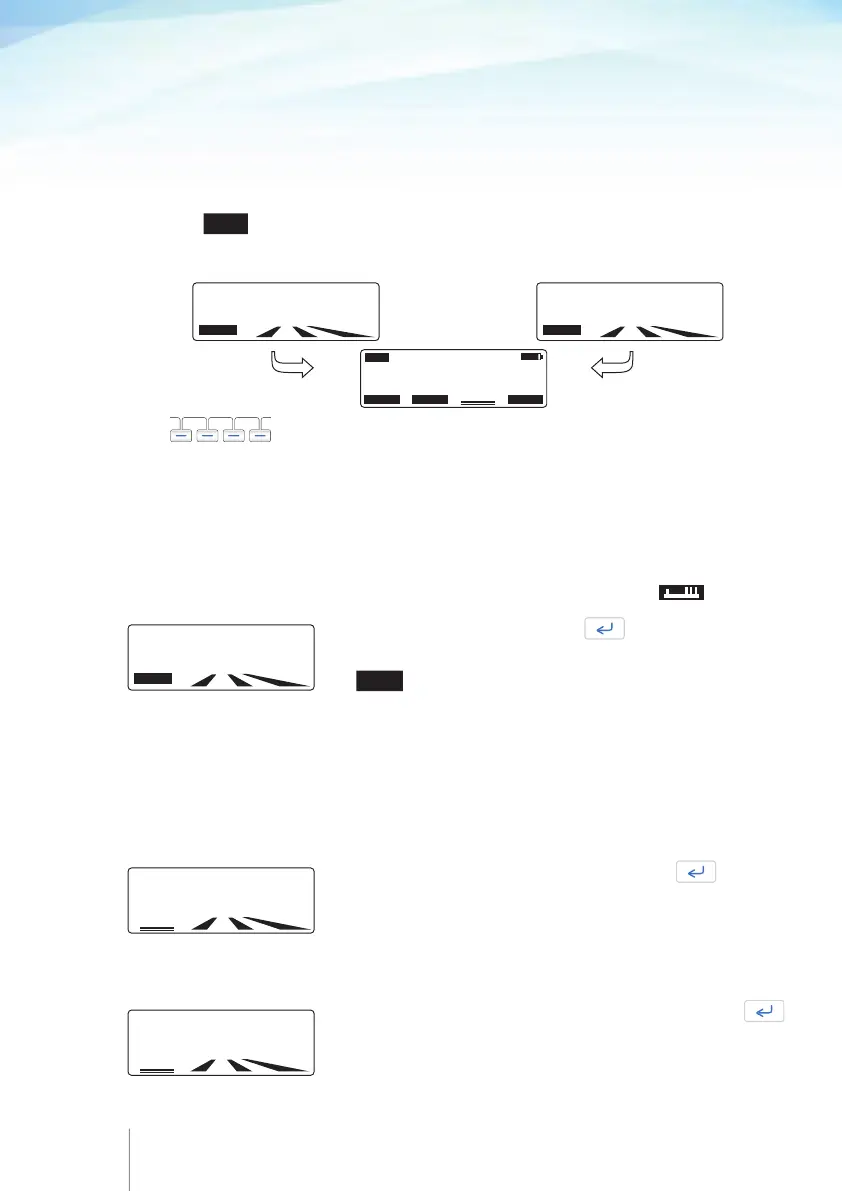
At the beginning of programming procedure, it is possible to select the programming
unit from ml, mg and μg.
When mg and μg programming units are used, entering the drug concentration is
required.
Press the
UNITS
soft key to select the programming unit from either the rate screen
or the concentration screen.
Use
to select the desired programming unit.
The programming unit can’t be changed over the course of an infusion.
The programming unit selected is stored and will be proposed for the next infusion.
BASAL RATE:
000.0 ml/hr
UNITS
CONCETRATION:
00.0 mg/ml
UNITS
SELECT MODE
CURRENT UNITS : (ml)
μg
mg
ml
PGM
5.2.4 Programming procedure for Continuous+Bolus mode
Enter the
BASAL RATE
and press .
You can change the programming units in this screen by using
the
UNITS soft key, please refer to Chapter 5 paragraph 5.2.3
“Select programming units”.
If infusion was previously set in mg or μg, the drug concen-
tration will be asked first.
If this parameter is not required, the value 000.0 should be entered.
Note:
If the basal rate value is higher than 49.9 ml/h then the
Bolus dose and Lockout interval functions are disabled and will
not appear on screen.
BASAL RATE:
000.0 ml/hr
UNITS
Enter the patient
BOLUS
dose value
and press .
If this parameter is not required, the value 000.0 should be entered.
Note:
If the patient Bolus parameter is set to 000.0 ml (or mg or
μg) then the Lockout interval, bolus limit or dose limit functions
are disabled and will not appear on screen.
Enter the
LOCKOUT INTERNAL
value in minutes and press
If this parameter is not required, the value 000 should be
entered.
LOCKOUT INTERNAL
015 min
BOLUS
05.0 m1
.



 To Next Page