5 NOV 2014 12:45
PUMP RUNNING
HISTORY
PROTOCOL
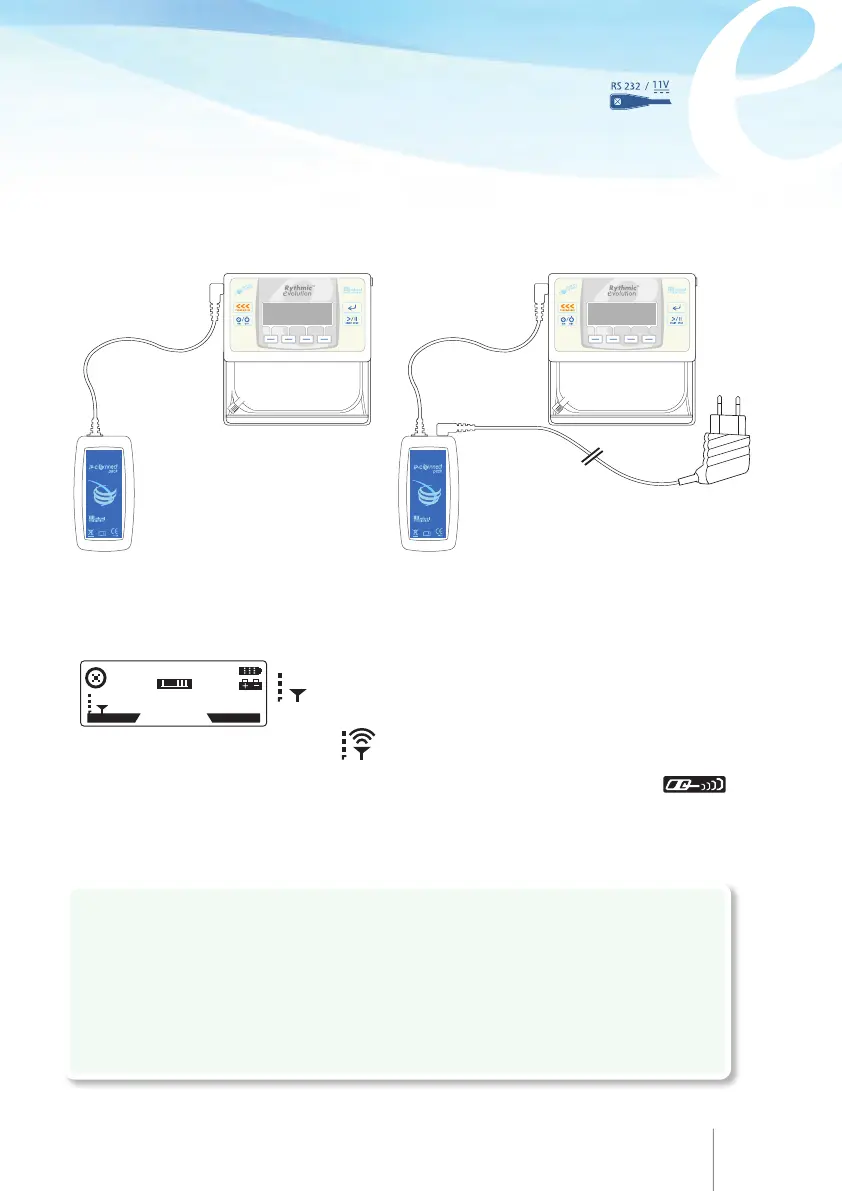
Connect the IP Connect Pack cord to the pump via the socket labelled on
the pump. Refer to the IP Connect Pack Directions For Use for detailed operation and
configuration of IP Connect Pack.
Access to Micrelcare is subject to a special procedure to open an account. Please,
refer to your local contact for further details. For detailed information regarding the
operation of MicrelCare, please refer to “MicrelCare” DFU.
Connection to pump and power adaptor
The operation of IP Connect Pack does not interfere with the pump.
Connection and operation of IP Connect Pack can be noticed in absence of any
alarm or warning.
When IP Connect Pack is ON and connected to the pump, the IP Connect Pack key
appears in the History screen, providing some information on IP Connect Pack module
.
When IP Connect Pack rechargeable battery is low, a message will be displayed on
the pump advising to recharge the IP Connect Pack battery.
On the main screen two logos are displayed: a small antenna
to mention the IP Connect Pack is connected to the
pump and when sending data, waves comes out of the
antenna
!Caution
• Prior to using the IP Connect Pack accessory for the first time, use the Micrel power
adaptor to fully charge the internal rechargeable battery.
• Always keep the internal battery (9V alkaline or rechargeable) inside the pump while
the IP Connect Pack is plugged to the pump.
78 79



 To Next Page