– 2.2 –
OPERATION PANEL
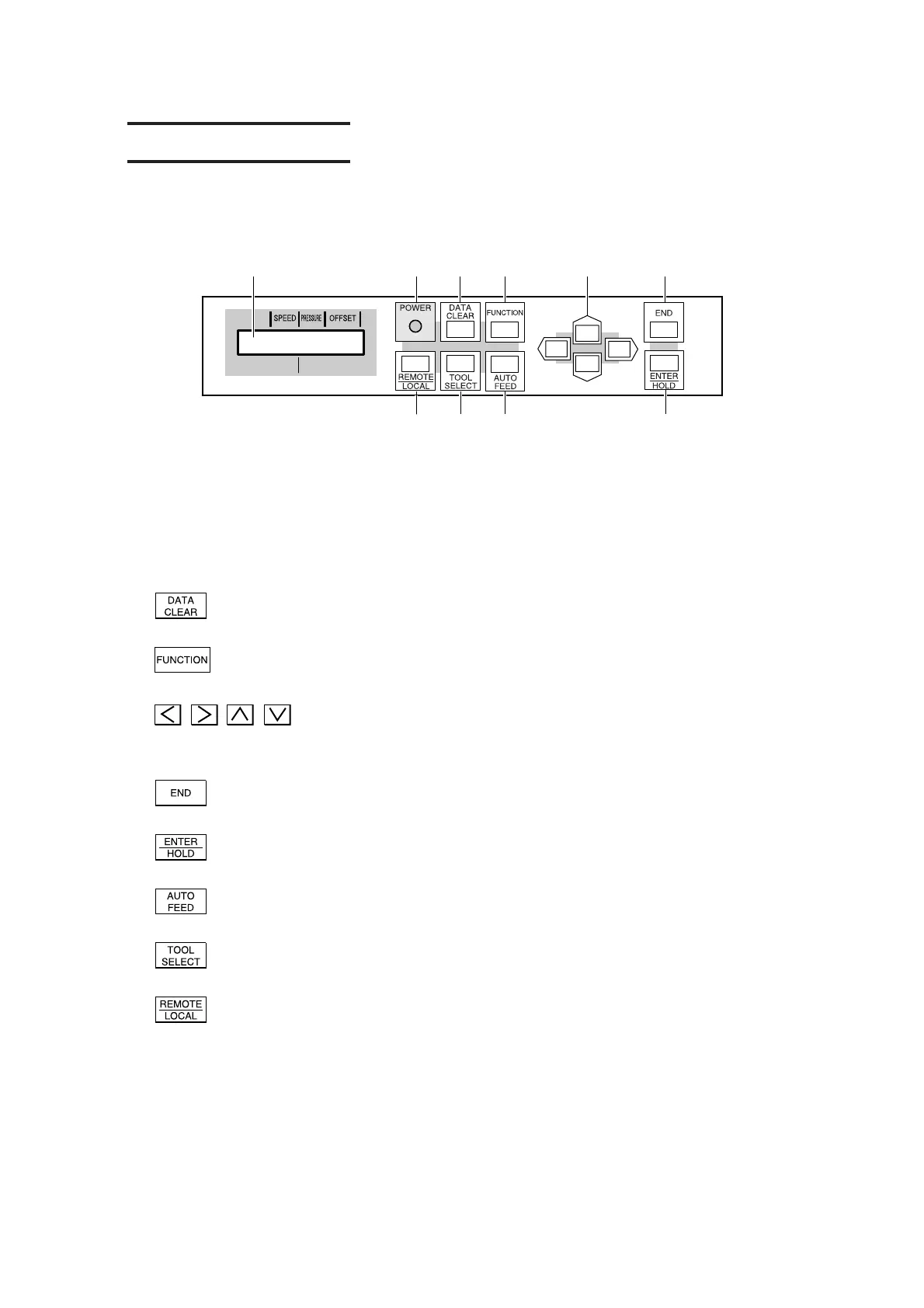
Configuration of the operation panel is as shown below.
1) Display panel
The display panel indicates tool conditions such as speed, pressure and offset, tool coordinates,
functions and error messages.
2) POWER lamp
It lights up when the power to the device is turned on.
3)
Data clear key
This key is used to clear the data received.
4)
Function key
This key is used to specify the function.
5)
, , , Jog key
These arrow keys are used to shift the carriage or sheet in the corresponding direction or change
settings.
6)
End key
It is used to cancel the value is last previously input.
7)
Enter/hold key
This key is used to enter the last previous input value for a setup item.
8)
Auto feed key (Refer to P. 3. 10)
This key is used to execute the sheet feeding.
9)
Tool select key
This key is used to select a tool and establish tool conditions.
10)
Remote/Local key
It is used to change over the operation mode between the REMOTE mode and LOCAL mode.
If this key is pressed while the device is in operation, the device will be brought to a halt.
To restart the device, repress the key.
123456
10 9 8 7











 To Next Page