– 4.6 –
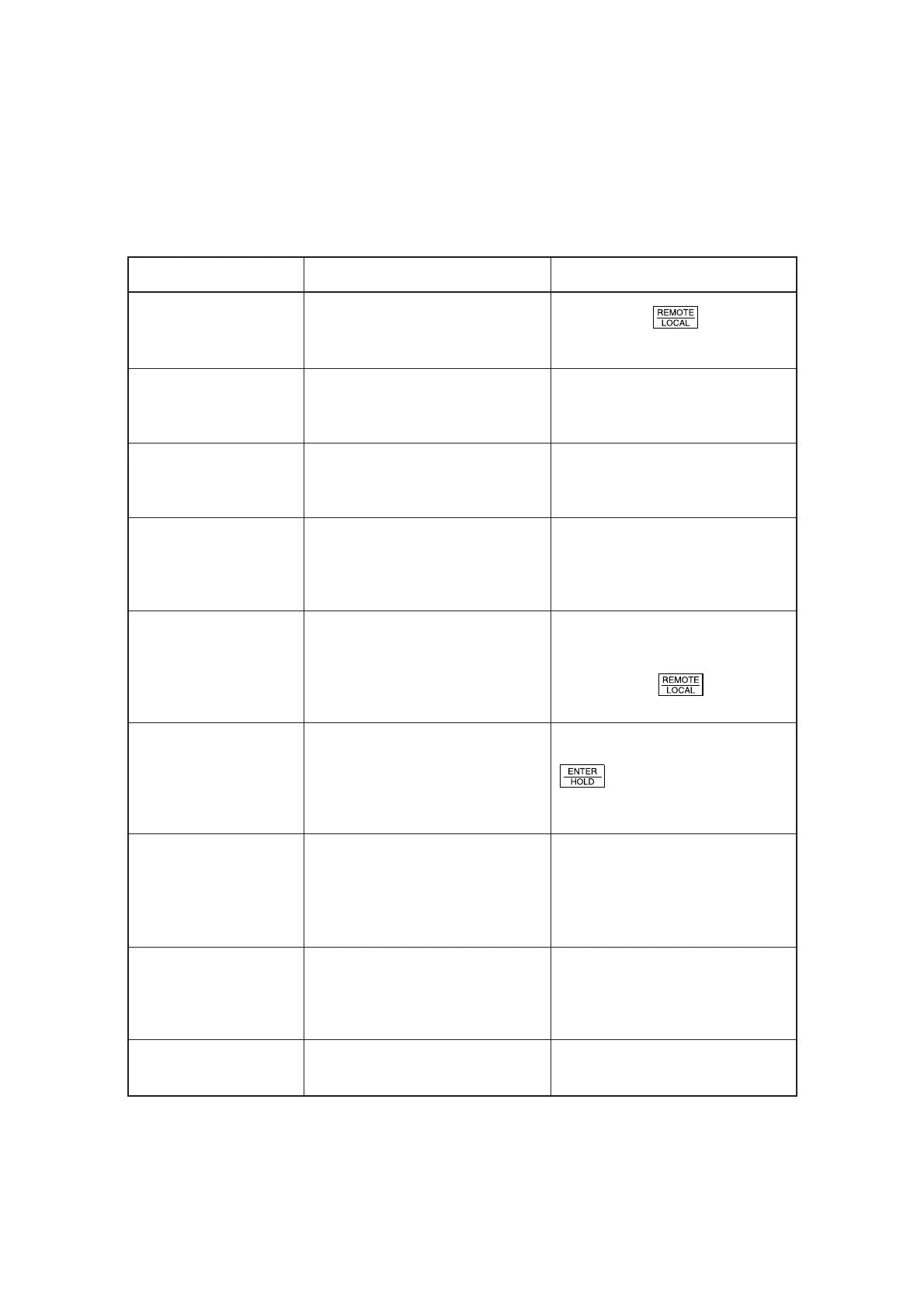
CUT1 * REMOTE *
CUT1 * 128KB *
** OFFSCALE **
** NO SHEET **
** VIEW **
** DIGITIZE **
* 1/10 COPY *
** END COPY **
** PAPER CUT **
Displays under the remote mode
The messages given below appear under the remote mode. They do not indicate errors but require
an appropriate action.
The device is in the remote mode.
This indicates the amount of data
received.
The data on cutting exceeds the
effective cutting area.
You have turned the sheet setting
dial without loading a sheet on the
device. The device stops after
cutting to the end of sheet.
The device has received the not-
ready-mode signal (NR;) from the
host computer to enter the local
mode.
The device has received the
digitization command (DP;) from the
host computer to enter the
digitization mode.
The device is engaged in the plural
sheets cutting. The number indicates
the “1st sheet is being cut/
Established number of sheets to be
cut.”
The device terminates copying when
one copy is finished since the data
received contains the origin updating
command (ZT;, !PG;).
The device is executing the paper
cutting.
Message Cause Action
A press on the
key will cause
the device to enter the local mode.
When starting cutting, the amount of
data will decrease in increments of
1 KB.
Use a larger sheet, decrease the
amount of data or execute the
divided cutting function.
Place a sheet on the device and turn
the sheet setting dial.
Execute required operations such as
the sheet detection or the
establishment of an origin.
Then, press the
key to make
the device to enter the remote mode.
Move the pen to a desired location,
where necessary, and press the
key.
To reset the digitization mode,
execute the data clear using the key.
Upon completion of the plural sheets
cutting, the device will automatically
enter the remote mode.
The plural sheets cutting is disabled.
Not in particular.











 To Next Page