– 3.20 –
Rotation [ROTATION]
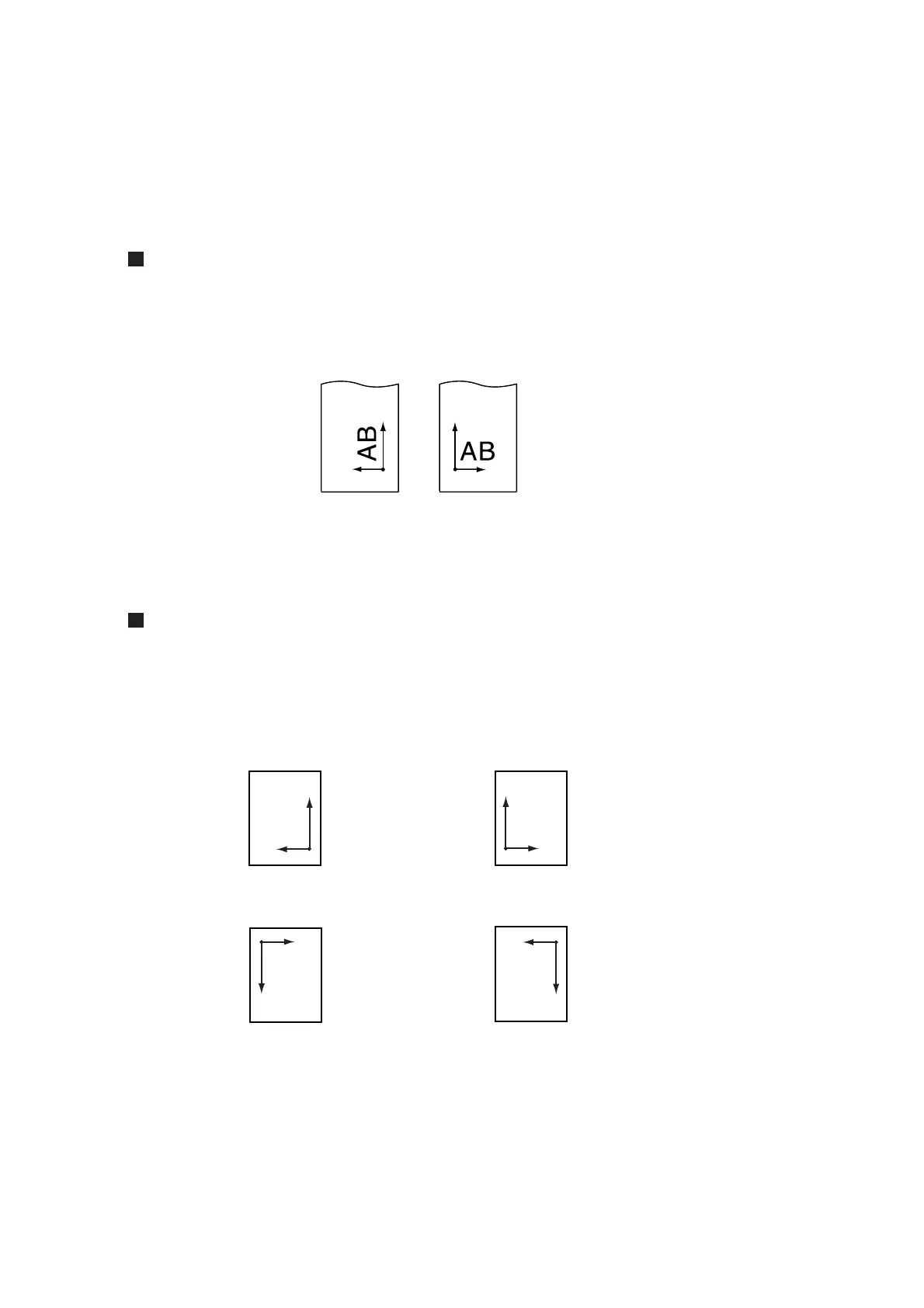
This function is used to specify the location of origin and direction of the axis of coordinates according
to the application software to be used.
Setting value (Make a choice and input it)
ON : The device rotates the coordinate axis and relocates the origin at a time.
OFF : The device does not perform rotation of the coordinate axis.
After the sheet detection, the carriage will stop at the origin.
Axis of coordinates
The device has four different axis of coordinates according to how the sheet loading direction and
the angle of rotation of the coordinate axis determined by the rotating function are combined.
Origin
Rotating function: OFF Rotating function: ON
Origin
< 90° ROTATION >
The sheet is loaded on
the rear of the device.
Rotation: OFF
The sheet is loaded on
the front of the device.
Rotation: OFF
The sheet is loaded on
the rear of the device.
Rotation: ON
The sheet is loaded on
the front of the device.
Rotation: ON
A(X)
B(Y)
AB
A(X)
B(Y)
AB
A(Y)
B(X)
AB
A(Y)
B(X)
AB
Origin
Origin
Origin
Origin
< 0° ROTATION >
< 180° ROTATION > < 270° ROTATION >











 To Next Page