– 2.5 –
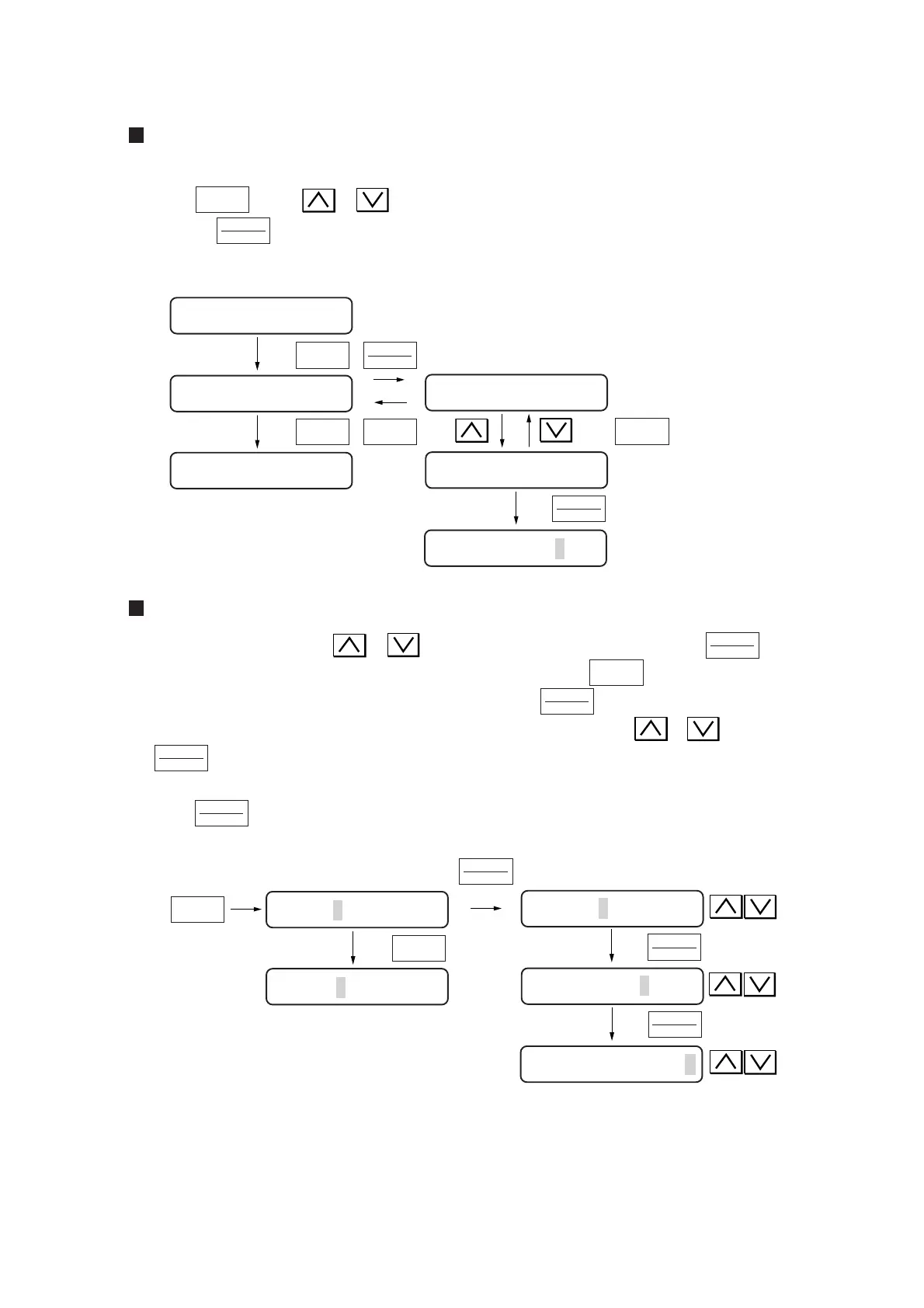
Selecting the setup item from the function menu
Select [SET UP] from the function menu following the above-stated procedure.
Press the key or or key to call the setup items.
Pressing the key will select the setup item currently displayed.
Refer to Chapter 3 for the types of setup items.
Inputting and entering a setting
Input a setting by pressing the or key and enter the setting by pressing the key.
For example, when you want to input cutting conditions, press the key to call the tool of
which cutting conditions are to be established and press the key to select it.
The cursor blinks at settings of “SPEED.” Input a desired setting using the or key. Press
the key to enter the value. Then, the cursor will move to the next item. Input settings for
“PRESSURE” and “OFFSET” following the same procedure as in the case of “SPEED.” Then,
press the key to enter the setting.
FUNCTION
END
FUNCTION
ENTER
HOLD
< Interface is selected >
ENTER
HOLD
FUNCTION
FUNCTION
ENTER
HOLD
ENTER
HOLD
ENTER
HOLD
ENTER
HOLD
ENTER
HOLD
TOOL
SELECT
ENTER
HOLD
ENTER
HOLD
TOOL
SELECT
TOOL
SELECT
SPEED | PRESSURE | OFFSET
ENTER
HOLD
CUT1 10 050 0.30
DIST. COMP <ENT>
SET UP <ENT>
SAMPLE CUT<ENT>
COMMAND <ent>
INTERFACE <ent>
BAUD RATE : 9600
CUT1 20 050 0.30
CUT1 20 050 0.30
CUT2 10 040 0.30
CUT1 10 050 0.30











 To Next Page