Chapter 6 Programming 6-9
Start Line or End
Line option is useful
where there are too
many errors or ‘Any
Data isn’t exist’ is
displayed.
Open a CAD
ASCII file for
conversion.
The CAD
Conversion
program will run
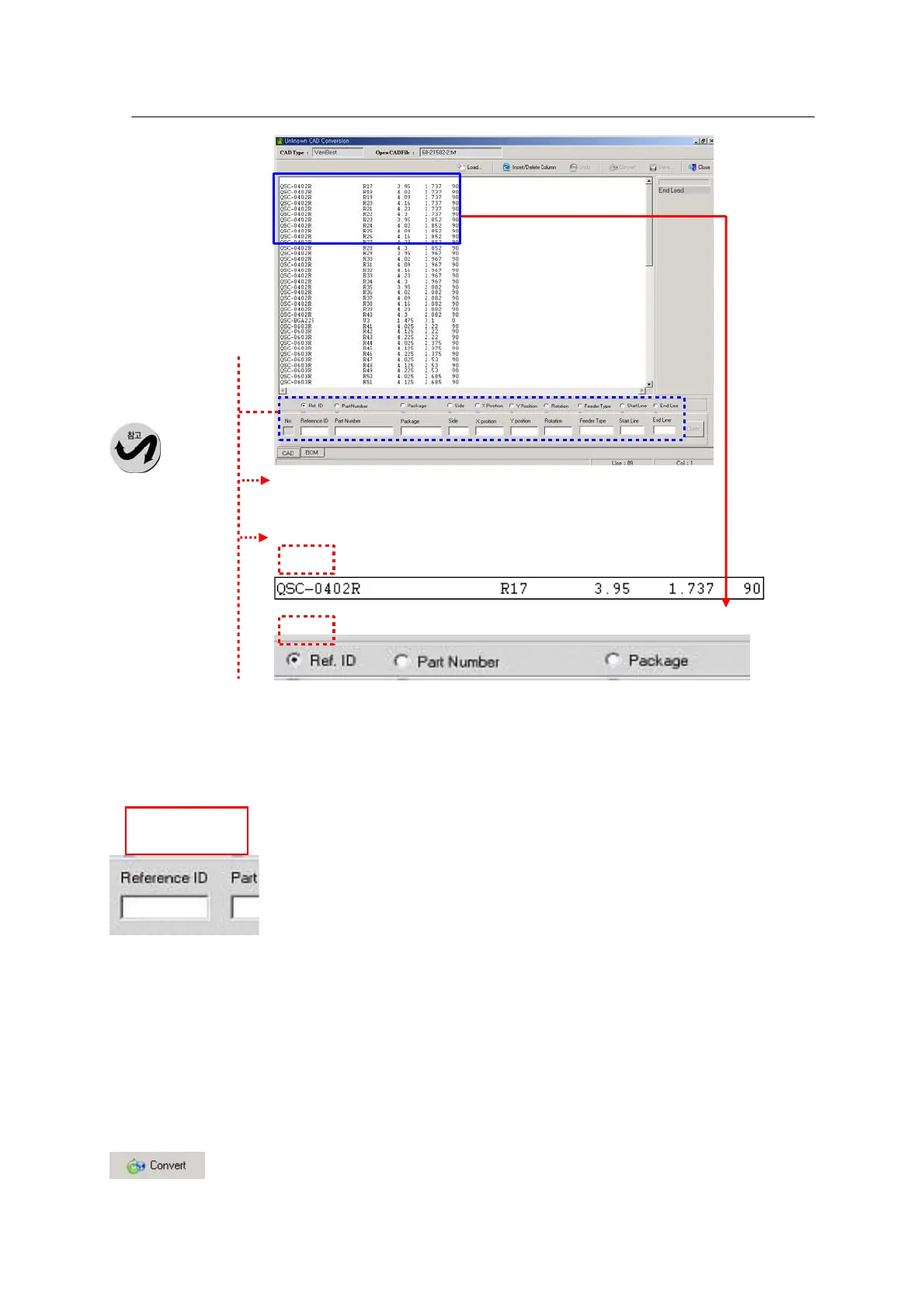
as shown below.
3
• Ref ID
Check
Ref. ID
in Figure
1 and
double
click on
Ref. ID
in Figure
2. The
Ref. ID
will be
automatically entered in the Reference ID field in Figure 3.
• Part Number
Click on Part Number in Figure 1 and double click on Part Number in Figure
2. The part number will be automatically entered in the Part Number field in
Figure 3.
* Enter X Position, Y Position and Rotation in the same way.
• Start Line and End Line
These parameters are used to define a data area. Double click on a start line and on an end line and
the selected lines will be entered.
Note) X Position and Y Position should be minimally entered for data conversion.
Enter Ref ID (Locate ID), Part Number, X position, Y position and Rotation.



 To Next Page