Installation
101
Mitel 470 as of R4.1
syd-0585/1.2 – R4.1 – 08.2016
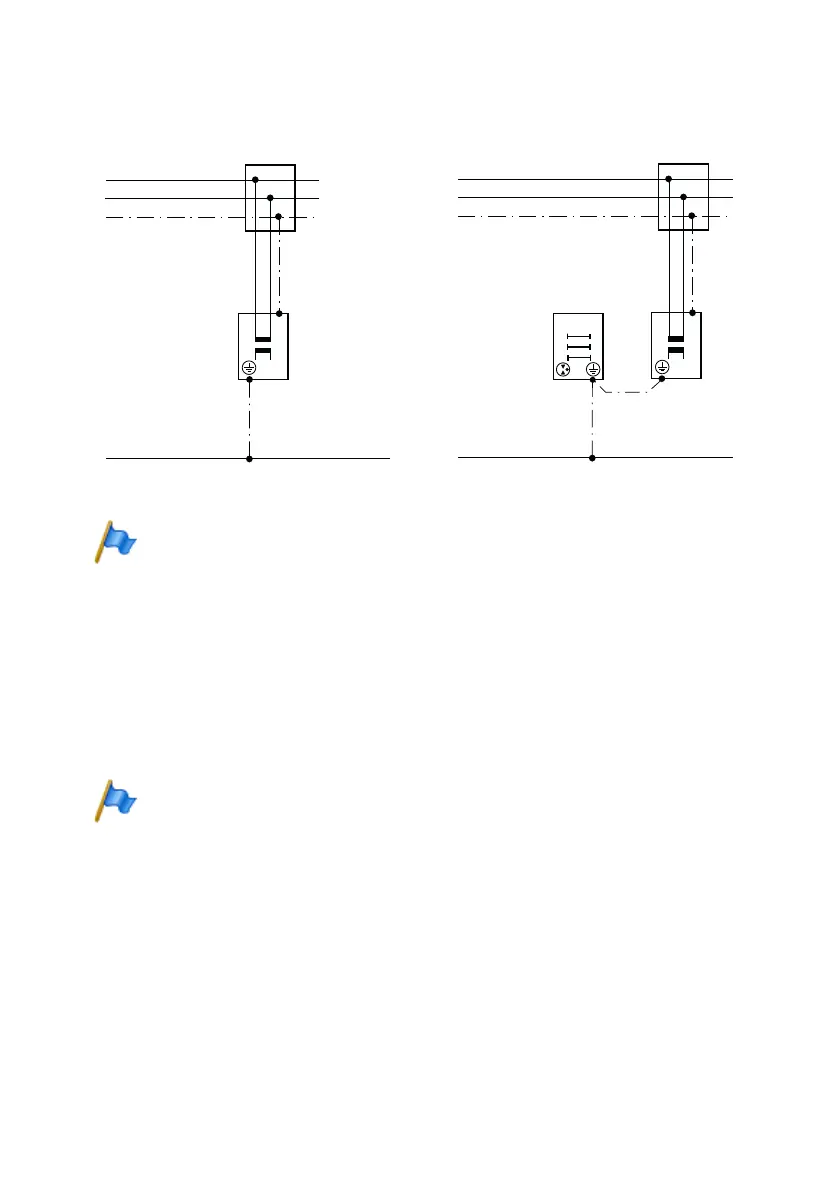
Fig. 22 Earthing of the communication server in the case of direct cabling and indirect cabling
Note
In the case of an indirection connection make sure that the communication server’s earthing
wire does not form any earth loops with the earthed cable screenings of the installation cables
leading up to the (main) distribution frame. The cables should be kept as short as possible and
laid out in parallel.
4. 3. 2 Connecting the cable screening
When using shielded installation cables also use shielded RJ45 connectors. In this
way the shielding of the installation cables is automatically connected with the housing
of the communication server and therefore with the building earth.
Note
Connect the cable screens to one another at the splitting point only. Observe the tree structure
principle to prevent earth loops.
Mitel 470
Mitel 470
Indirect connection
Direct connection
Copper wire yellow/
green 2,5 mm
2
protected 4,0 mm
2
unprotected
Copper wire yellow/ green
2,5 mm
2
protected 4,0 mm
2
unprotected
(Main) distribu-
tion board
Building earth
Building earth
Protective wire
Protective wire
Socket-outlet
Socket-outlet
Mains power
Mains power



 To Next Page