Installation
108
Mitel 470 as of R4.1
syd-0585/1.2 – R4.1 – 08.2016
4. 5. 5 Fitting DSP modules
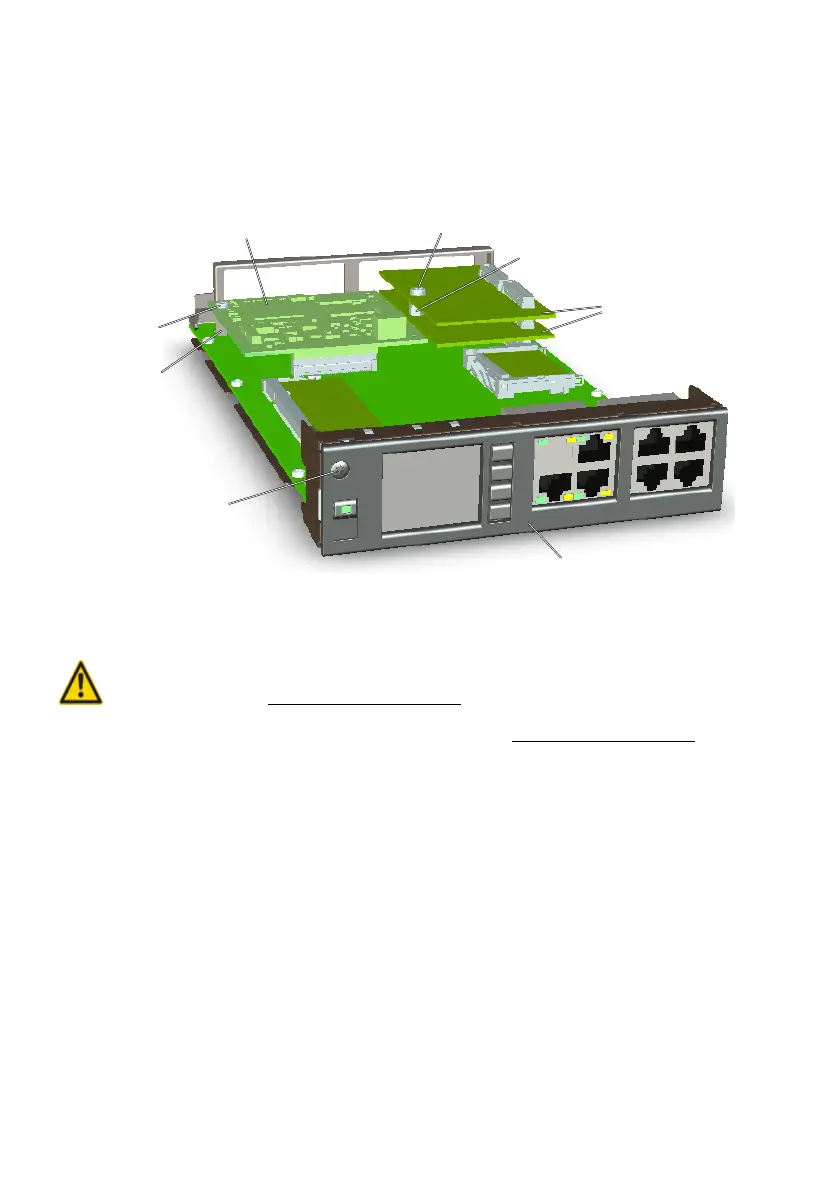
DSP modules are fitted to the Call Manager card. A maximum of 2 DSP modules can
be stacked.
Fig. 27 System modules on the Call Manager card
To fit a DSP module, proceed as follows:
Warning
Be sure to observe the "Safety regulations", page 94.
1. Shut down the call manager via the control panel (see "On/Off key", page 217).
2. Unscrew the screw on the Call Manager card and remove the card by pulling the
fastening screw.
3. Remove the fastening screw on the module slot for DSP modules.
4. The spacer sleeve for the lower module is already premounted on the processor
card. For the upper DSP module screw the spacer sleeve supplied with the module
into place.
5. Place the module on slot (or onto a module already fitted in that slot) and press
down evenly on both connectors as far as the stop.
6. Secure the module with the fastening screw.
7. Carefully slide the Call Manager card into the shaft of slot 1 and gently press the
card as far as it goes into the connection on the backplane.
8. Secure the Call Manager card back into its slot with the screw.
9. Restart the call manager by pressing the On/Off button on the call manager card.
Call manager card
Fastening screw of the
call manager card
Spacer sleeve
Fastening screw
IP media module
Spacer sleeve
Fastening screw
DSP modules



 To Next Page