Operation and Maintenance
221
Mitel 470 as of R4.1
syd-0585/1.2 – R4.1 – 08.2016
6. 5 Application server display and control panel
The application server display and control panel consists of one On / Off button and a
few status LEDs.
6. 5. 1 On/Off key
Pressing the On/Off button starts up the application server (which is switched off). In
normal operation mode, the application server is shut down by briefly pressing the
On/Off button.
Notes:
– The application server can also be shut down and started via the Call manager control panel
or via WebAdmin in the Maintenance / System reset ( =4e) view.
– Shutting down the applications server can take some time and can be checked using the
status LED on the On/Off button (see Tab. 98).
– If regular shutdown is not possible (for instance because the application is no longer react-
ing), the application card is forced to shut down after 2 minutes without the operating system
being shut down normally. Unsaved data will be deleted.
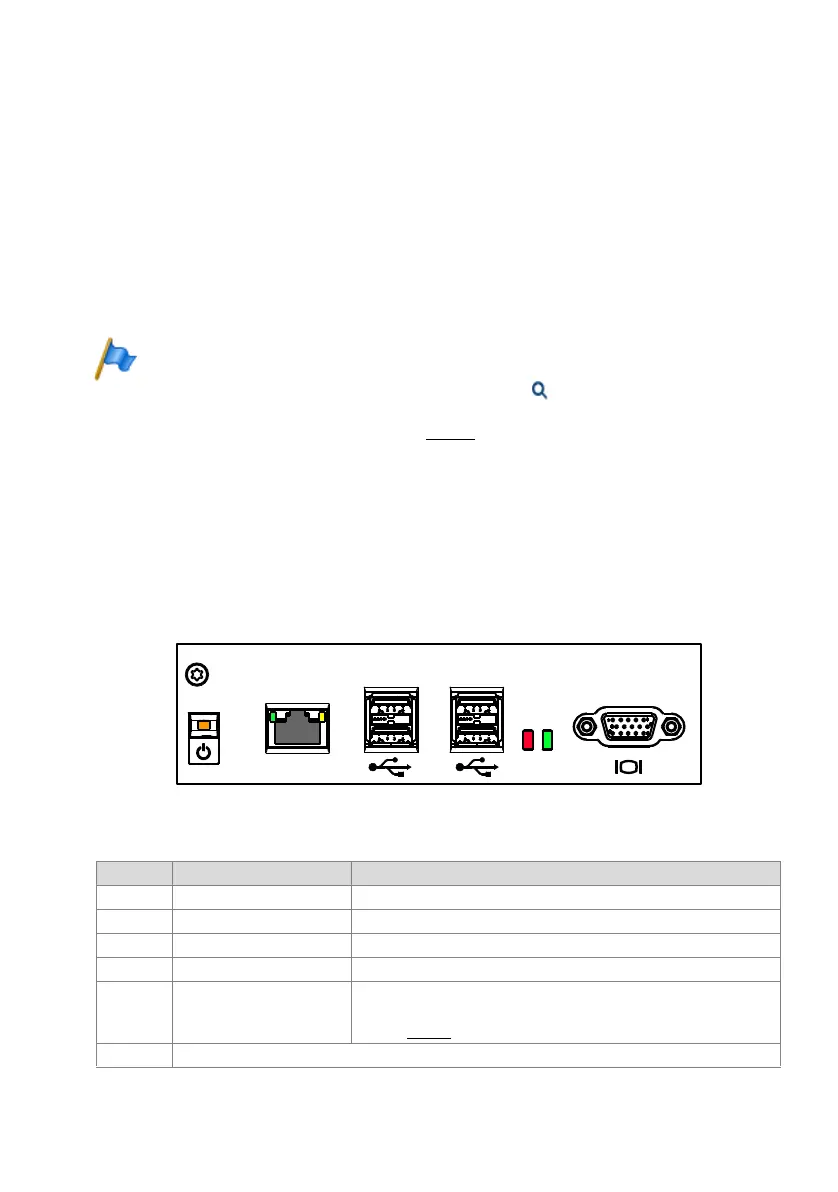
6. 5. 2 Status LEDs
Status LEDs can be found on the On/Off buttons and on the Ethernet interfaces. There
is also one LED for the USB ports and the hard disk.
Fig. 89 Status LEDs on the applications server
Tab. 98 Explanation of the status LEDs on the applications card
LED Signalling Meaning
On/Off Steady green Applications server running fault-free
On/Off Steady red Error on the applications server
On/Off Steady orange Applications server is switched off
HDD Flickering green Hard disk access
USB Steady red Power overload on one of the USB interfaces.
Note: The maximum permissible current input at the USB interfaces var-
ies (see Tab. 29
).
LAN The Ethernet interface on the applications server is covered as there is currently no provision for its use.
USB
HDD
LAN



 To Next Page