Installation
125
Mitel 470 as of R4.1
syd-0585/1.2 – R4.1 – 08.2016
FOP (see "Fan-out panel FOP", page 148) or with 8-fold assigned connecting cables
(see e.g. "Prefabricated system cable 4 x RJ45", page 113).
Tips
– Multiply assigned RJ45 sockets are colour-coded in blue.
– To be able to make emergency calls even in the event of a mains power failure, you have
the possibility of running up to 8 analogue FXO exchange lines via the EFOP emergency
fan-out panel. In the event of a power failure the EFOP switches exchange lines automati-
cally and directly over to up to 8 analogue phones (see "Emergency fan-out-panel (EFOP)",
page 151).
One call charge module can be fitted to each FXO card if required (see "Fitting call
charge modules", page 110).
In a direct connection the RJ45 connector is connected directly to the trunk cable using
a crimp clip.
With an indirection connection you need to observe the cable requirements.
Notes
– Inadmissibly high temperatures can occur on the FXO card when connecting to local
exchanges generating a very high loop current (up to 90mA). If so, the PCB temperature
monitoring deactivates the FXO ports in groups of 4 ports. If the temperature then drops, the
FXO ports are automatically reactivated group by group. This behaviour can occur particu-
larly when the ambient temperature is higher than normal and/or with a system with maxi-
mum configuration. Normally local exchanges produce a loop current of approx. 25 mA,
which does not cause any restrictions.
– Circuit type as per EN/IEC 60950: TNV-3
Connection
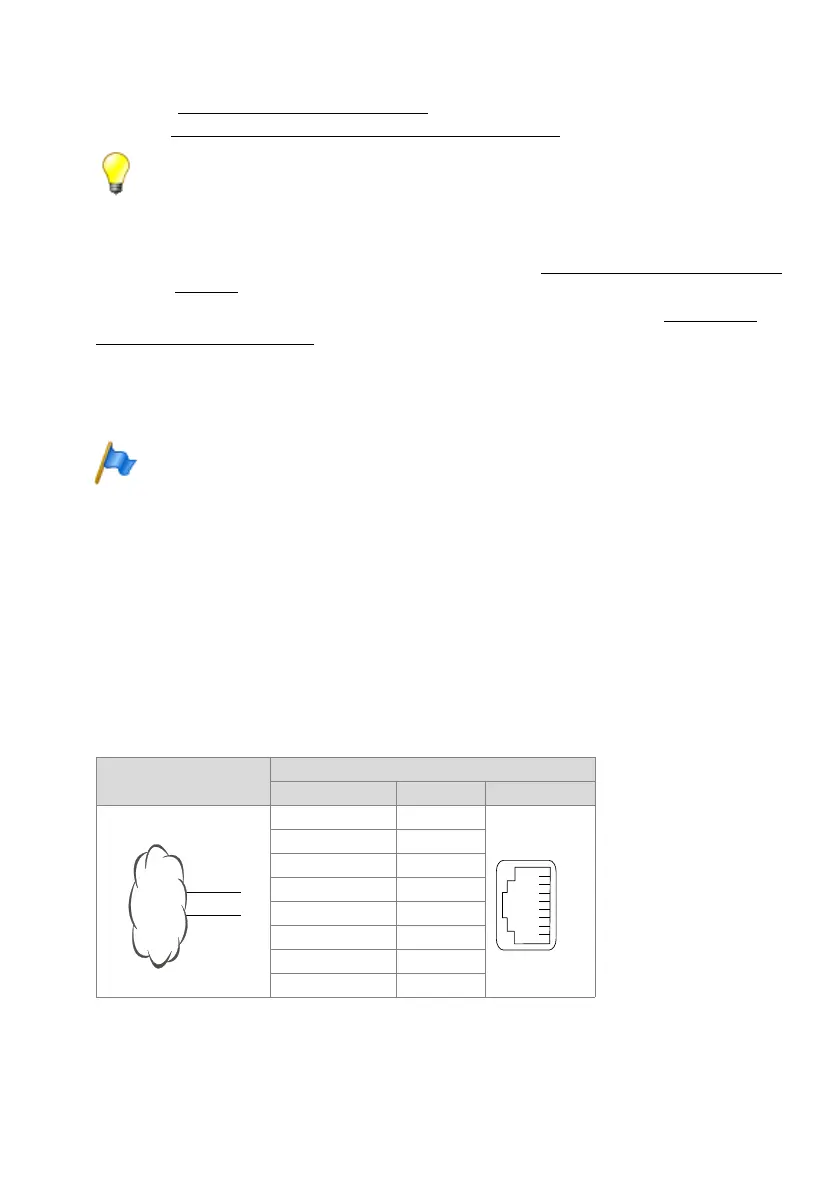
Assignment of the RJ45 sockets on the front panel:
Tab. 54 Connection FXO network interface
Public analogue network
Communication server
FXO signal Pin Socket
–1
–2
–3
a4
b5
–6
–7
–8



 To Next Page