Installation
146
Mitel 470 as of R4.1
syd-0585/1.2 – R4.1 – 08.2016
Any playback equipment (tape recorder, CD player, etc.) with a line output can be used
as the audio source. It is advisable to merge the left/right audio signal via 2 resistors
(see Fig. 59
).
Warning
The default value of all FXS interfaces is set to Phone/Fax. Audio equipment may be damaged
by the DC or AC voltage imposed.
Make sure that the mode of the FXS interface is configured to External audio source before
connecting audio equipment.
Note:
The customer is responsible for all copyright matters relating to any music playback.
Tab. 71 Technical data for FXS mode: External audio source
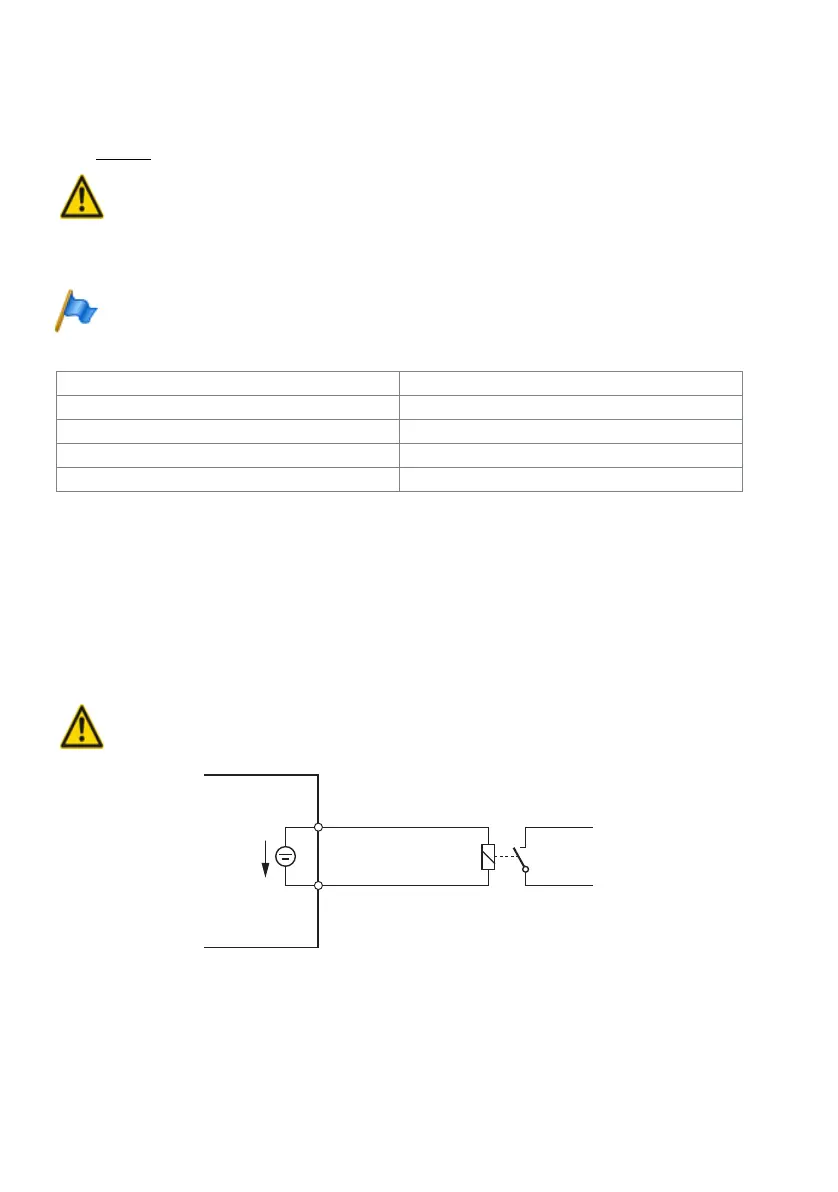
FXS mode: Control output
If an FXS interface is configured as a control output, the signal can be used to control
external devices or equipment (e.g. heating, alarm or outdoor lighting systems).
The no-load voltage is 24 VDC; the current is limited to 25 mA. A connected relay must
be of the type 24 VDC and must not draw more than 300 mW in power.
There are no special requirements for the cables.
Warning
Control outputs must have a floating connection.
Fig. 60 Connection for FXS mode: Control output
Input impedance approx. 15 k
Ω
Input level configurable
Input circuit asymmetrical
Output resistance audio source < 1 k
Ω
Installation cable NF cable screened (required for low levels)
a
b
24 VDC
max. 25mA
FXS interface



 To Next Page