4 Using the phone system
Final
Using Mitel
5340 IP
phones
This section describes the Mitel 5340 IP phones. To set up your new phone
service, see “Initial setup for 5340 phone service” on page 5. For a description
of your phone, see “Mitel 5340 IP phone” on page 4. Other topics covered in
this section are: “Answering a call on the 5340 phone” on page 6, “Making a
call on the 5340 phone” on page 8, “Using features via the 5340 phone” on
page 9, “Volume control on the 5340 phone” on page 26, and “Voice mail on
the 5340 phone” on page 26.
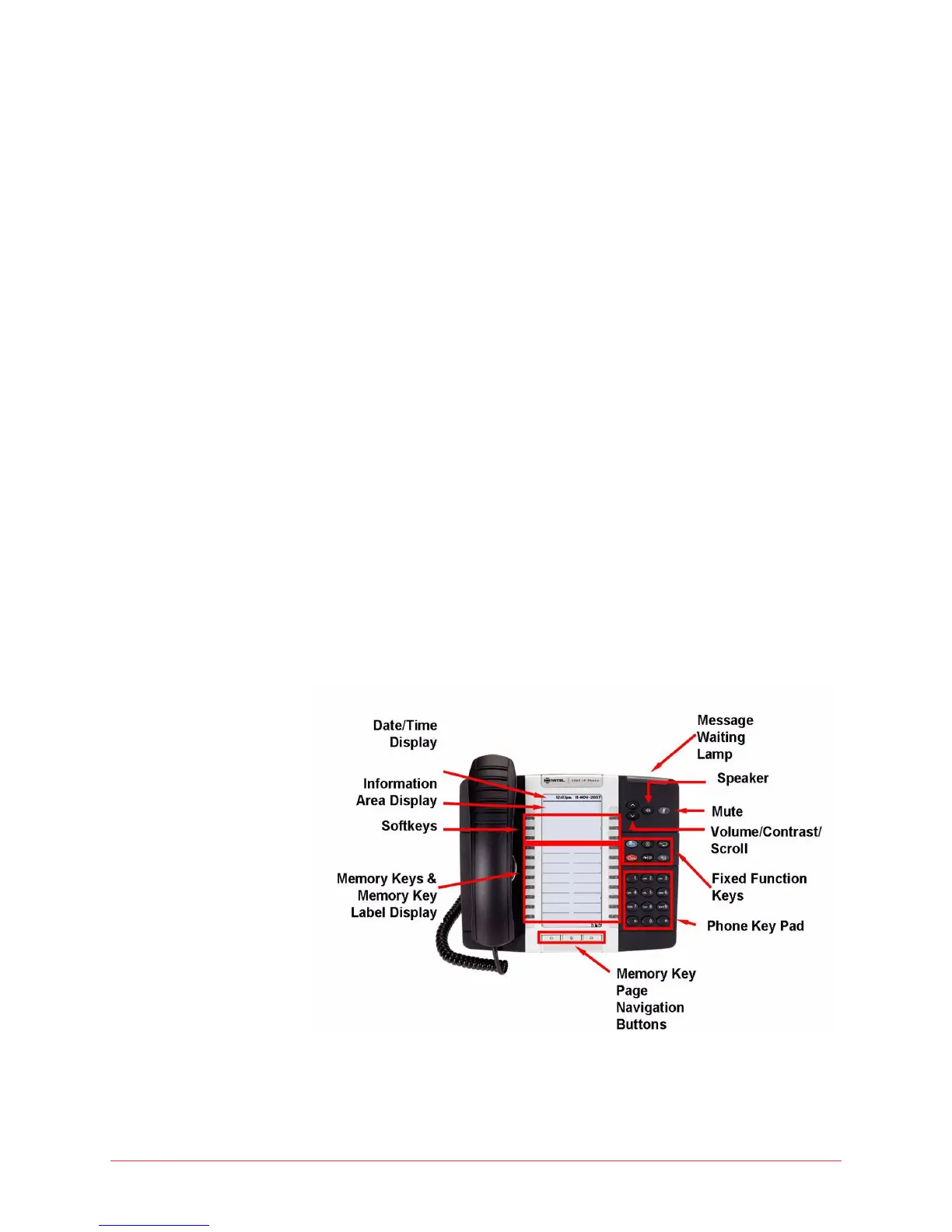
Mitel 5340 IP phone
The Mitel 5340 IP phone has the following features:
Handsfree speakerphone
• Date/Time Display
• 2-line 20-character backlit Information Area Display
• 3 pages of 16 (total 48) multi-function memory keys with color LEDs
• Memory key label LCD display
• 6 Fixed function keys
• Mute and Speaker keys
• Message Waiting Lamp
• Dedicated headset jack
• Wall mountable
Figure 1: Mitel 5340 IP Phone



 To Next Page