Maintenance
Change the oil in the vacuum pump MRP60
98 10.06.2014
7.3 Change the oil in the vacuum pump MRP60
7.3.1 Drain oil
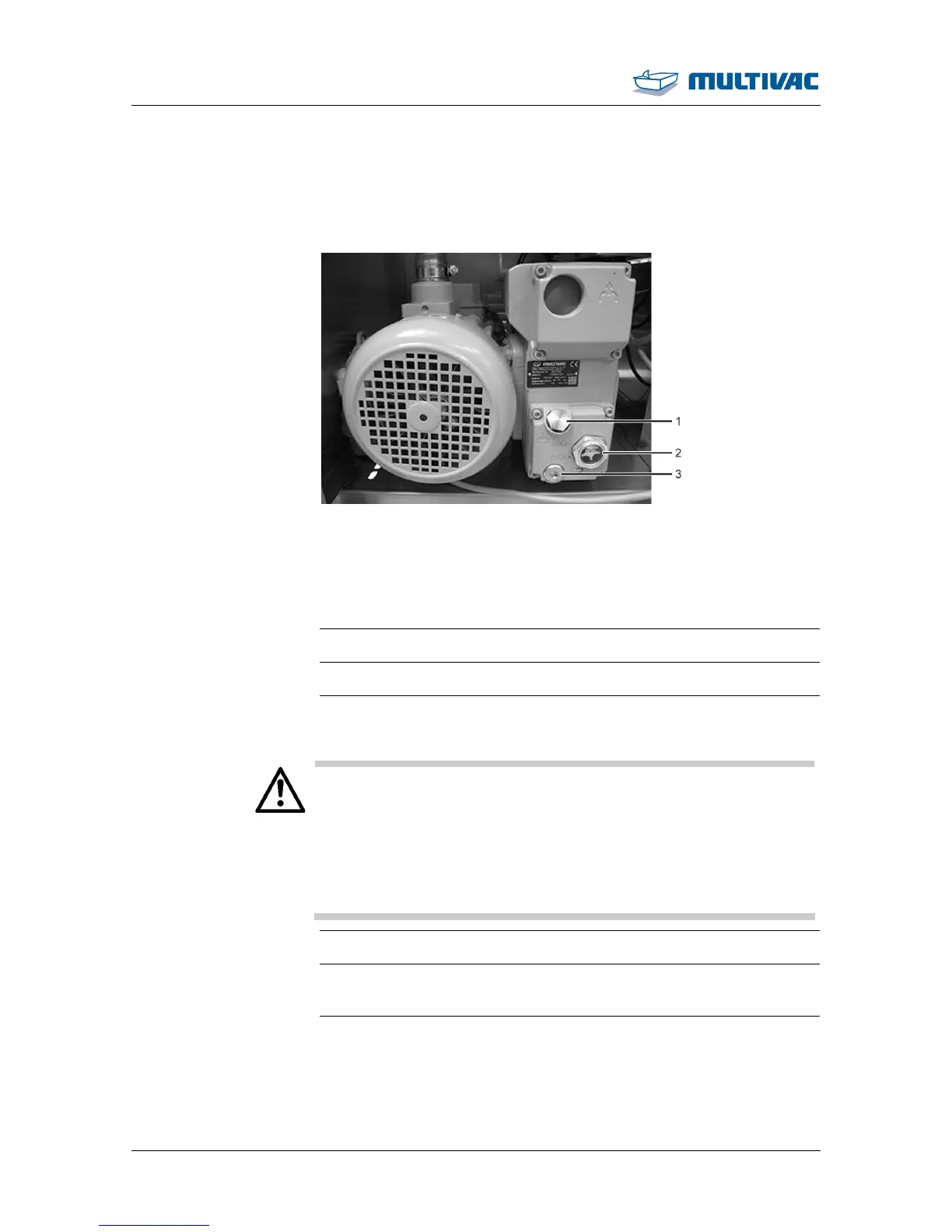
Fig. 44: Design of vacuum pump
1
Screw plug of fill opening
2
Oil sight glass
3
Screw plug of drain opening
¾ Switch off the machine.
¾ Disconnect the machine from the mains electricity.
¾ Allow the machine and vacuum pump to cool down for 1 hour.
WARNING
Burn hazard!
The surface of the vacuum pump can reach temperatures of over
70 °C during operation.
Touching the vacuum pump can lead to burns.
Before performing any work on the vacuum pump:
¾ Allow the vacuum pump to cool down.
¾ Wear personal protective equipment.
¾ Remove the safety guard on the back of the machine.
¾ Hold the liquid container (e.g. an empty oil bottle) under the drain
opening.
¾ Unscrew the screw plug.
¾ Drain the oil completely.
¾ Wipe off any oil from the machine.



 To Next Page