Main components of your printer 11
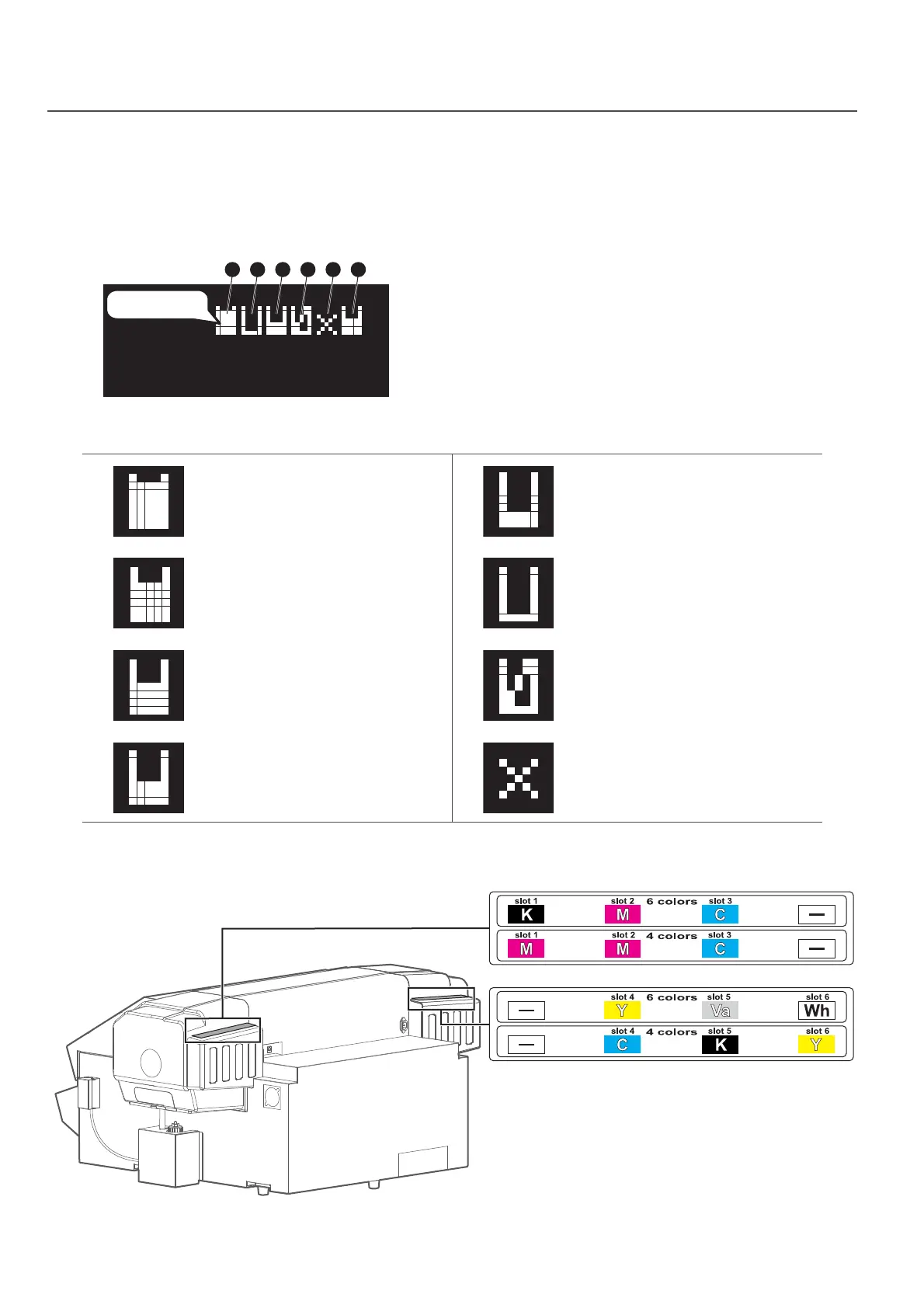
Icons to indicate the status of the ink or cartridges are displayed in the following situations:
• When no menu is displayed
• When there is an ink or cartridge error
The ink colors and slot locations for each color are shown below.
Icon displays on operation panel
• Each indicator corresponds to the cartridge slots from Slot 1 through Slot 6.
The leftmost indicator represents the ink level of the cartridge in Slot 1.
• In the display shown on the left, the slot 2 cartridge’s ink is low, the slot 4
cartridge’s ink has run out, and no cartridge has been inserted in slot 5.
• The following icons indicate the status of each slot:
Remaining ink amount :
More than 80%, less than 100%
Remaining ink amount :
Less than 20%
Remaining ink amount :
More than 60%, less than 80%
Ink Low
Remaining ink amount :
More than 40%, less than 60%
Ink End
Remaining ink amount :
More than 20%, less than 40%
No cartridge
234561
Type1
Icons
Slot numbers














 To Next Page