Transporting 139
3 Transporting
Please refer to this section when transporting this product.
When transporting this product, it is necessary to empty the waste ink tank and fixate the print head and the table with
packaging material. Transporting without these steps can cause ink leakage.
To use the printer again, reinstall the printer and perform initial charging.
Transporting
Skin or eye contact with UV curable ink may cause skin inflammation or allergic reaction.
When using this product, wear personal protective equipment (supplied gloves or solvent-resistant
gloves, goggles or protective eyewear, protective mask, protective clothing) to avoid skin contact
with ink.
• When moving this product, always empty the waste ink tank even moving short distance.
• Do not tilt, or place this product upside down.
Otherwise the ink may leak or the handling mentioned above may cause abnormality.
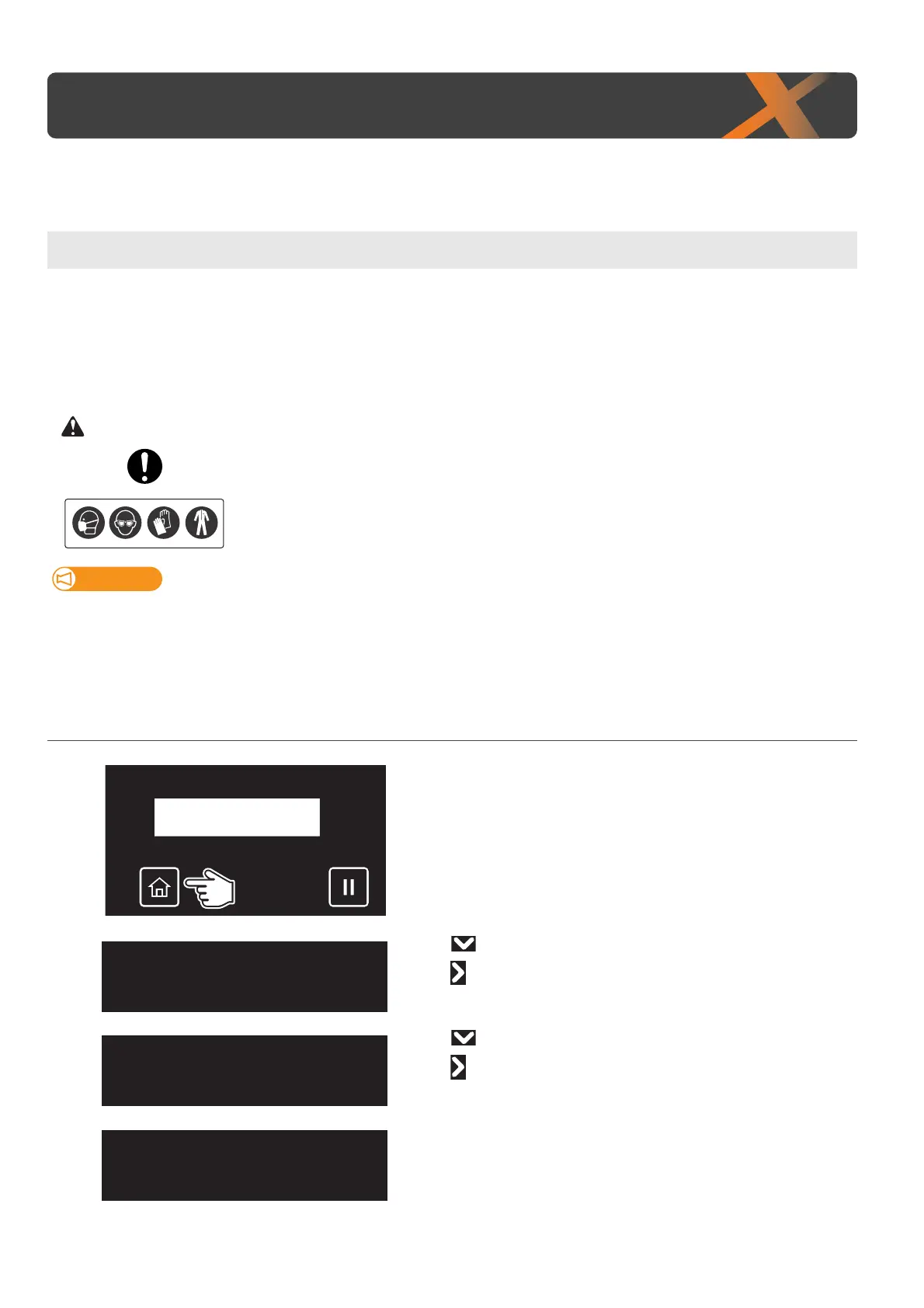
1. Discharging the ink in the printer and waste ink
[1]
Tap [Home].
[2]
• Use to choose the menu shown left.
•Tap .
[3]
• Use to choose the menu shown left.
•Tap .
[4]
Tap [Enter].
Maintenance5
InkDischarge
InkDischarge
Start ー> Enter





 To Next Page