6.10 The Marker function
Narda IDA-3106 107
6.10.1 The Marker menu
Press the Marker softkey.
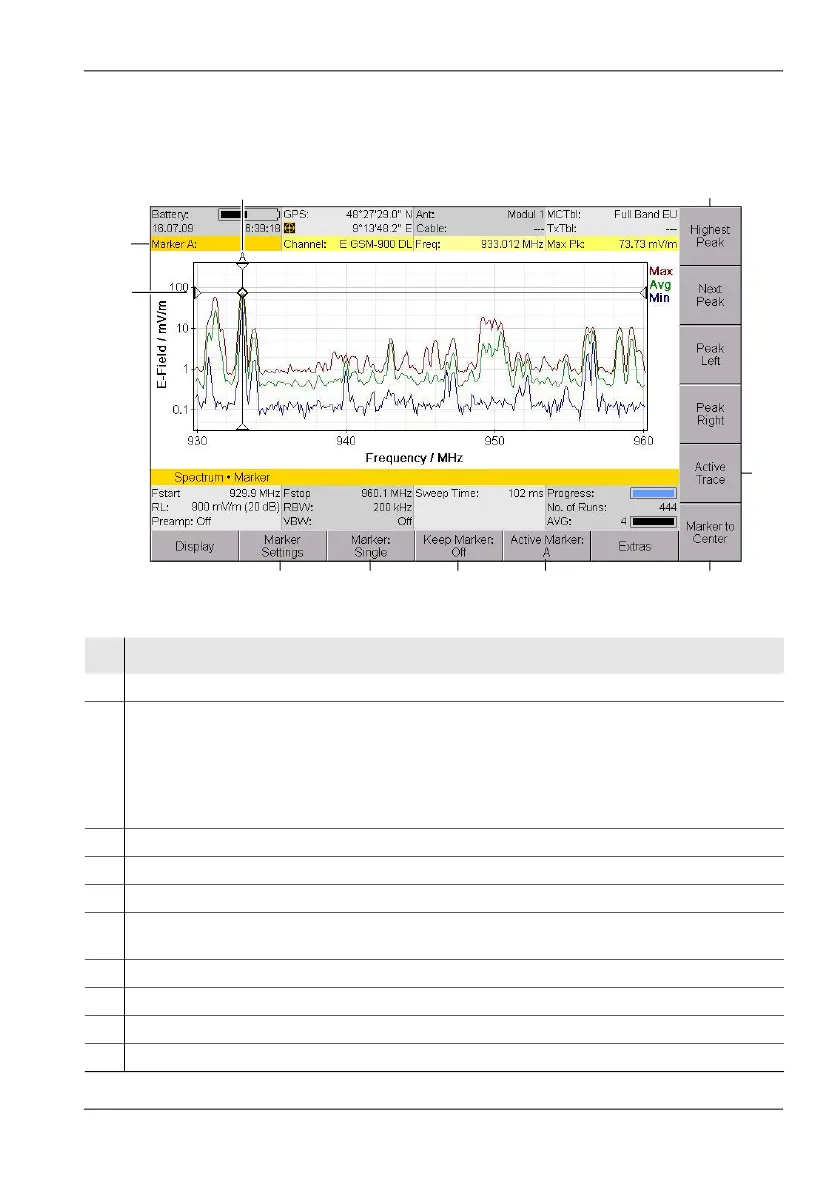
Figure 19: Marker menu (display with one marker)
69
1
2
3
7
4
8
10
5
No. Function / Explanation
1 Graphical display of the measurement value at the marker position.
2 Marker bar with marker information:
• Marker A: Marker A is active
• Channel: Selected channel.
(If a transmitter table is selected, the transmitter names will be shown here.)
• Freq: Frequency at the marker position
• Max. Pk: Selected trace type/detector and measured value
3 Graphical display of the marker position (for trace type Max in the example).
4 Marker functions for peak value selection (see Table 28 on page 109).
5 Specifies on which trace the marker is to be used
6 Sets Fcent to the position of the active marker. Parameter that depend on Fcent like Fspan
and RBW are automatically adapted.
7 Active marker (Marker A is active in the example).
8 Selects whether the marker is shown even after you exit the Marker menu.
9 Display type: Single marker or difference marker
10 You can set the marker evaluation properties under Marker Settings.



 To Next Page